Blog > QuickBooks Merchant Services Fees: What You’re Actually Paying
QuickBooks Merchant Services Fees: What You’re Actually Paying

If you’re running your business on QuickBooks, there’s a good chance you’re also using QuickBooks Payments to collect card payments. It makes sense at first glance. Everything lives under one roof, invoices sync automatically, and you don’t have to think about setting up a separate merchant services provider. Convenient? Absolutely. Cost-effective at real volume? That’s worth a closer look.
Most businesses don’t realize how much QuickBooks merchant services fees are quietly eating their margins. Not because Intuit is hiding anything, but because flat rate pricing is designed to feel simple. And simple, at scale, almost always means expensive.
How QuickBooks Payments Actually Charges You
QuickBooks merchant services operate on a flat rate model. Every transaction within a given payment method, swiped, invoiced, or keyed-in, is charged the same fixed percentage, regardless of what kind of card was used, who issued it, or what network processed it. On the surface, that sounds reasonable. In practice, it means you’re paying a padded rate on every single transaction, every single day.
Every Fee You’re Probably Not Tracking
Transaction rates are the most visible part of QuickBooks merchant services rates, but they’re far from the only payment processing fees you’re absorbing.
Instant deposit fees are one of the most overlooked charges. Standard transfers take a few business days. If you need funds sooner, QuickBooks charges an additional fee for instant access, typically around 1.75%. For businesses managing cash flow carefully, this gets used regularly and compounds quickly.
Chargeback fees catch people off guard. When a customer disputes a charge and the decision goes against you, there’s a flat fee on top of the reversed transaction. This is standard across the industry, but the amount matters, especially in sectors where disputes happen more frequently.
Hardware costs are worth factoring in, too. Unlike some competing payment processor options, QuickBooks doesn’t offer complimentary card readers, and a full terminal setup comes straight out of pocket.
Refund processing is one of the quieter ones. When you issue a refund, you generally don’t get the original transaction fee back. You processed the sale, paid the fee, and now you’re absorbing that cost even though the money went back to the customer.
Monthly plan fees. QuickBooks Payments itself has no monthly fee, it’s pay-as-you-go, meaning you only pay per-transaction processing fees. But QuickBooks Payments only works inside QuickBooks Online, which does have its own monthly subscription. If you’re on the Simple Start plan, that’s $38/month* on top of your processing fees. Depending on your volume, that added cost may or may not be worth it, and many businesses pay for the plan without ever running the numbers to check.
None of these fees are buried in fine print. But once you add the QuickBooks Online subscription on top of the per-transaction processing fees, the total cost of using QuickBooks’ merchant services can look a lot different than the advertised per-transaction rate alone suggests.
* All QuickBooks plans are 50% off your first 3 months
What This Looks Like at Real Volume
This is where the conversation gets concrete. If you’re a practice manager, office administrator, or finance lead at a growing company, these numbers are going to look familiar.
Say your business processes $2 million in card payments per year. Under QuickBooks Payments flat rate pricing at 2.5%, you’re paying $50,000 annually in processing costs before any of the additional charges described above.
A dedicated payment processor using interchange-plus pricing would charge you the actual interchange cost plus a fixed markup, something like 0.3% and $0.10 per transaction. Depending on your card mix, your effective rate might land somewhere around 1.7% to 2.0%. On $2 million annually, that’s $34,000 to $40,000. The difference is real money, not noise.
At $5 million in annual volume, you’re potentially looking at a gap of $25,000 to $80,000 per year, depending on pricing structure, card mix, and how often you’re using instant deposits or absorbing chargeback fees. For a mid-market company, that’s a meaningful number.
Why the “It’s Already in QuickBooks” Argument Doesn’t Hold Up
The most common reason businesses stick with the default payment solution is integration. Nobody wants to rebuild their accounting workflows, and that’s a completely fair concern.
But here’s what most people don’t realize: most dedicated processors offer direct, native QuickBooks integration. The right merchant services for QuickBooks won’t require you to abandon your existing setup at all. Transactions post automatically, invoices are marked as paid, and your accounts receivable updates in real time, exactly the same way it does with QuickBooks Payments.
The integration concern is worth a conversation, not a decade of overpaying.
When QuickBooks Payments Actually Makes Sense
To be fair, QuickBooks Payments isn’t a bad product. It’s just not the right payment solution for every business at every stage.
If you’re processing under $150,000 per year, the flat rate model is probably fine. The savings from switching to interchange-plus pricing wouldn’t justify the time involved. Simplicity wins at that volume.
If your payment volume is irregular, maybe a few large months and long slow stretches, the predictability of flat rate pricing has some genuine value.
But once you’re consistently processing $500,000 or more annually, the math starts working against you. And in industries like healthcare, where average ticket sizes are higher and recurring billing for payment plans is common, the cost gap widens even faster.
A Better Payment Processing Solution for Medical Offices
For medical practices specifically, the standard flat rate payment processing fees hit harder than in most industries. Higher average transaction amounts, recurring billing, co-pay workflows, and patient payment plans all add up in ways that make a flat rate merchant services provider particularly costly over time.
This is exactly where EBizCharge earns its reputation as a top-rated payment processing solution. Rather than flat rate pricing that quietly pads the processor’s margin, EBizCharge offers interchange-optimized pricing that scales properly with your volume. For mid-market companies and medical practices running real numbers, that difference is significant.
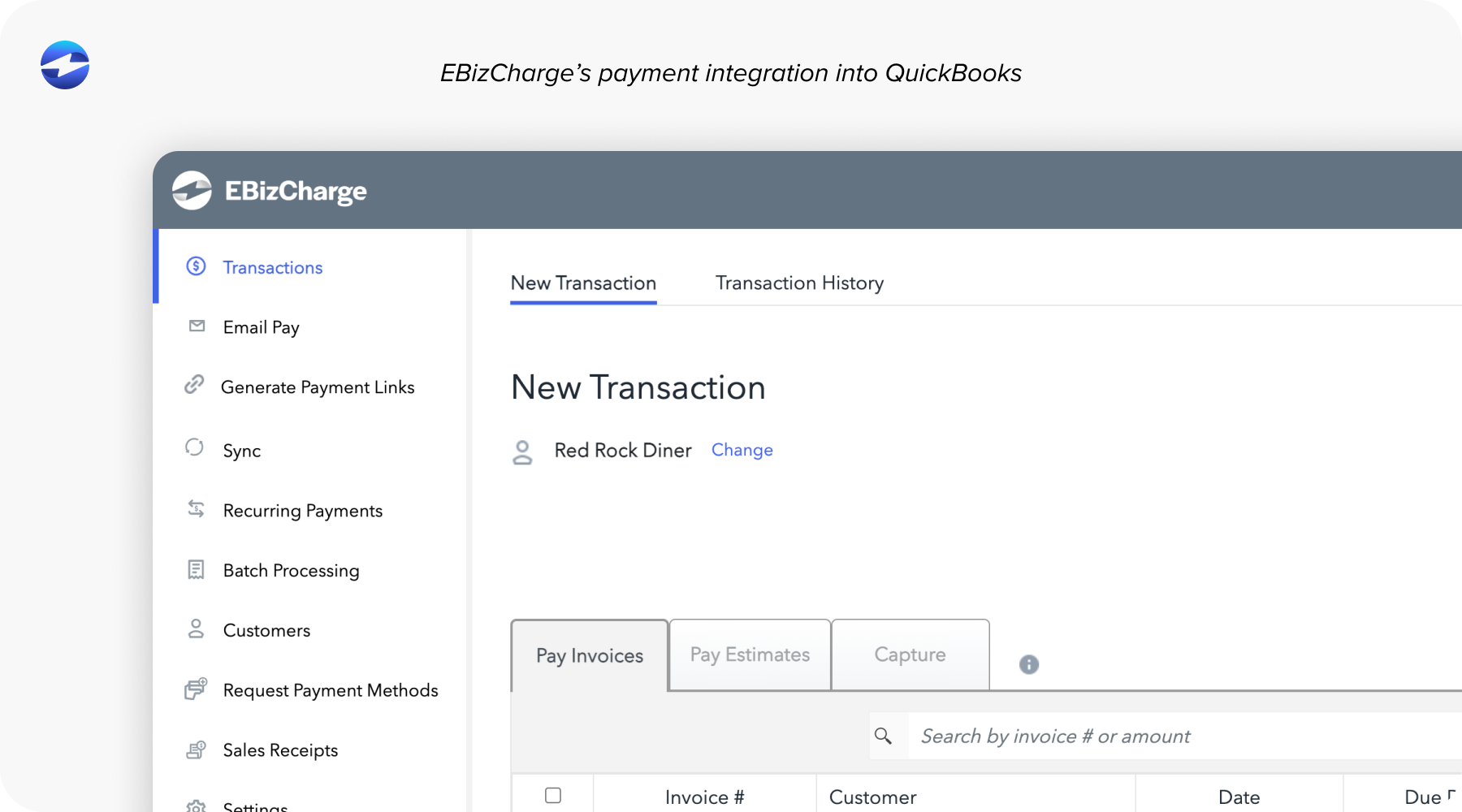
For offices already on QuickBooks, the integration is genuinely seamless. EBizCharge was built specifically to function as a native payment solution inside QuickBooks, across Desktop, Online, and Enterprise versions. Payments post automatically to accounts receivable, invoices are marked as paid instantly, and your billing staff keeps working the same way they always have.
EBizCharge also supports recurring billing and patient payment plans as built-in features, which matters in a medical setting where payment flexibility directly affects collections. As a dedicated merchant services for QuickBooks users, it also handles Level 3 pricing to secure the lowest possible rates on qualifying transactions, something QuickBooks Payments doesn’t offer at all.
When you compare this to what merchant services QuickBooks natively provides, EBizCharge consistently delivers more capability for less cost. That’s not a promotional claim; it’s the math that plays out when you compare effective rates across the same volume.
How to Audit What You’re Actually Paying
Before making any changes, get your real number. Pull three months of processing statements and calculate your effective rate. Divide total fees paid by total volume processed. That single percentage tells you more than any published rate.
Once you have it, compare it against what interchange-plus processors would charge for the same volume and card mix. Request quotes from two or three providers and ask specifically for projected effective rates, not just the headline markup or base percentage.
Then factor in switching costs honestly. Hardware, integration setup, and training time are real but typically one-time costs that are recovered within a few months as the ongoing savings become more meaningful.
Finding The Right Merchant Services Provider for You
QuickBooks merchant services is built for convenience, and for businesses at low volume or with simple needs, that convenience may well be worth the premium. But for growing companies and medical practices processing serious volume, the cost of that convenience is measurable and ongoing.
The good news is that switching your payment processor doesn’t mean starting from scratch. The right merchant services provider gives you the same QuickBooks workflow you already rely on, combined with pricing that actually reflects what it costs to move money. Run the audit, know your effective rate, and make the decision based on data rather than habit.
- How QuickBooks Payments Actually Charges You
- Every Fee You’re Probably Not Tracking
- What This Looks Like at Real Volume
- Why the “It’s Already in QuickBooks” Argument Doesn’t Hold Up
- When QuickBooks Payments Actually Makes Sense
- A Better Payment Processing Solution for Medical Offices
- How to Audit What You’re Actually Paying
- Finding The Right Merchant Services Provider for You