

Resources | Comparisons
EBizCharge vs. Fortis: Which Integrates Better with QuickBooks?

20,000 businesses have chosen EBizCharge over alternatives







If your business runs on QuickBooks, your payment processor should do far more than simply accept credit cards. It should operate directly inside QuickBooks, automatically syncing payment data, eliminating manual reconciliation, and supporting the accounting workflows your finance team depends on every day.
For QuickBooks users, the real value of a payment platform is not just transaction processing — it’s how effectively payments integrate into daily accounting operations. Many platforms can facilitate payments, but a deeply integrated solution streamlines invoicing, collections, reconciliation, reporting, and accounts receivable (AR) through a single connected workflow built directly into QuickBooks.
While both EBizCharge and Fortis integrate with QuickBooks, integration alone is not the differentiator. The real difference is how effectively each platform supports accounting workflows, automation, and operational efficiency inside QuickBooks itself.
This comparison examines EBizCharge and Fortis through the lens that matters most to QuickBooks users: integration depth, operational efficiency, and the day-to-day realities finance teams manage behind the scenes.
01 Why it Matters: Native Payments vs Connected Payments
QuickBooks may centralize accounting operations, but a disconnected payment system can still create unnecessary friction across everyday financial workflows. When payments operate outside of QuickBooks, finance teams often end up reconciling manually, chasing invoice and payment statuses across systems, re-entering data that should sync automatically, and building reports from spreadsheets instead of live data. Over time, those extra steps compound into slower closes, aging receivables, reporting blind spots, and hours lost to administrative cleanup.
These challenges affect more than efficiency. They impact reporting accuracy, cash flow visibility, customer experience, and the time finance teams spend on administrative work instead of strategic decisions.
That’s why integration depth matters.
A surface-level integration may only sync records periodically or require manual exports between systems. A truly embedded payment solution should do all of the following:
- Automatically match payments to invoices
- Sync payment and customer data in real time
- Update accounts receivable instantly
- Post transactions directly to the general ledger
- Simplify reporting and reconciliation
- Create a more seamless payment experience for customers
- Keep your team inside QuickBooks, not multiple systems
A modern payment solution should do more than process transactions. It should help businesses improve operational efficiency, maintain accurate financial records, accelerate collections, and simplify the entire payment lifecycle.
This is where EBizCharge stands apart.
Finding a reliable payment processing solution inside QuickBooks can be the difference between a system that simply processes payments and one that manages your entire payment workflow. Not every solution delivers both.
02 The Problem: Where Fortis Falls Short in QuickBooks Workflows
On the surface, Fortis offers QuickBooks payment integration capabilities similar to many payment providers. But for finance teams working inside QuickBooks every day, this is where Fortis begins to fall short. The challenge is not simply accepting a payment — it is supporting the workflow around it.
Part of that friction comes from the way Fortis is positioned. The platform is primarily built around embedded payments and software integrations rather than accounting-focused workflows. While its QuickBooks materials reference integration support broadly, they do not clearly specify compatibility across QuickBooks Online, Desktop, and Enterprise editions. For businesses operating in more complex QuickBooks environments, that lack of clarity can create additional implementation and troubleshooting overhead. Independent payment consultants have noted that custom integration setups with Fortis typically carry additional costs that are not always transparent upfront.
The operational friction becomes more visible when issues arise inside the workflow itself. Across public review platforms, including Capterra and Trustpilot, Fortis users have noted recurring concerns around billing transparency and inconsistent support responsiveness. For finance teams working against close deadlines, those gaps carry real consequences, including additional manual reconciliation work, delayed cash application, and time spent troubleshooting payment processes instead of closing the books.
These are not isolated issues. They are friction points that surface throughout the accounting workflow, from payment processing and reconciliation to collections and financial close. For QuickBooks-centric finance teams, that friction can ultimately become the difference between operational efficiency and operational slowdown.
03 The Better Alternative: EBizCharge, Built for the full QuickBooks workflow
EBizCharge is a top-rated, certified payment solution for QuickBooks Online, Desktop, and Enterprise — all three versions. Rather than operating as a separate system that periodically syncs with QuickBooks, EBizCharge runs inside it, unifying payment processing, invoicing, and reconciliation into a single connected workflow. Fortis’s QuickBooks support does not extend across all versions, which matters the moment your business runs on Desktop or Enterprise.
For finance teams, that distinction changes everything about how payment data moves through the business. With EBizCharge’s QuickBooks integration:
- Every payment is matched to the right invoice automatically
- AR and GL update when a transaction is processed
- Reporting reflects real numbers in real time
- Your team stays in QuickBooks and doesn’t toggle between systems
The result: finance teams shift from chasing payment status to managing cash flow strategically.
A more complete payment toolset built for Business-to-Business (B2B)
Where Fortis covers the transactional basics, EBizCharge goes further with a native set of collection and billing tools designed around how B2B businesses actually get paid:
For accounting teams, the real priority is keeping invoicing, reconciliation, collections, and month-end close moving without disruption. That is where operational friction starts to become noticeable.
Native payment tools built for B2B quickbooks workflows
 Customer payment portals
 Secure click-to-pay links in email invoices
 ACH/eCheck processing
 Recurring billing with smart retry logic
 Level 3 data processing
 State-compliant surcharging
 Tokenization & enterprise-grade security
 24/7 complimentary support
Each of these capabilities is built directly into the EBizCharge and QuickBooks experience, rather than added through disconnected tools or third-party workarounds.
One system. One source of truth.
As a result of EBizCharge operating directly inside QuickBooks, invoicing, payment processing, and reconciliation all share the same real time data through one system and one source of truth.
That means no sync delays, no duplicate workflows, and no conflicting information across separate systems.
The result is a more connected payment operation with greater visibility, faster reconciliation, and stronger control across every stage of the payment workflow.
01
Deeper integrations
100+ accounting, ERP, CRM, and eCommerce systems
02
End-to-end automation
Invoicing, payments, and reconciliation in one flow
03
Flexible B2B payment options
Cards, ACH, portals, click-to-pay, and recurring billing
04
Real-time reporting
Live visibility into AR, transactions, and cash flow
05
Cost control
Interchange-plus pricing, level 3 data, and surcharging built in
06
Fast implementation
Minimal setup time, teams are up and running quickly
For QuickBooks users, that translates into:
- Less time spent on manual reconciliation and administrative work
- Faster invoice to cash cycles
- Lower processing and operational costs
- Greater visibility across the entire payment lifecycle
The real question is not whether disconnected systems create friction. It is how much time, money, and operational efficiency your business is losing by continuing to work around them.
At a Glance: EBizCharge vs Fortis: Feature Comparison Inside QuickBooks
While EBizCharge and Fortis may appear similar at face value, the differences become clear when you examine how each solution actually performs inside QuickBooks. The comparison below covers eight core integration features, and in each one, the same pattern emerges: Fortis checks a box while EBizCharge builds out the full functionality.
| Feature | Fortis | EBizCharge |
|---|---|---|
| Invoice & Payment collection | Connected | Native & certified |
| Reconciliation | Manual/partial | Automatic |
| Auto Invoice matching | Limited | Yes |
| Level 3 data processing | Limited | Yes |
| Branded customer payment portal | Basic | Multi-invoice, branded |
| Setup speed (per G2) | Varies | Minimal downtime |
| Security | PCI-compliant | PCI-compliant and validated |
Scroll to compare 
The pattern is consistent across every category. EBizCharge goes further in every area, from native QuickBooks embedding and real-time AR sync to Level 3 data processing, branded payment portals, and enterprise-grade security. Where Fortis offers a baseline connection, EBizCharge delivers an end-to-end integration built for how B2B finance teams actually operate inside QuickBooks.
Integration Depth: Where the Operational Gaps Show
Feature tables show what is available. The real test is how each solution performs inside your actual workflow. Across the areas that matter most to QuickBooks finance teams, the pattern is consistent.
How do Fortis and EBizCharge perform inside QuickBooks
| Feature | Fortis Payments | EBizCharge |
|---|---|---|
| Invoice & Payment collection |  Integrated payment acceptance Integrated payment acceptance
Accept ACH, credit card, and digital wallet within QuickBooks |
Integrated payments accepted
Accept ACH, and credit cards within QuickBooks |
| Reconciliation |  Syncing payments to QuickBooks Syncing payments to QuickBooks
Review workflow needs to determine fit |
Automated payment synchronization
Reduces manual data entry and reconciliation time |
| QuickBooks Environment support | QuickBooks integration available
Verify compatibility with your specific edition |
Supports Online, Desktop & Enterprise
Publicly supports all three QuickBooks products |
| Support | Support availability
Availability and response times may vary |
24/7 U.S.-based support
In-house teams trained in accounting workflows |
| Operational impact | Impact depends on workflow needs
Depends on your configuration and internal workflows |
Designed to reduce manual work
Faster reconciliation and improved efficiency during close |
Scroll to compare
Why the difference matters

Save time
Automated workflows and reconciliation reduce manual work
Reduce risk
Accurate data sync helps reduce errors and exceptions

Improve productivity
Finance teams can focus on analysis not data entry

Close with confidence
Reliable data and support helps keep month and year-end on track
04 Reviewer consensus: Not just our analysis. Independent reviewers agree.
When compared to Fortis, EBizCharge is consistently recognized by independent G2 reviewers for usability, implementation speed, and overall alignment with business needs. The ratings reflect real user experiences.
 Fortis Fortis  |
 EBizCharge EBizCharge  |
|
|---|---|---|
| Meets requirements | 9.5  |
9.5  |
| Ease of use | 8.5  |
9.5 |
| Ease of setup | 8.8  |
9.2  |
| Quality of support | 9.5 |
9.6  |
Scroll to compare
EBizCharge outperforms Fortis in ease of use, ease of setup, and overall user satisfaction. The difference is especially noticeable during implementation, where EBizCharge’s native QuickBooks architecture helps reduce configuration complexity, minimize integration challenges, and accelerate time to value.
G2 reviewers frequently highlight how naturally EBizCharge fits into existing QuickBooks workflows, allowing teams to process payments, manage invoices, and reconcile transactions without switching between systems. Users also point to a smoother onboarding experience and faster adoption across finance teams, particularly compared to more disconnected payment platforms.
05 The Bigger Question: Good Enough is Costing You More than You Think
Most finance leaders evaluate payment platforms by asking a simple question: does it work? For a platform like Fortis, the answer is technically yes. But when the bar is set that low, the real costs stay invisible until they show up in your close cycle, your AR aging report, or your processing fees.
Fortis processes payments, offers reporting visibility, and provides accessible customer support. For straightforward, low-complexity payment scenarios, that may be sufficient.
But as soon as you introduce variable invoice amounts, higher transaction values, B2B card workflows, and QuickBooks-driven AR processes, sufficient stops being enough. Fortis’s integration limitations mean your team absorbs the difference in manual steps, reconciliation time, and processing costs that do not have to exist.
EBizCharge is built to go further. It Delivers:
- Payments embedded directly inside QuickBooks across all three versions
- AR automation that eliminates manual reconciliation and data entry
- Cost reductions built into every transaction through Level 3 processing and surcharging
- Branded payment portals, secure email payment links, and recurring billing included
- 24/7 dedicated support at no additional cost, so workflow issues never wait until morning
- Enterprise-grade tokenization and encryption that keeps sensitive data secure at every step
For businesses that rely on QuickBooks as the operational center of their finance workflow, the difference is not just how payments are processed — it’s how much manual work, reconciliation effort, and operational complexity can be eliminated altogether. That’s where EBizCharge creates meaningful separation.
06 The Verdict: EBizCharge, The Better Way to get Paid in QuickBooks
For B2B companies that want to accept card and ACH payments seamlessly, strengthen AR operations in QuickBooks, and keep payment workflows running as efficiently as the rest of their business, EBizCharge is the clear choice.
Built natively for QuickBooks Online, Desktop, and Enterprise, EBizCharge goes beyond payment processing to streamline the entire invoice-to-cash cycle. Real-time AR automation, automatic invoice matching, Level 3 processing, compliant surcharging, branded payment experiences, and enterprise-grade security all work together inside a single connected workflow.
For finance teams looking to scale operations without scaling manual work, EBizCharge is more than a payment solution. It is a smarter way to run payments inside QuickBooks.
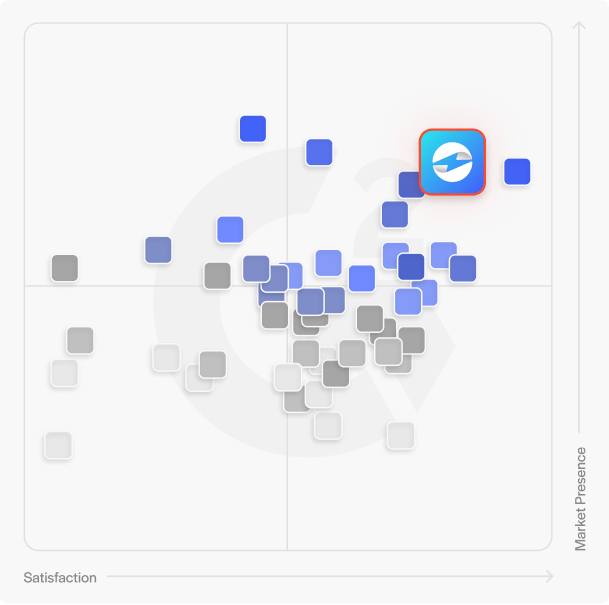

Hear why EBizCharge is
the number 1 choice
Hear why EBizCharge is the number 1 choice
Contact our sales team to learn more about why EBizCharge is consistently chosen over alternatives.
$0 Cancellation Fees | Unlimited Support
