Blog > Merchant Services for Accounting Firms: Payment Processing That Syncs with Your Books
Merchant Services for Accounting Firms: Payment Processing That Syncs with Your Books

There’s a quiet irony at the center of most accounting firms. You spend your days cleaning up other people’s financials, reconciling accounts, and making sure your clients’ books are airtight. Then you go back to your own back office and manually match payment processor deposits to open invoices for the third month in a row.
It happens more than anyone wants to admit. The reason isn’t poor organization. It’s that most payment processing solutions on the market were never designed with accounting firms in mind. They were built for retail and e-commerce. When you try to run professional services billing through a tool built for something else, you end up doing extra work to compensate.
This article is for managing partners, firm administrators, and practice managers who are ready to stop compensating. We’ll cover what accounting firms actually need from a payment processing setup, what genuine software integration looks like, and how to find the best merchant services for accounting firms without getting distracted by features that don’t matter for your workflow.
Why Accounting Firms Have Different Payment Needs
Most payment processing guides treat all businesses the same. Pick a processor, connect your bank account, and start accepting payments. That works well enough for a retail shop or a SaaS company. It doesn’t work as well for a firm billing a mix of retainers, hourly engagements, and project-based clients across multiple service lines.
Your billing is more complex. A retainer payment from an advisory client needs to hit a different income account than a tax preparation fee from an individual. An ACH payment for a large audit engagement carries a different processing cost structure than a credit card payment from a small business owner. And your credit card processing fees shouldn’t be a mystery — you need clear, itemized records of what each transaction actually costs so that expense hits the right account without any guesswork. When your credit card processing setup treats all of those the same way and dumps them into one combined deposit at the end of the day, someone on your team has to untangle it manually.
Then there’s the professional image piece. Your clients tend to be financially sophisticated. They’re business owners, controllers, and CFOs. When they receive a payment request from your firm, the experience should reflect the standard they associate with your work. A generic payment link from a consumer-grade merchant services provider doesn’t exactly reinforce that.
The Real Cost of a Disconnected Payment System
Manual reconciliation has a cost that’s easy to underestimate because it’s spread across small tasks rather than one visible line item.
If your payment processor sends lump-sum deposits to your bank account, someone on your team is matching those deposits to individual invoices every month. For a small firm, that might be two hours. For a firm with 50 or more active clients and multiple billing types, it can run five hours or more. That’s time that could be spent on client work or anything else that moves the firm forward.
Beyond the hours, manual reconciliation introduces errors. Payments get coded to the wrong account. Processing fees create discrepancies that don’t surface until month-end close. Each of those errors has downstream effects on your profits and losses, your partner distributions, and your own firm’s tax planning.
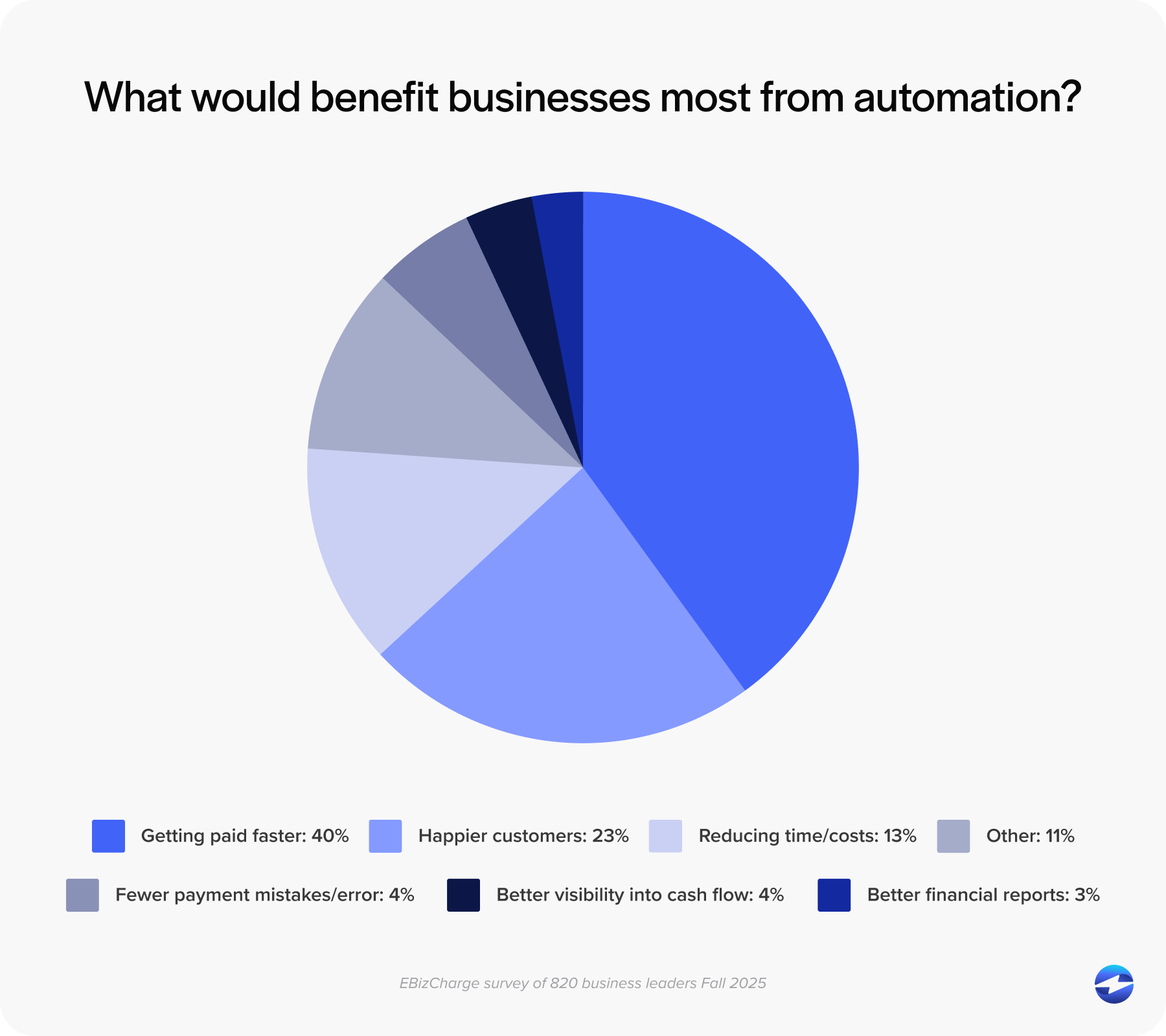
The hidden cost of the wrong payment solution isn’t just the reconciliation time. It’s everything that flows from the errors it produces.
What Real Integration Looks Like
Many payment processors advertise accounting software integration. What they usually mean is a CSV export, a Zapier automation, or a one-way sync that records deposits without matching them to invoices. That’s not integration. It’s a different route to the same manual work.
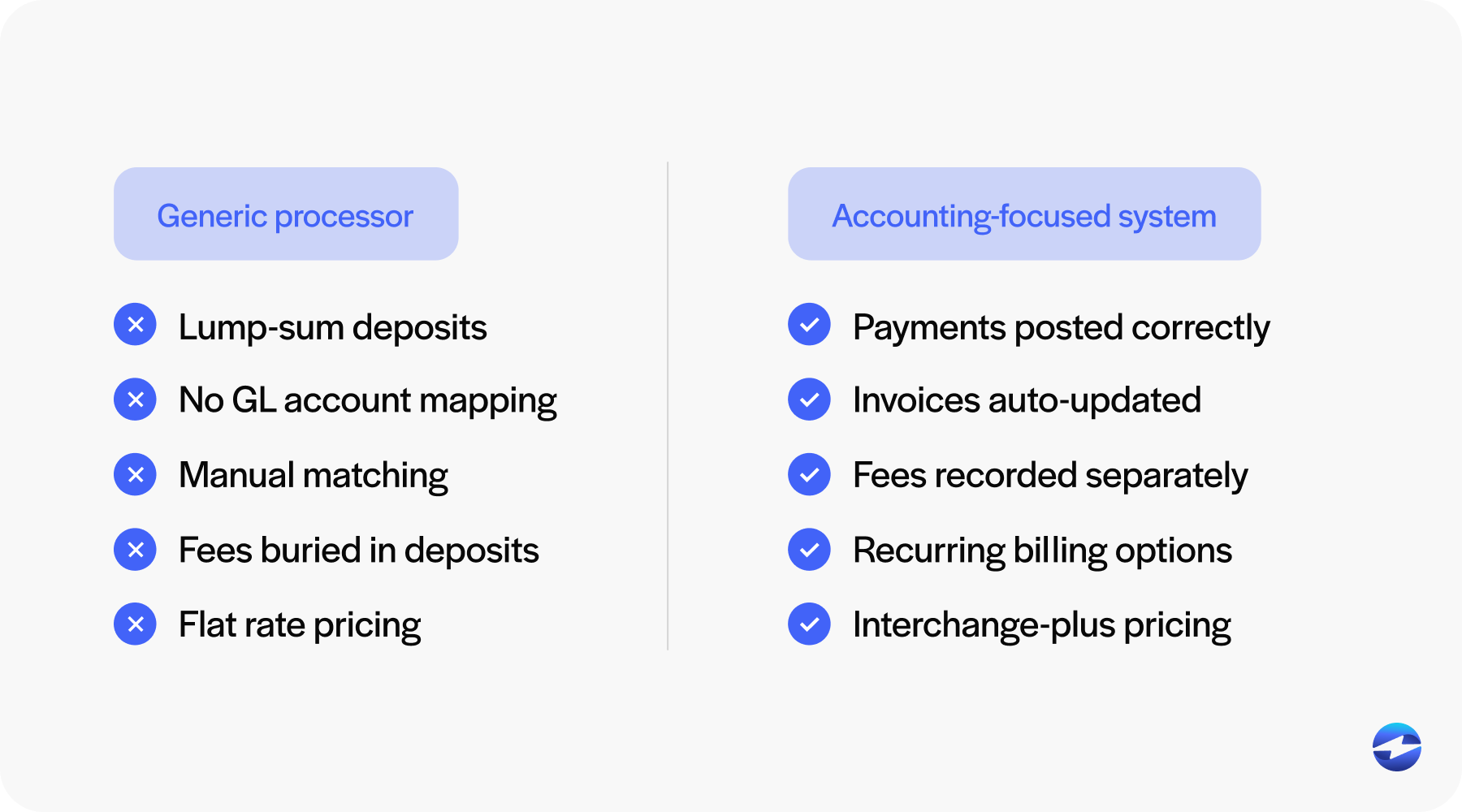
Real payment processing software integration means the payment system and your accounting platform are talking to each other automatically. The best payment processing software doesn’t make you think about data moving between systems — it just moves it, correctly, every time. When a client pays an invoice, the invoice status updates to paid, the deposit posts to the correct GL account, and the processing fees are recorded separately. All of that happens without anyone on your staff acting as the intermediary.
Bidirectional sync matters here. One-way data pushes still leave you managing the relationship from one side. True bidirectional sync means that a refund recorded in your payment processor posts automatically to your books, and a canceled invoice in your accounting software immediately closes the associated payment link.
A real payment processing solution also lets you define exactly how different payment types, fees, and refunds hit your chart of accounts. You set it up once, and it works the same way on every transaction from that point forward.
If a vendor says their system “connects with QuickBooks,” ask what that means in specific terms. If the answer involves any manual steps or third-party tools, that connection isn’t saving you as much work as they’re implying.
What to Look for in a Merchant Services Provider
When you’re comparing options, most feature lists look similar on the surface. Here’s what actually matters for an accounting firm.
Native integration with the software your firm uses is the starting point. Not a generic API connection. A direct, maintained integration with QuickBooks, Xero, Sage, Microsoft Dynamics, NetSuite, or whatever platform sits at the center of your operations.
Transaction-level detail matters just as much as the integration itself. Good payment processing doesn’t just record that a deposit arrived. It records which client paid, which invoice it applies to, and what the net amount was after fees. That granularity is what makes reconciliation automatic.
ACH acceptance is worth prioritizing for accounting firms specifically. Many of your clients are businesses that prefer bank transfers for larger invoices. ACH fees are also significantly lower than credit card fees, which add up at professional services billing rates.
A branded client payment portal matters too. When a client opens a payment link from your firm, it should look like it came from your firm. Taken together, these criteria define what a good payment solution looks like for a professional services firm — specific enough that you can use them to filter out vendors quickly.
Common Options and How They Compare
EBizCharge is the standout option for merchant services for accounting firms. Unlike general-purpose processors that bolted on accounting integrations as an afterthought, EBizCharge was built around the idea that payment processing and accounting software should work as one system. It has native, bidirectional integrations with QuickBooks, Sage, Microsoft Dynamics, NetSuite, Acumatica, and other platforms professional services firms actually use. Payments post to the correct GL account automatically. Invoice statuses update in real time. Processing fees are recorded separately. The payment portal is fully brandable, recurring billing works natively for retainer clients, and surcharging is supported where state law allows. Pricing uses an interchange-plus model, which is more transparent and cost-effective for firms processing at professional services volumes. For firms frustrated by processors that promise integration and deliver CSV files, EBizCharge is where the search usually ends.
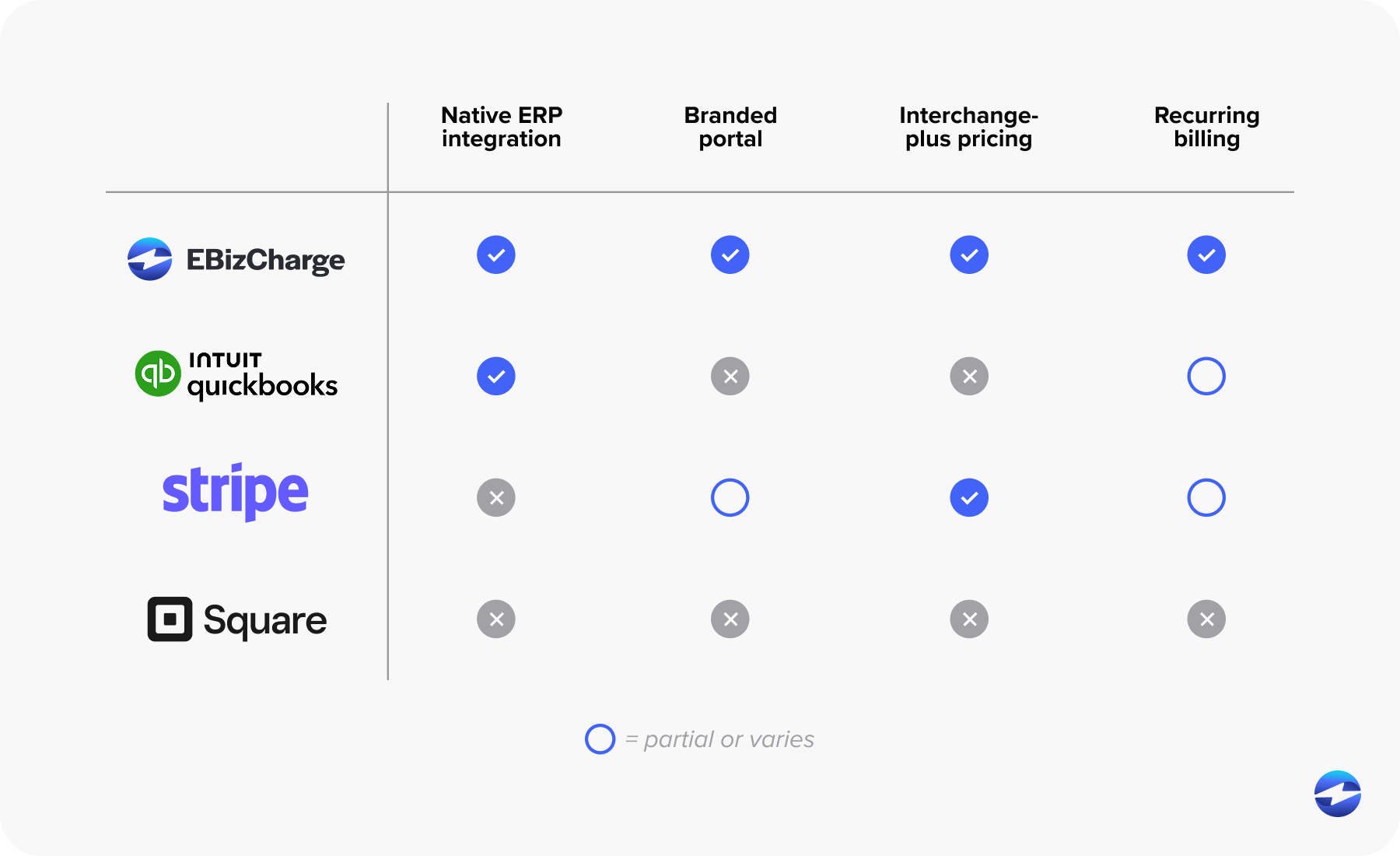
General-purpose processors like Stripe and Square have reliable infrastructure, but their accounting integrations are shallow. You’ll get deposits recorded, but matching them to specific invoices and posting them to the right accounts still involves manual work. They create friction for professional services billing.
Practice management platforms like Ignition, TaxDome, and Karbon have payment features built-in. If your firm already runs on one of these tools, the payment functionality may be adequate. For firms that aren’t embedded in those ecosystems, the payment piece on its own doesn’t offer much.
Accounting-software-native options like QuickBooks Payments and Xero Pay offer simple setup and tight integration with their parent platforms. Rates tend to be less competitive, and the feature set is basic. Workable for smaller firms, but not a strategic long-term choice.
Making the Switch Without Disrupting Your Clients
The main thing that keeps firms from switching is the worry about disrupting billing mid-engagement. That concern is reasonable, but the transition is manageable if you approach it in order.
Start by mapping your current payment mix. Which clients pay by check, which by ACH, which by card? Migrate recurring retainer clients first, since they’re on a billing schedule. Run both systems in parallel for 30 to 60 days to give yourself a buffer.
Test your chart of accounts mapping before you go live. Run a test transaction and trace it through your accounting software to confirm it’s hitting the right accounts. Catching a configuration error before it touches live data is much easier than unwinding incorrect entries after the fact.
Finding The Right Merchant Services Provider for Your Business
The right merchant services setup for an accounting firm isn’t just about accepting payments. It’s about what happens after a payment is processed. Does it land in the right account? Does it close the right invoice? Does it give you accurate books without hours of manual cleanup every month?
When you’re looking for the best merchant services for accounting firms, EBizCharge is the payment processor built to meet that standard. The integration is native, the reporting maps to how accountants think, and the day-to-day experience is what good payment processing should feel like: invisible.
If your firm is ready to replace the monthly reconciliation scramble with a system that works, EBizCharge is a good place to start.