Blog > QuickBooks Payments vs EBizCharge: Direct Comparison
QuickBooks Payments vs EBizCharge: Direct Comparison
When looking for a QuickBooks payment processor, the choices can feel overwhelming. But realistically, if you want true native integration with your accounting system, you’re probably looking at QuickBooks Payments or one of the handful of third-party processors that integrate at the same depth. EBizCharge is one of those alternatives, and it’s worth understanding how these two solutions actually stack up.
This isn’t about declaring a winner. It’s about figuring out which payment processing solution makes sense for your specific situation. If you’re a controller, CFO, or accounting manager trying to make this decision, you need the straight facts without the marketing spin.
Quick Overview: What You’re Comparing
QuickBooks Payments is Intuit’s native payment processing service, built directly into QuickBooks. Setup is straightforward, and the basic functionality is right there when you need it. For businesses with simple payment needs and moderate volume, it does exactly what it’s supposed to do.
EBizCharge is a third-party payment processor that offers native QuickBooks integration across all versions—Desktop, Online, and Enterprise. The integration depth is comparable to QuickBooks’ own solution, but the feature set is built for businesses that need more control and advanced capabilities.
Think of it this way: QuickBooks Payments is designed for simplicity and convenience. EBizCharge is designed for businesses that have outgrown basic payment processing.
Pricing & Fee Structure
QuickBooks payment processing fees use a straightforward percentage-based model. For card-not-present transactions (most B2B invoicing), rates typically run around 2.9% plus $0.25 per transaction. ACH transfers are cheaper, usually around 1% with a cap. For some, that simplicity can feel like a breath of fresh air.
The challenge comes when your volume increases. That percentage-based pricing scales directly with your revenue. Processing $500,000 a month means significantly higher fees than processing $50,000, even though your operational complexity might not have increased proportionally.
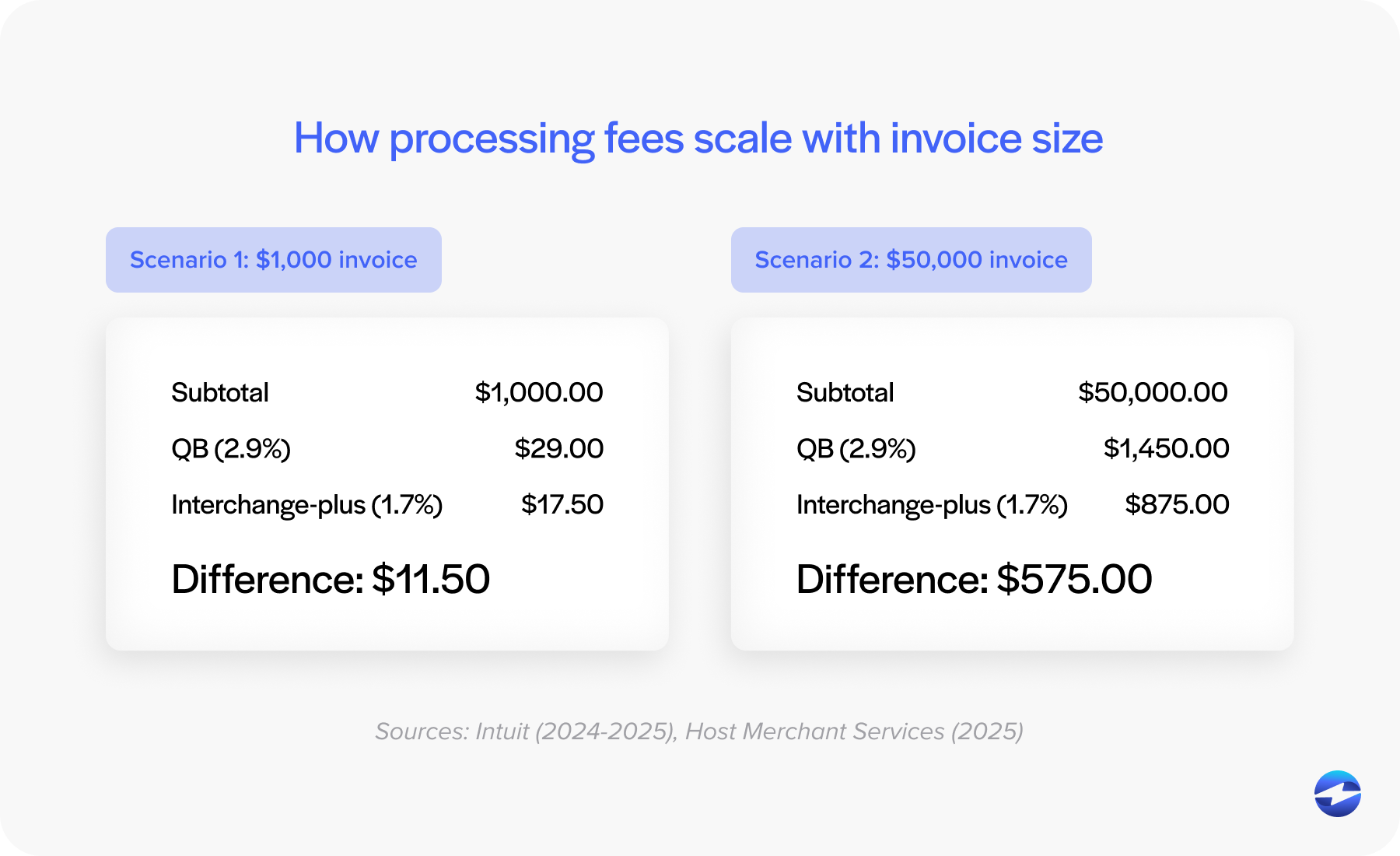
EBizCharge structures pricing differently. While exact rates vary based on your business and volume, the model works well for businesses processing higher volumes. The fee transparency is generally better, too—fewer surprise charges when you review your monthly statement.
At lower volumes, the cost difference might not be dramatic. At higher volumes, the math starts tilting toward alternatives. It’s important to run your actual numbers and do the math on both pricing structures to find what works best for you.
Core Features Comparison
Both solutions handle the basics: accepting credit cards, processing ACH transfers, and syncing payments back to QuickBooks. Where they differ is in the advanced capabilities.
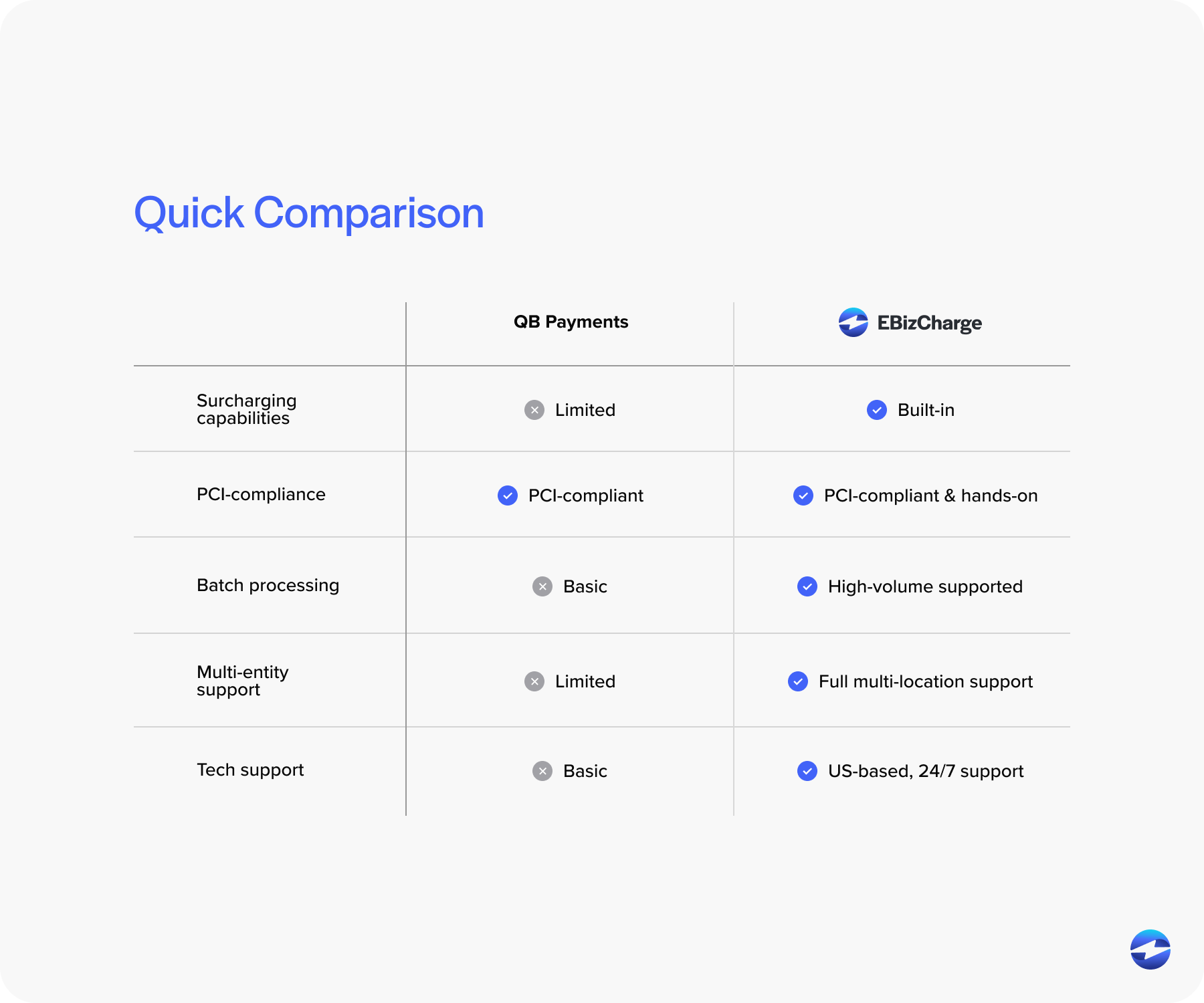
Surcharging capabilities represent one of the biggest practical differences. If you’re in a state where surcharging is legal and you want to offset processing costs, the implementation approaches differ dramatically. QuickBooks Payments has surcharging capabilities, but they’re not as straightforward to implement. EBizCharge builds surcharging into its core functionality with automated compliance handling across different states. For businesses where cost recovery matters, this can translate to tens of thousands in annual savings.
Payment links and branding show another clear distinction. The QuickBooks payment processing system generates payment links, but customization options are limited. The payment page looks like QuickBooks, not your company. EBizCharge lets you fully brand payment pages with your logo, colors, and messaging. It’s a small detail that makes a difference in how professional your customer experience feels.
Batch processing and automation become critical at scale. Both solutions automate the basics—matching payments to invoices, updating customer records. But EBizCharge’s batch processing capabilities are more sophisticated, which matters when you’re generating payment links for hundreds of invoices or managing complex approval workflows.
Security & PCI Compliance
Both solutions take security seriously, but they handle PCI compliance responsibilities differently.
QuickBooks Payments is PCI DSS compliant and handles the technical security requirements for payment processing. Your business is still responsible for certain compliance requirements, but Intuit manages the heavy lifting around data encryption and secure payment processing. For most businesses, this approach works fine – you’re relying on Intuit’s infrastructure and compliance management.
EBizCharge also maintains PCI DSS compliance but provides more hands-on support during audits and compliance reviews. The difference shows up when you’re preparing for an audit or need documentation for compliance purposes. EBizCharge’s approach includes more direct compliance management assistance, which matters if your business faces regular audits or operates in highly regulated industries.
Both solutions use proper encryption and fraud prevention measures. The practical difference is less about the baseline security – both are secure – and more about how much support you get managing compliance requirements and responding to security questionnaires from customers or auditors.
Enterprise & Multi-Entity Support
This is where the conversation changes significantly for businesses running QuickBooks ERP or managing multiple entities.
QuickBooks Payments handles basic multi-entity scenarios adequately, but it starts showing limitations when your organizational structure gets complex. Multiple subsidiaries, different locations with separate accounting, complex payment routing—these scenarios can require workarounds that create unnecessary manual work.
EBizCharge is specifically designed to handle the complexity of QuickBooks ERP. Multiple entities, multiple locations, and different payment workflows for different business units—the system manages these scenarios without forcing you into manual processes. If you’re running Enterprise and dealing with organizational complexity, this difference matters more than almost any other feature.
As your business grows and your QuickBooks setup becomes more sophisticated, you need a payment processing solution that grows with you. That means handling increasing volume without performance issues, supporting more complex workflows, and maintaining data integrity across your entire organization.
Support & Service
Support quality might not seem critical until you actually need help. Then it becomes the most important factor.
QuickBooks Payments support works through Intuit’s standard support channels. For routine questions, it’s fine. When you have an urgent issue—a batch of payments that didn’t process, a customer who can’t complete a transaction, a compliance question before an audit—the standard support model can feel inadequate.
EBizCharge provides US-based support from people who understand both payment processing mechanics and QuickBooks integration details. When something breaks, you’re talking to someone who can actually troubleshoot the problem. You also get dedicated account management, which means someone who knows your specific setup.
For businesses where payment processing is mission-critical, support quality isn’t a nice-to-have.
Which Solution Fits Your Business?
Both solutions work. The best QuickBooks payment solution for your business depends on your specific circumstances.
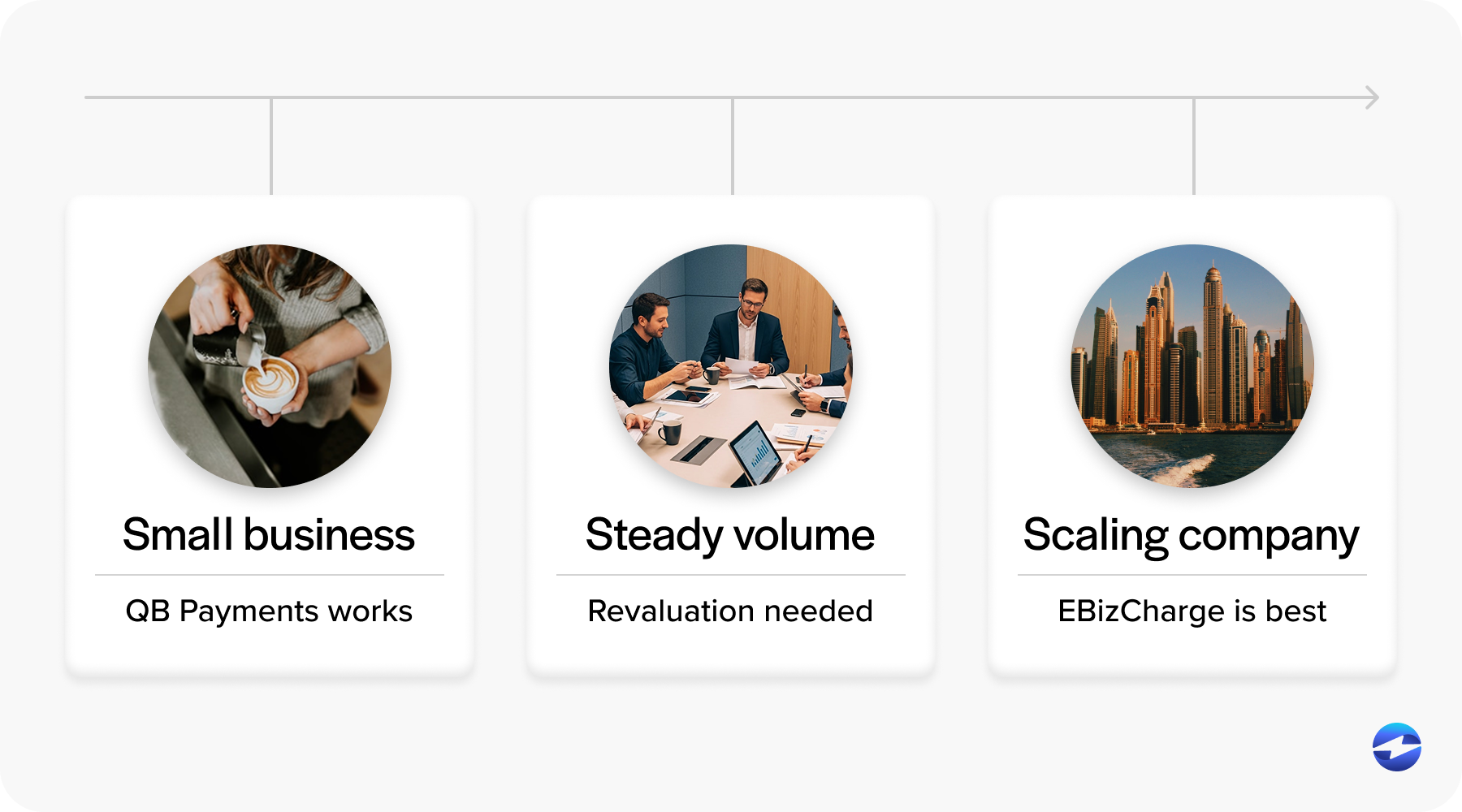
QuickBooks Payments makes sense when your processing volume is moderate, your payment needs are straightforward, and you prioritize convenience. If you’re a smaller business without complex requirements and you value having everything built into QuickBooks, the native solution is perfectly adequate.
EBizCharge makes sense when you’re processing higher volumes, need cost recovery through surcharging, run QuickBooks ERP with multiple entities, or need branded payment pages. It also makes sense when support quality matters—when you need expert help quickly when issues arise.
If you’re reading this comparison because you’re curious but generally satisfied with your current setup, you’re probably fine staying put. If you’re reading this because you’re frustrated with limitations or watching your QuickBooks payment processing fees eat into your margins, you’re probably ready for an alternative to QuickBooks Payments.
Making Your Decision
Before choosing between these options, ask yourself a few straightforward questions.
What’s your monthly processing volume, and where will it be in 12 months? Cost structures that work at $30,000 monthly might not make sense at $300,000.
Do you need surcharging capabilities? If you’re in a competitive industry where margins matter and you can legally surcharge, calculate the actual dollar impact based on your volume.
How important is branding and customization? If your payment pages are an extension of your customer experience, the difference between a generic QuickBooks page and a fully branded payment portal is significant.
Are you running QuickBooks ERP with multiple entities or complex organizational structures? If your accounting setup is sophisticated, you need a payment processor that can handle that complexity without creating manual work.
What level of support do you need? If payment processing downtime directly impacts your business, you need better support than standard ticket-based systems.
Most businesses don’t switch QuickBooks payment processors because their current solution stopped working. They switch because their needs evolved beyond what their current system was designed to handle.
Choosing The Right Payment Solution for Your Business
There’s no universal answer to which is the best QuickBooks payment solution. QuickBooks Payments provides simplicity and convenience with native integration that’s already there. EBizCharge provides advanced features, better pricing at scale, and support built for businesses that need more than basic QuickBooks payment processing.
The right choice depends on where your business is today and where it’s headed. If you’re processing significant volumes, managing complexity, or finding yourself working around limitations, it’s worth evaluating what else is available. If your current setup works fine and you’re not hitting any pain points, there’s no reason to change.
Run your numbers, assess your actual needs honestly, and choose based on your specific situation. Both solutions will process payments and sync to QuickBooks. The question is which one will do it in a way that makes your job easier rather than harder.