Blog > Construction Payment Processing with Sage Intacct: Complete Guide
Construction Payment Processing with Sage Intacct: Complete Guide
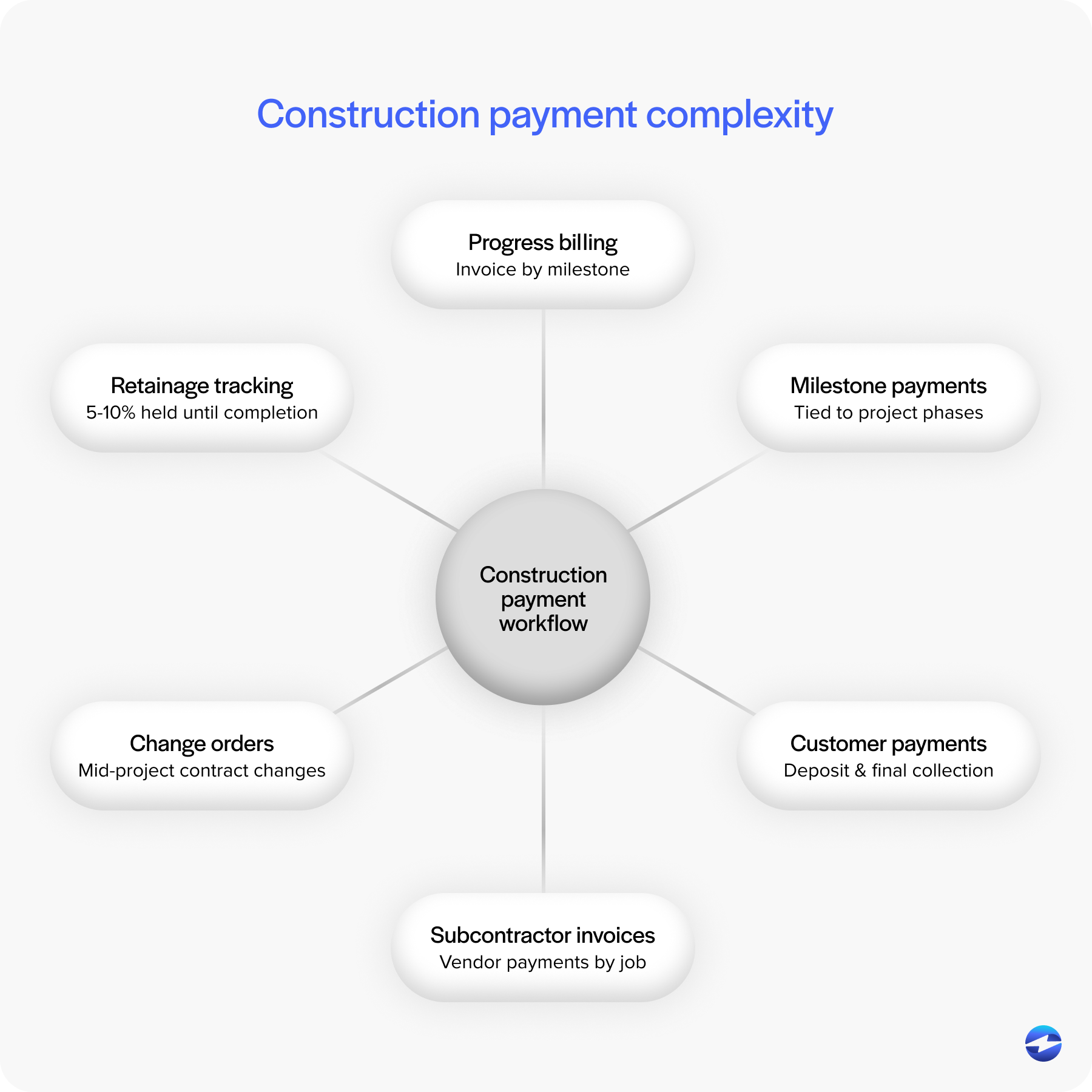
If you work in construction, you know that managing payments can be as complex as the projects themselves. Between progress billing, retainage, subcontractor invoices, and milestone-based payments, there’s a lot to track—and even more that can go wrong. A single delayed invoice or misapplied payment can throw off cash flow and slow down the entire operation.
That’s where automation and connected systems make a difference. Tools like Sage Intacct ERP help construction companies keep their financials organized, accurate, and transparent. The platform was designed for industries that rely on project-based accounting and recurring payments, which makes it a natural fit for construction firms juggling multiple jobs at once.
Sage Intacct construction solutions give you a way to bring all the moving parts—billing, payroll, and payment collection—into one ecosystem. With the right payment processing solution, you can keep projects funded and finances predictable without the usual back-and-forth between systems.
Understanding Construction Payment Workflows
Construction payment workflows are different from standard business transactions. Instead of a single invoice and payment, projects typically involve progress billing, where payments are tied to completed milestones. Then there’s retainage—holding back a portion of funds until the project is finished—and change orders that alter the contract midstream.
Each of these moving pieces makes cash flow management tricky. Many construction firms still rely on spreadsheets or disconnected tools, which leads to delays, duplicate entries, and incomplete records. Even small mistakes can snowball into disputes or lost revenue.
Sage Intacct for construction brings all these elements together under one roof. Payments, job costing, accounts receivable, and project accounting all live in the same environment. This integration ensures that every transaction—whether it’s a customer payment or subcontractor payout—is tracked accurately and reflected instantly across your books.
Sage Intacct construction project billing: how it works
Project billing in Sage Intacct is built around progress billing, where invoices go out as work gets completed. Each project gets its own billing schedule tied to milestones, completion percentages, or time-and-materials tracking. When a threshold is reached, the system generates an invoice automatically using the contract terms, job cost codes, retention amounts, and approved change orders already in the system.
Retainage is handled within the same workflow. You set the retention percentage at the contract level, and Sage Intacct calculates and withholds that amount on every progress bill. When retention is released at project completion, the system creates the final invoice and updates your AR balance in one step.
For firms running dozens of active projects at a time, this eliminates the manual invoice assembly that bogs down accounting teams and leads to billing disputes.
Construction invoicing in Sage Intacct
Sage Intacct supports the main construction contract types natively, including fixed-price, time-and-materials, cost-plus, and unit-price billing. Every line item on an invoice traces back to a specific job, cost code, or phase, so there’s a clear audit trail from billing to project accounting.
For general contractors sending AIA-style billing documents like the G702/G703 application for payment, Sage Intacct can structure invoices to match that format. Invoices can also be emailed directly from the system with payment links attached, which cuts down the back-and-forth that typically slows collections.
How Sage Intacct Simplifies Construction Payment Processing
With Sage Intacct payment processing, construction firms can automate repetitive tasks that would otherwise take hours each week. Invoices can be generated automatically when milestones are reached, payments can be applied directly to the correct accounts, and updates are posted instantly to the general ledger.
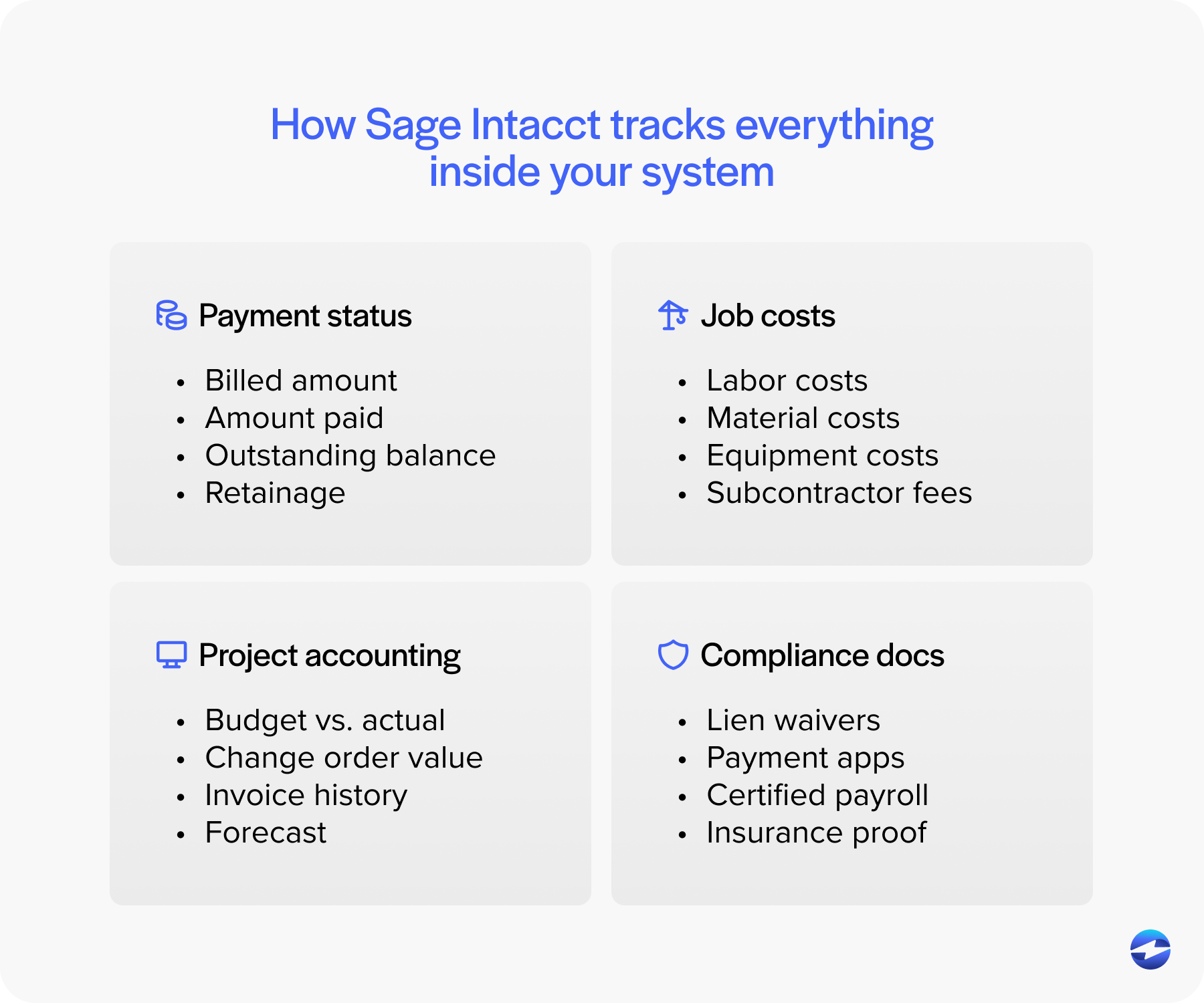
Instead of managing dozens of manual reconciliations, you get a clear view of what’s been billed, what’s paid, and what’s still outstanding. Retainage is easier to track, and compliance documentation stays attached to each payment record.
Because everything lives in one connected environment, finance teams and project managers are always working from the same set of data. This transparency reduces the risk of miscommunication and gives leadership better insight into overall financial health.
Sage Intacct Payment Processing and Integration
A major advantage of Sage Intacct integration is how it connects directly to the modules you already use—general ledger, project accounting, accounts receivable, and payroll. That means every transaction, from vendor payments to customer receipts, flows seamlessly through your financial system.
When combined with a dedicated payment processor, Sage Intacct becomes a complete end-to-end payment management tool. Companies can process credit cards, ACH transfers, and eChecks directly from within the system. Payments post automatically, and reconciliation happens in real-time.
This level of integration isn’t just about convenience—it’s about accuracy. With every payment linked to the right job or customer record, reporting becomes easier and more reliable. Teams spend less time fixing errors and more time focusing on cost control and forecasting.
Processing payments through Sage Intacct
On its own, Sage Intacct handles the accounting side: recording incoming payments against open invoices, applying credits, posting cash receipts, and managing outbound vendor payments through accounts payable.
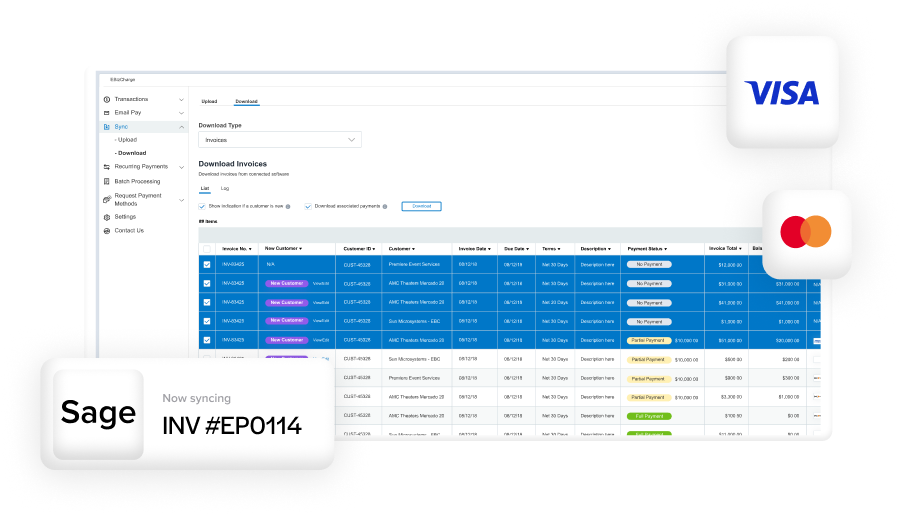
With an integrated payment processor like EBizCharge, the workflow becomes more hands-off. You can pull up an open invoice inside Sage Intacct, collect a credit card or ACH payment right there, and the transaction posts to the correct invoice, project, and general ledger entry automatically. Progress payments that used to take a week to fully process and reconcile can clear in a day or two.
Processing Credit Cards in Sage Intacct for Construction
In the past, construction companies hesitated to accept credit cards due to processing fees. However, with competitive rates and Sage Intacct construction pricing transparency, it’s now becoming standard practice. Customers appreciate the flexibility, and businesses benefit from faster collections.
Sage Intacct CRE (Construction and Real Estate) supports credit card and ACH payments securely through PCI-compliant security practices like tokenization. Sensitive data never touches your internal systems, reducing risk and simplifying audits. Whether you’re collecting a deposit, progress payment, or final invoice, the process is fast and protected.
When paired with an integrated payment processor, credit card transactions flow directly into the right accounts within Sage Intacct ERP. There’s no need to export data, upload batches, or manually reconcile. That time saved adds up across dozens—or hundreds—of projects each year.
Managing Costs and Fees in Sage Intacct Payment Processing
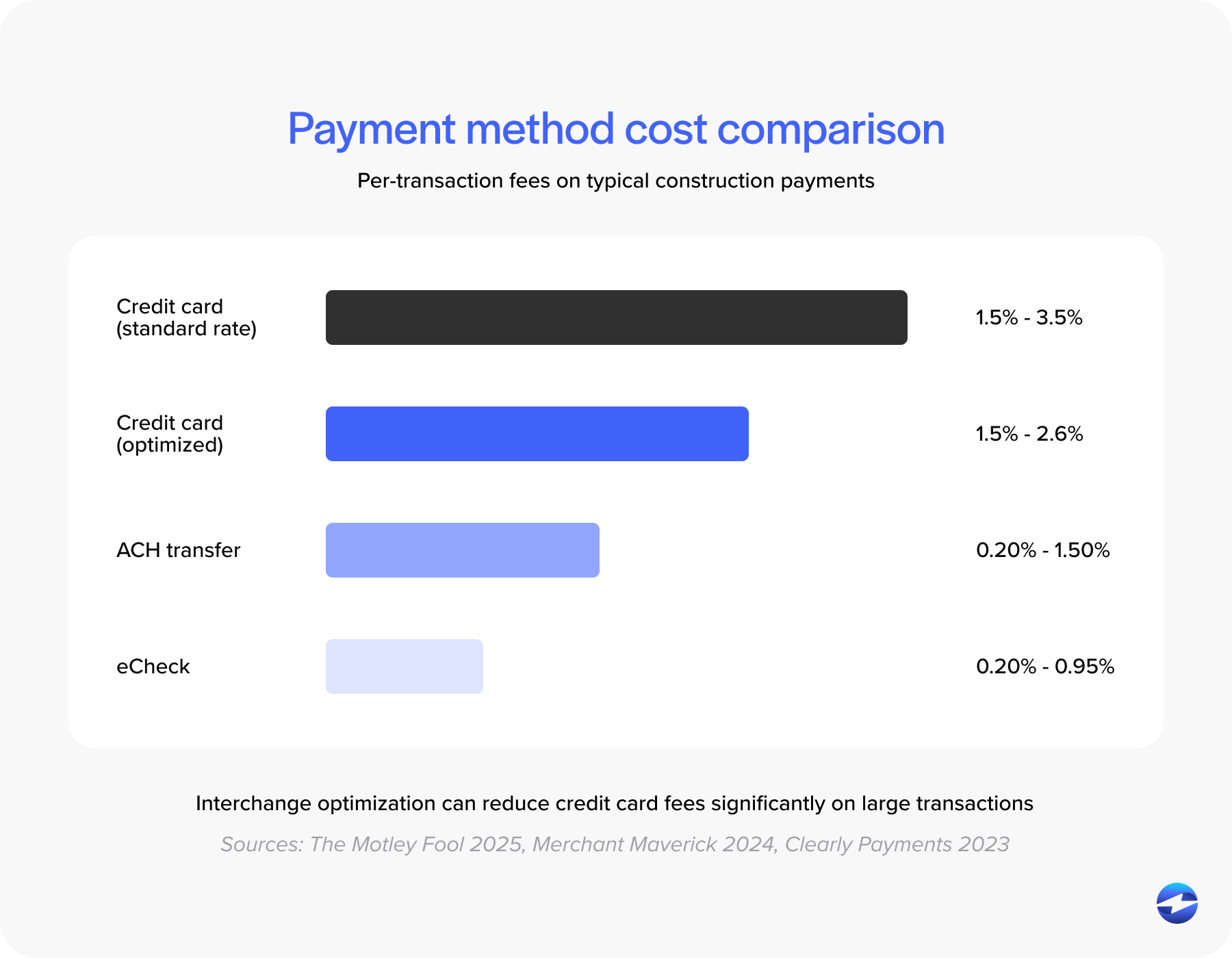
Every dollar counts in construction, and that includes the cost of getting paid. Sage Intacct payment processing gives you visibility into transaction fees, so you can make informed decisions about which payment methods to promote.
Some integrated processors, like EBizCharge, include features such as interchange optimization. This automatically routes each transaction through the lowest-cost category, helping reduce overall fees without extra effort. The result is lower processing costs and a more predictable cash flow.
With costs tracked directly in Sage Intacct for construction, finance teams can see exactly how much each payment method impacts margins. That level of insight helps guide pricing strategies, subcontractor terms, and even how you approach new bids.
Expanding Beyond Construction: Sage Intacct in Other Industries
While this guide focuses on Sage Intacct construction, it’s worth noting how flexible the system is across industries. Healthcare organizations, for example, use Sage Intacct integration to manage claims, automate patient billing, and ensure HIPAA-compliant payment workflows. Professional services and SaaS companies use it for recurring billing and subscription payments.
For construction teams, this means you’re not working with a niche or outdated platform. You’re using an ERP trusted across industries for its automation, reporting, and adaptability. That’s especially valuable for firms expanding into design-build, property management, or maintenance contracts.
Is Sage Intacct good for construction?
For mid-size construction firms that have outgrown entry-level accounting software, Sage Intacct is a strong fit. Job costing, progress billing, retainage, and revenue recognition all work natively inside the platform rather than through bolted-on modules.
General contractors, specialty contractors, and design-build firms tend to get the most value. The platform is cloud-native, handles multi-entity consolidation well, and integrates with construction tools like Procore and PlanGrid. Reporting is flexible enough to build custom dashboards by project, division, or entity without an outside BI tool.
Where it has limitations: Sage Intacct doesn’t include built-in estimating or takeoff tools, so you’ll need a separate preconstruction solution. Most construction firms also pair it with a dedicated payroll provider for prevailing wage and certified payroll requirements rather than relying on native payroll alone.
Why Choose Integrated Payment Solutions like EBizCharge
A strong payment processing solution can make or break your efficiency. EBizCharge is a popular choice for construction firms using Sage Intacct ERP, as it seamlessly integrates into existing workflows.
EBizCharge automates payment posting, handles refunds and ACH transfers, and generates detailed transaction reports—all from within Sage Intacct. It also helps reduce costs through rate optimization and offers transparent reporting so you always know where your money is going.
For teams managing multiple projects, this means no more manual reconciliations or waiting on payment confirmations. Payments are applied instantly, freeing your accounting staff to focus on budgeting, forecasting, and payroll management. And since EBizCharge works directly with Sage Intacct construction payroll, it ensures every dollar that flows in and out is accounted for correctly.
Building a Stronger Financial Foundation with Sage Intacct
In an industry where timelines and budgets are always under pressure, having reliable payment systems isn’t a luxury—it’s essential. With Sage Intacct construction and the right payment processing solution, companies can automate tedious tasks, improve cash flow, and keep every project financially on track.
Whether you’re handling retainage, credit card payments, or payroll, Sage Intacct ERP provides the structure and visibility you need. By pairing it with an integrated payment processor, you’re not just simplifying payments—you’re strengthening your entire financial operation.
At the end of the day, good construction management depends on good data. And with Sage Intacct for construction, that data finally comes together—secure, connected, and ready to support your growth.
Frequently asked questions
Does Sage Intacct have a virtual terminal for construction payments?
Sage Intacct itself doesn’t include a built-in virtual terminal, but integrated payment processors like EBizCharge add that functionality. With EBizCharge connected to Sage Intacct, you can key in credit card or ACH payments manually through a virtual terminal without leaving the platform. This is useful for collecting phone payments or processing one-off transactions that fall outside your normal invoicing workflow.
Can Sage Intacct handle construction payroll?
Sage Intacct includes basic payroll functionality, but most construction companies pair it with a dedicated payroll provider that specializes in prevailing wage, union reporting, and certified payroll requirements. Sage Intacct integrates with several payroll platforms, so the payroll data still flows into your general ledger and job cost reports automatically. The key benefit is that payroll costs get allocated to the correct project and cost code without manual journal entries.
What payment methods can you process through Sage Intacct?
With an integrated payment processor, Sage Intacct supports credit cards, debit cards, ACH transfers, and eChecks. Each payment method can be processed from within the platform and posted to the correct invoice, customer, and project record automatically. Without an integration, Sage Intacct handles payment recording and reconciliation, but the actual transaction processing happens through your bank or a separate payment gateway.
How does Sage Intacct handle retainage in construction billing?
Sage Intacct tracks retainage at the contract level. You set the retention percentage when the contract is created, and the system automatically withholds that amount on every progress invoice. Retained amounts are tracked separately in your accounts receivable so you can see exactly how much is being held across all active projects. When a project reaches substantial completion and retention is released, Sage Intacct generates the final retention invoice and updates your AR balance.
Is Sage Intacct cloud-based?
Yes. Sage Intacct is a cloud-native platform, meaning it runs entirely in the cloud with no on-premise server requirements. For construction companies, this means your accounting and project teams can access the system from any location, including job sites, using a web browser. Updates and security patches are applied automatically by Sage.