Blog > Epicor Kinetic Payment Processing: Your Integration Options
Epicor Kinetic Payment Processing: Your Integration Options

If you’re running your business on Epicor Kinetic, chances are you’ve already invested heavily in getting your ERP right. Epicor software plays a central role in how manufacturers and distributors manage production, inventory, accounting, and customer relationships. But when it comes to payments, many Epicor users still feel friction.
Payment processing often lives just outside the Epicor ERP system. Invoices are generated in one place, payments are taken in another, and reconciliation becomes a manual chore. Over time, this disconnect slows cash flow and adds unnecessary work.
This article takes a practical look at Epicor Kinetic payment processing and the integration options available today. If you’re responsible for finance, operations, or IT inside Epicor Kinetic, this guide is written for you.
Understanding Payment Processing Within Epicor Kinetic
Epicor Kinetic is well-designed to handle core financial workflows. Accounts receivable, invoicing, and customer records all live inside the system. On paper, that should make payments straightforward.
In reality, payment acceptance is where things can break down. Many Epicor ERP users rely on external payment tools that don’t fully sync with Epicor. Credit card payments might be taken in a browser window. ACH details might be stored somewhere else. Staff then re-enter payment data back into the ERP system.
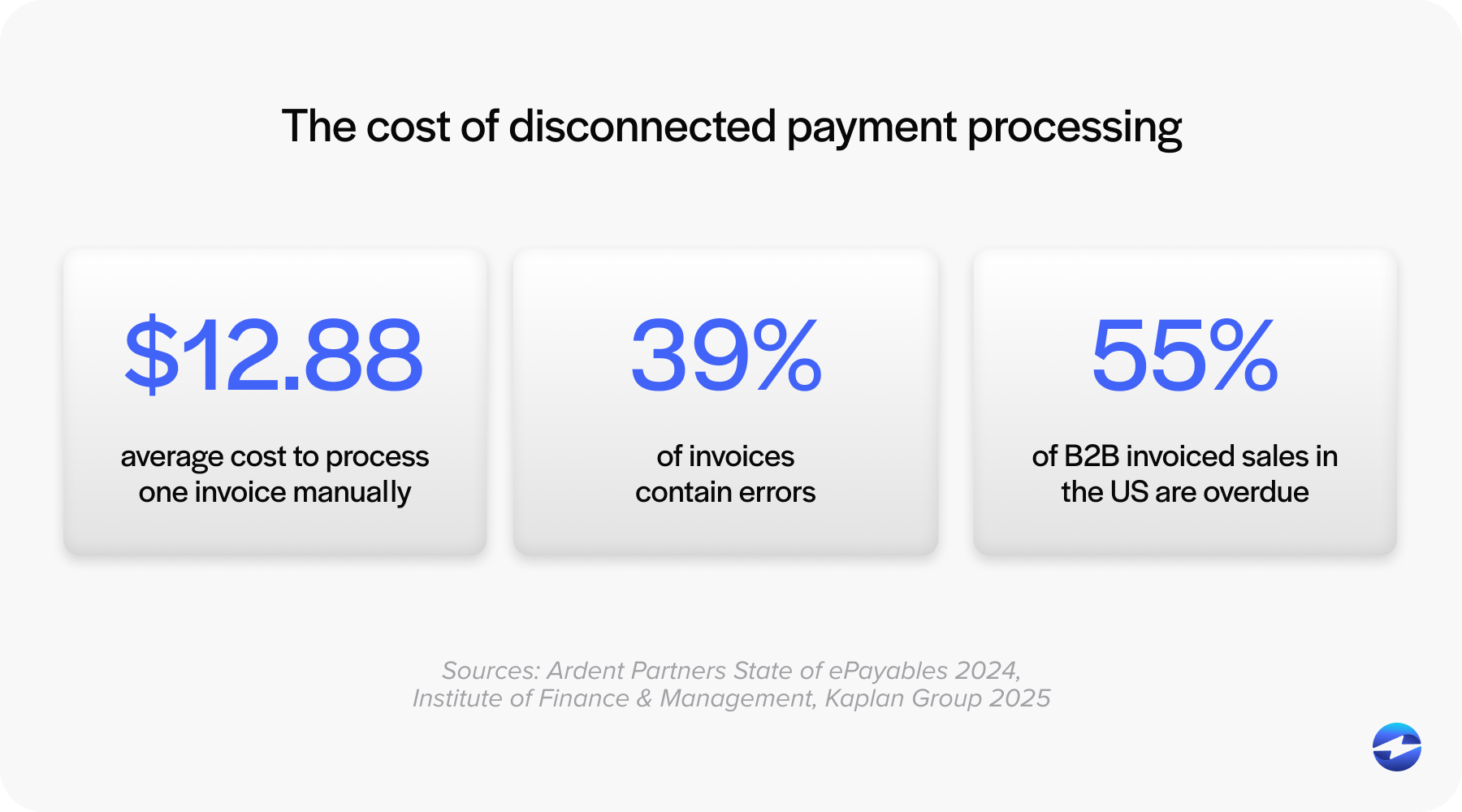
That manual handoff creates problems: errors creep in, posting delays happen, and customers don’t always get the payment experience they expect.
This is why Epicor payment processing works best when it’s tightly integrated. A true Kinetic payment integration keeps payment data connected to invoices, customers, and reporting inside Epicor itself.
Epicor Kinetic Payment Processing Options
Epicor Kinetic users generally have a few paths when it comes to payments.
Some rely on basic, native functionality and pair it with a standalone payment processor. This approach works, but it usually means toggling between systems. It’s functional, but not very efficient.
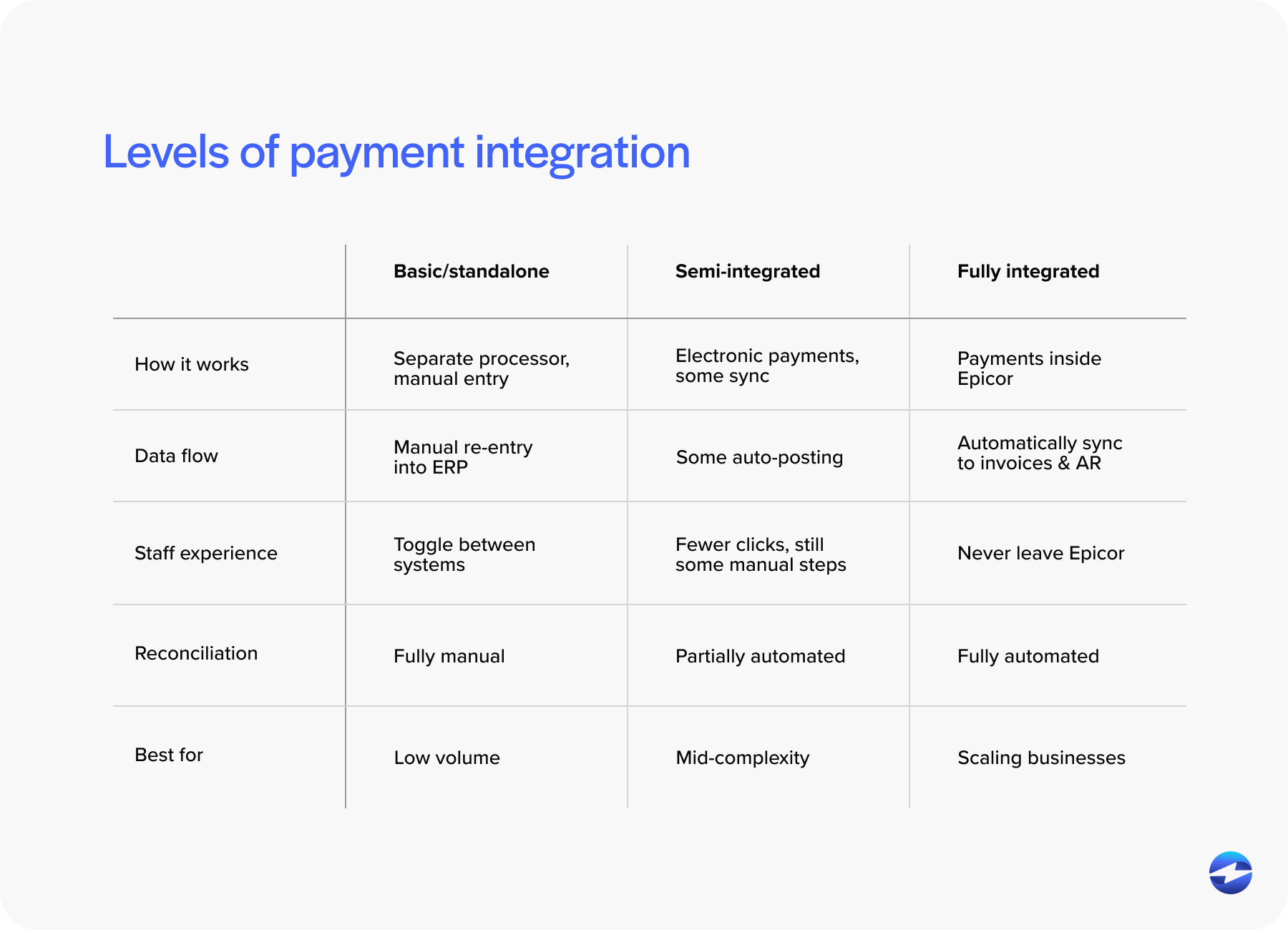
Others use semi-integrated solutions. These allow payments to be taken electronically but still require some manual posting or reconciliation. It’s an improvement, but gaps remain.
The most effective option is a fully integrated payment processing solution built specifically for Epicor. With this setup, credit card and ACH transactions are initiated and recorded directly inside Epicor Kinetic screens. Payment data flows automatically into the Epicor ERP system.
Deployment matters, too. On‑premise Epicor 10 environments may require different technical approaches than cloud-based Epicor Kinetic deployments. A flexible integration that supports both is key for long-term stability.
Epicor Credit Card Processing Integrations: Beyond EPX
Epicor Payment Exchange (EPX) is often the first option Epicor users encounter. EPX provides a built-in path to accept payments within Epicor.
For some businesses, EPX is enough. For others, limitations become clear over time. Reporting constraints, limited flexibility, and fewer options around customer-facing payments often push teams to explore alternatives.
This has led many Epicor users to look beyond EPX for Epicor Kinetic credit card processing. Third-party integrations can offer deeper functionality without sacrificing ERP connectivity.
When evaluating alternatives, it’s worth paying attention to features like secure tokenization, support for Level II and Level III data, and tools that reduce PCI scope. These details matter, especially for B2B companies processing higher transaction values.
Integration Methods for Epicor Kinetic Payments
Not all integrations are built the same.
API-based integrations and middleware approaches connect Epicor to an external payment processor, but they can introduce complexity if not well designed. Maintenance and upgrades become ongoing concerns.
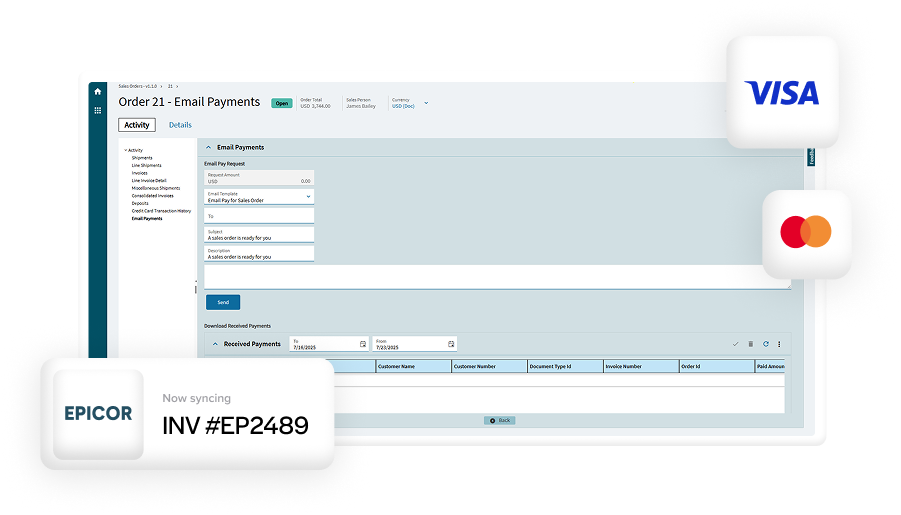
Embedded payment solutions, on the other hand, allow users to process payments directly within Epicor Kinetic screens. From a day-to-day perspective, this feels seamless. Staff don’t need to leave the ERP system to take a payment or check its status.
Customer-facing payment portals add another layer. These portals connect back to Epicor and allow customers to pay invoices online, on their own schedule. When done right, payments post automatically to the correct customer and invoice.
Each approach affects usability, reporting, and scalability. The best Kinetic ERP payments setups feel invisible to users while staying tightly connected behind the scenes.
Improving Cash Flow and Reducing DSO in Epicor
One of the biggest reasons companies invest in integrated payments is cash flow.
Disconnected systems slow everything down Invoices go out late. Payments come in, but posting lags behind. Follow-ups take longer than they should.
Integrated Epicor Kinetic payments help shorten that cycle. Invoices can include direct payment options. Customers can pay online or via stored payment methods. Payments post immediately inside Epicor.
This visibility makes a real difference. Finance teams can see what’s been paid, what’s pending, and what needs follow-up—all without leaving the Epicor ERP system. Over time, these small improvements add up to lower days sales outstanding (DSO) and more predictable cash flow.
Payment Processing Considerations for Manufacturers Using Epicor
Many Epicor users operate in manufacturing, including industrial and equipment-focused businesses. Payments in these environments are rarely simple.
Transactions are often large. Deposits may be required upfront. Progress or milestone payments are common. Customers may prefer ACH over credit cards.
A flexible payment processing solution needs to support these realities. It should handle partial payments, recurring billing, and multiple payment types without workarounds.
Security is another crucial factor. Manufacturers can’t afford disruptions or compliance issues. Payment data must be handled carefully, especially when transactions tie directly to long sales cycles and high-value equipment.
Key Features to Look for in an Epicor Kinetic Payment Integration
When evaluating a payment processor for Epicor, a few features consistently matter.
- The user experience: Payments should feel native inside Epicor Kinetic. If staff need extensive training or external tools, adoption suffers.
- Security: Tokenization and PCI compliance support reduce risk and simplify audits.
- Payment flexibility: Credit cards, ACH, and customer payment portals should all be supported.
Finally, reporting and reconciliation. Finance teams need clear audit trails and reliable data that matches what’s inside Epicor.
Choosing the Right Epicor Kinetic Payment Integration Partner
Not every payment provider understands Epicor.
Experience matters. A partner with deep Epicor knowledge is more likely to deliver a stable integration that survives upgrades and version changes.
Support matters, too. When something breaks—or when Epicor updates—having a knowledgeable team behind the integration makes all the difference.
Asking the right questions upfront can save time later. How does the integration handle upgrades? How are payments reconciled? What happens when workflows change?
Why EBizCharge Is a Great Fit for Epicor Kinetic Users
For Epicor users looking to simplify payments, EBizCharge’s embedded payment processing solution is designed with Epicor Kinetic in mind.
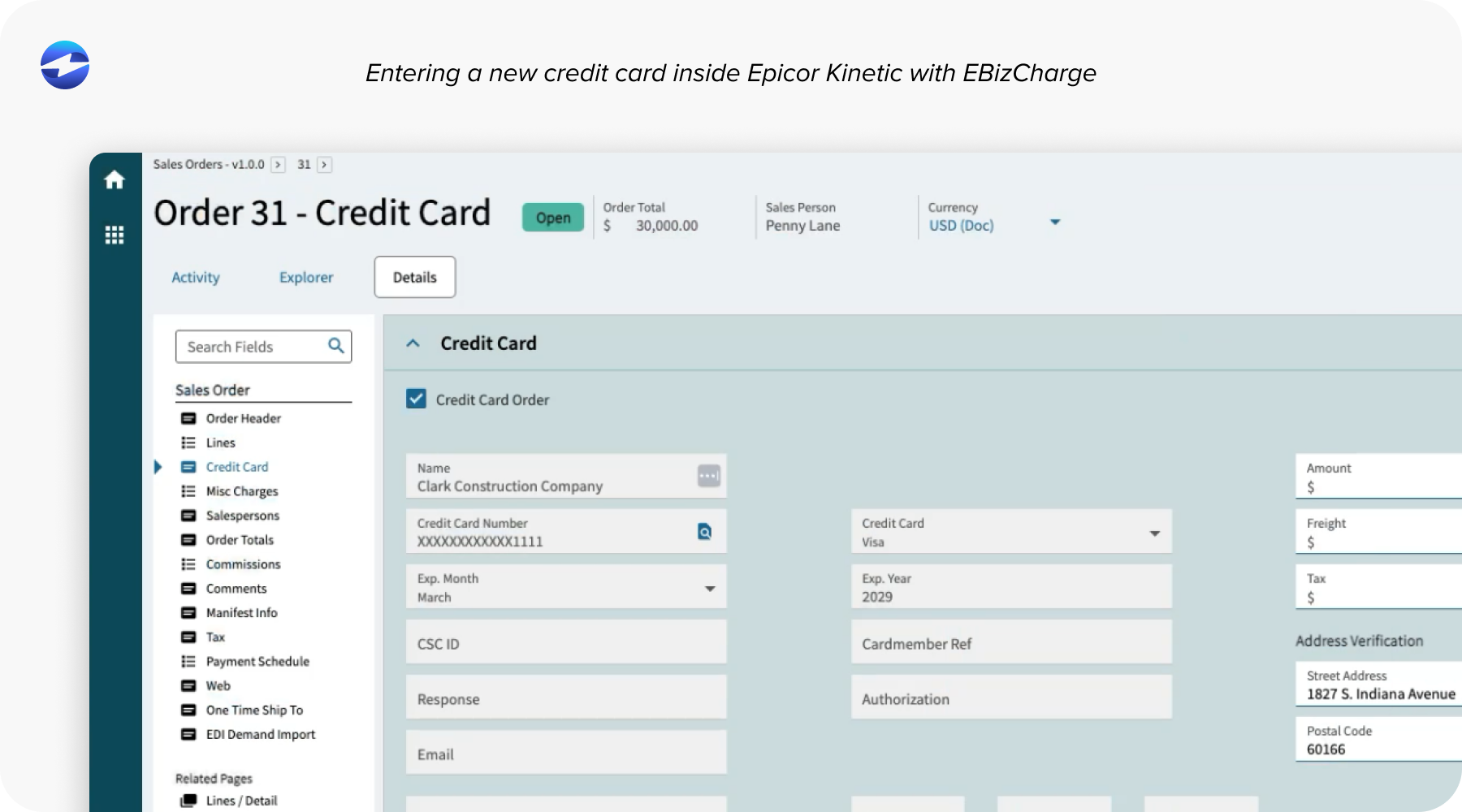
EBizCharge embeds Epicor Kinetic credit card processing and ACH directly into Epicor workflows. Payments are processed inside the ERP, not in disconnected systems. That alone removes a significant amount of manual work.
Tools like customer payment portals give customers an easy way to pay invoices online, while secure tokenization keeps sensitive data out of the Epicor ERP system. Payments post automatically, improving accuracy and visibility.
EBizCharge also supports complex B2B payment scenarios common among manufacturers and distributors. Large transactions, deposits, recurring billing, and ACH payments are handled without workarounds.
For teams focused on efficiency, cash flow, and simplicity, EBizCharge helps turn Epicor payment processing into a natural extension of Epicor Kinetic—rather than a separate system to manage.
- Understanding Payment Processing Within Epicor Kinetic
- Epicor Kinetic Payment Processing Options
- Epicor Credit Card Processing Integrations: Beyond EPX
- Integration Methods for Epicor Kinetic Payments
- Improving Cash Flow and Reducing DSO in Epicor
- Payment Processing Considerations for Manufacturers Using Epicor
- Key Features to Look for in an Epicor Kinetic Payment Integration
- Choosing the Right Epicor Kinetic Payment Integration Partner
- Why EBizCharge Is a Great Fit for Epicor Kinetic Users