
Blog > NetSuite Electronic Invoicing: Complete Guide to Automated Payment Collection
NetSuite Electronic Invoicing: Complete Guide to Automated Payment Collection

Getting invoices out the door is only half the battle. The real challenge is getting paid quickly without your AR team spending hours on manual follow-up, data entry, and reconciliation. For finance teams using NetSuite software, electronic invoicing offers a path to faster payments and less administrative headache—but only if it’s set up right.
This guide walks through how NetSuite electronic invoicing actually works, where native features fall short, and what it takes to truly automate payment collection.
What Is Electronic Invoicing in NetSuite?
True NetSuite electronic invoicing means the entire workflow is digital and automated—from invoice creation to delivery to payment collection to reconciliation.
The NetSuite software handles basic invoicing natively. You can create invoices from sales orders, subscriptions, or projects, email them to customers, and track status and aging. For simple operations, this works fine.
But there’s a difference between basic digital invoicing and fully automated e-invoicing. Basic digital invoicing still requires manual steps—someone reviews and sends invoices, enters payments, and reconciles accounts. Automated e-invoicing removes those touchpoints. Invoices are generated and sent automatically; payment links are embedded, and payments post and reconcile without human intervention.
How NetSuite Electronic Invoicing Works
The process starts when NetSuite creates an invoice. This can happen automatically based on rules you define – when a sales order ships, when a subscription billing cycle hits, or when a project milestone is completed. You set the triggers once, and NetSuite invoicing takes it from there.
Once an invoice exists, it needs to reach your customer. Email is the most common route, with invoices going out alongside embedded payment links so customers can pay right away. Some businesses also use customer portals, giving clients a place to view all their invoices, check payment history, and submit payments whenever it’s convenient for them.
What makes this actually useful is how everything stays connected. NetSuite ERP synchronizes in real-time, so the moment an invoice is created, your AR reflects it. When a customer pays, the invoice status updates automatically. You’re not waiting on batch processes or manual updates to know where you stand financially – it just happens.
Limitations of Native NetSuite Invoicing
The native NetSuite invoicing features cover the basics, but they leave gaps that end up creating manual work for your team.
Even with automation in place, someone usually needs to review invoices before they go out. Payment entry still requires intervention more often than it should. And matching payments to invoices? That’s rarely automatic – especially when customers make partial payments or pay multiple invoices with a single check.
The built-in payment options have their own constraints. The native NetSuite payment gateway doesn’t always offer the flexibility growing businesses need. Payment method options can be limited, and features like automated retry logic for failed payments may not be available at all.
Reconciliation is where things really slow down. Payments come through, but figuring out which invoice they belong to takes time. Partial payments, overpayments, unapplied cash – all of it requires someone to dig in and investigate. And if you’re running NetSuite ERP with multiple subsidiaries, these headaches multiply across every entity.
Then there’s the scalability questions. A process that works fine at 100 invoices a month starts falling apart at 1,000. Those small manual touchpoints that seemed manageable suddenly become major time drains.
Benefits of Automated Electronic Invoicing
When NetSuite electronic invoicing is set up properly, the improvements show up in ways you can actually measure.
For starters, invoices reach customers faster. There’s no lag time waiting for someone to review and hit send – invoices go out the moment they’re triggered, which means the payment clock starts ticking sooner. That speed translates directly into cash flow. Businesses commonly see their Days Sales Outstanding drop by 10-15 days just from tightening up the invoicing process.
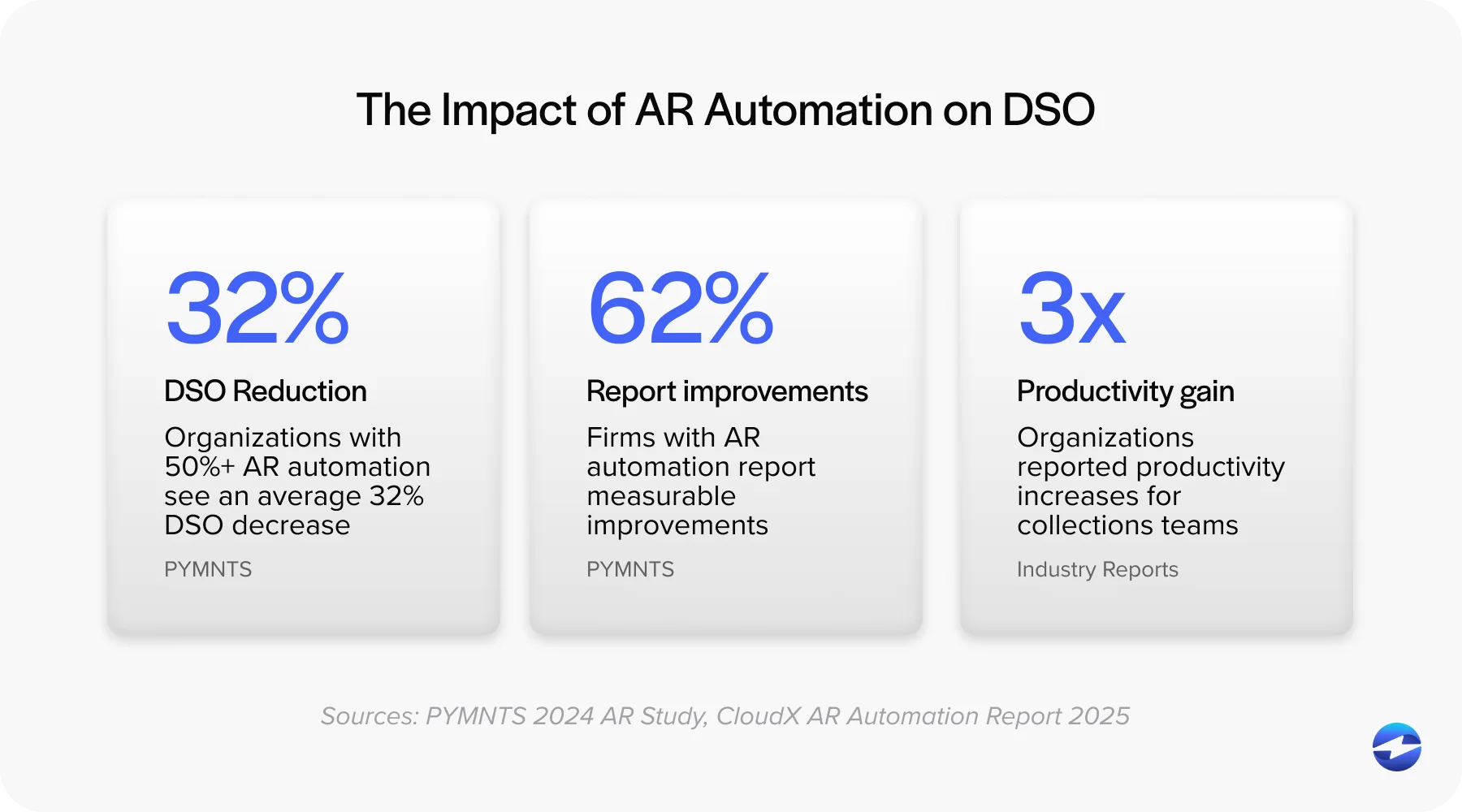
Accuracy gets better almost by default. Every time a person manually enters payment information, there’s a chance for mistakes. Automation removes those touchpoints entirely, which means fewer errors to track down and fix later.
Your AR team gets their time back, too. When they’re not buried in invoice generation, payment entry, and reconciliation tasks, they can focus on work that actually requires human judgment – handling exceptions, building customer relationships, improving processes.

And customers notice the difference. Self-service payment options, multiple ways to pay, clean and simple payment pages – these things matter. When paying is easy, people pay faster. It’s that simple.
Key Features to Look for in a NetSuite E-invoicing Solution
When evaluating options for NetSuite payment processing, certain features matter most.
Automated invoice generation and delivery should require zero manual intervention for standard scenarios. Secure, embedded payment links let customers pay directly from invoice emails—click, pay, done.
Multiple payment methods—ACH, credit cards, digital wallets—give customers flexibility. Automated reminders handle collections without manual effort. Partial payments, payment plans, and retry logic accommodate how customers actually pay.
Payment Card Industry (PCI) compliance and data security protect your business and customers. This isn’t optional.
Automated Payment Collection in NetSuite
The real power comes from connecting invoices directly to payments. When a customer pays through an embedded link, that payment should automatically post to NetSuite, match to the correct invoice, and update the customer account. No manual entry required.
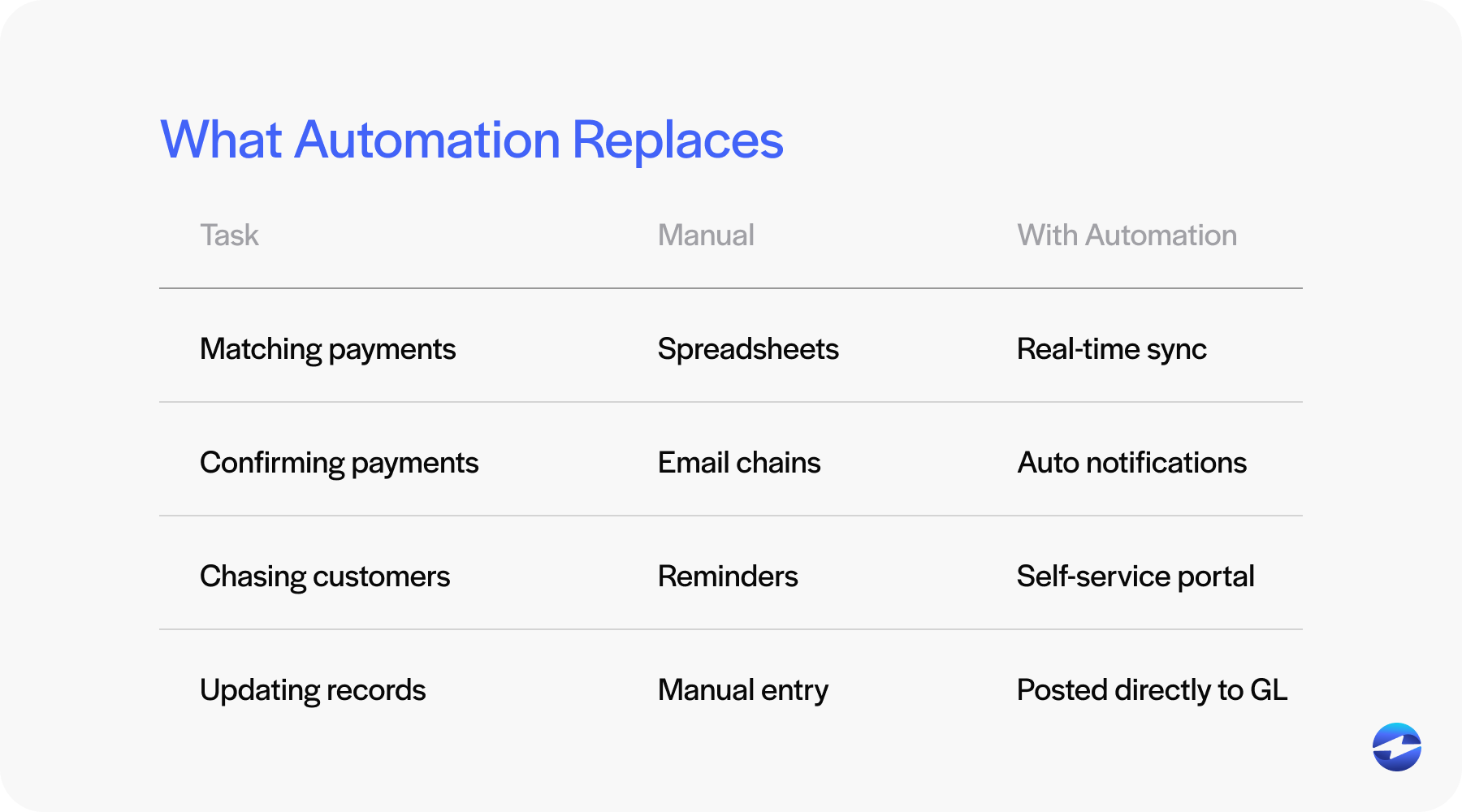
Customer self-service options let clients pay when convenient; a portal where they can view invoices, see history, and make payments reduces friction and accelerates collection.
Real-time payment posting means your AR is always current. No waiting for batch processing. Payments post as they happen.
Failed payment handling matters more than people realize. A good payment processor automatically retries failed payments based on configurable rules rather than requiring manual intervention.
Recurring billing automates ongoing customer relationships. Set up the subscription once, and invoices are generated and collected automatically each cycle.
Compliance and Tax Considerations
Electronic invoicing isn’t just about convenience – there are real compliance requirements to consider, and they vary depending on where you operate and what industry you’re in. Some jurisdictions have specific rules about invoice formats or require certain reporting. It’s worth understanding what applies to your business before you automate anything.
Tax accuracy matters on every single invoice. The NetSuite software handles sales tax and value-added tax (VAT) calculations, but your electronic invoicing workflow needs to preserve that accuracy all the way through delivery and payment. Mistakes here create problems down the line, both for your books and your customer relationships.
Then there’s the security side. When you’re handling payment information, data protection and PCI compliance aren’t negotiable. Any payment processing solution you use has to meet PCI-DSS requirements. Your customers trust you with their payment data, and that trust needs to be earned through proper security practices.
Integrating NetSuite with an Electronic Invoicing Solution
NetSuite native features get you part of the way, but most businesses eventually realize they need a third-party integration to achieve full automation. The trick is finding a payment solution with a proper NetSuite integration – not just a surface-level connection.
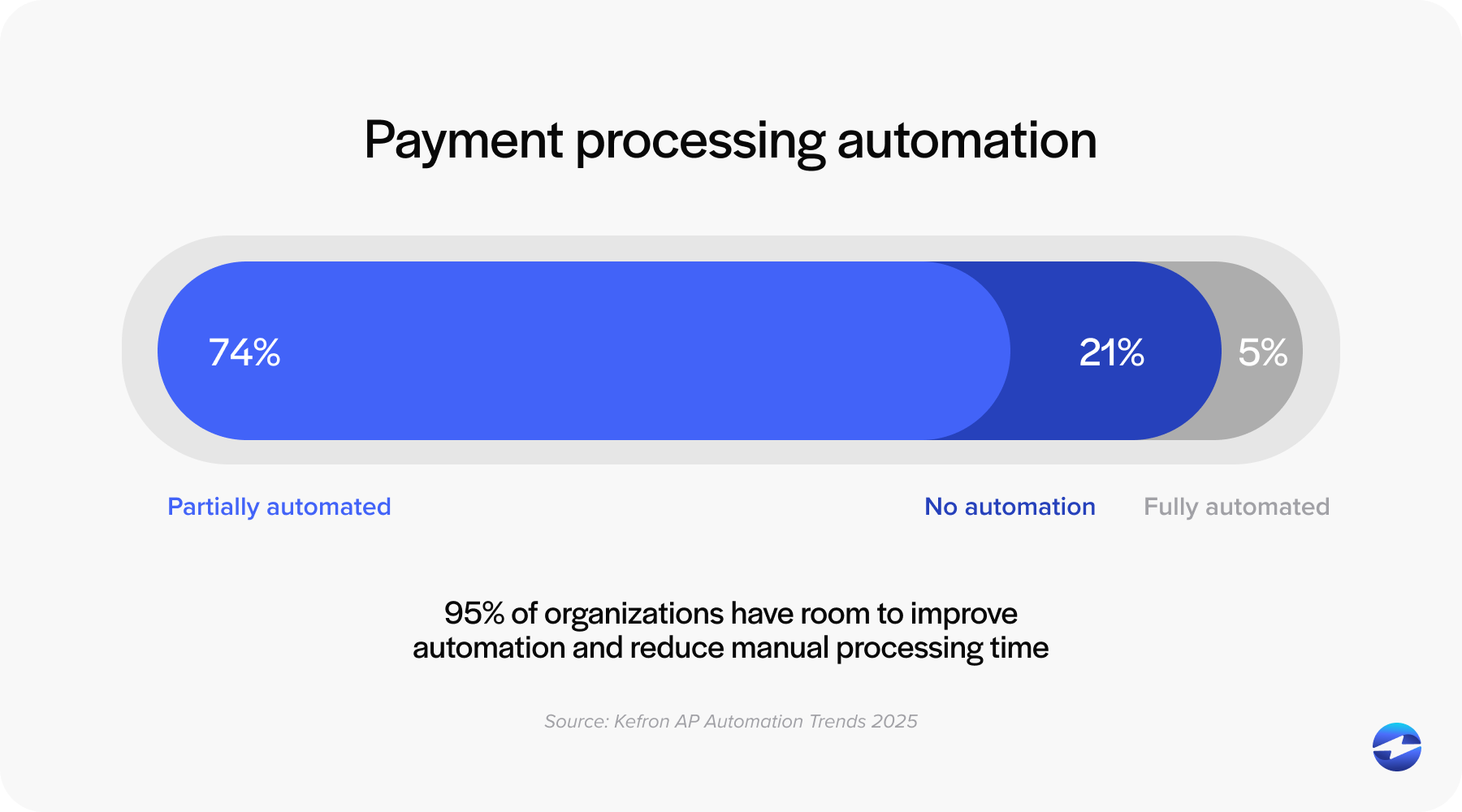
Why does native integration matter so much? A payment processor that’s built specifically for NetSuite already understands how the system works. It knows the data structure, can handle the complexity of multi-entity setups in NetSuite ERP, and syncs in real-time without requiring custom development or workarounds.
Without deep integration, you end up with data duplication and reconciliation headaches. Payments come through one system, invoice data lives in another, and someone has to manually clean up the gaps. True NetSuite integration eliminates that. Payment data flows where it needs to go without anyone playing middleman.
Implementation shouldn’t be a months-long project either. A well-designed payment processing solution is built for straightforward setup. You should be looking at weeks, not quarters, from kick-off to go-live.
Best Practices for Implementation
Before you flip the switch on automation, take an honest look at your current AR workflows. What’s actually working? Where does manual intervention slow things down? Where do delays pile up? Documenting this upfront helps you prioritize what to automate first and sets realistic expectations for improvement.
Get your invoice templates in order before you start automating. Consistent formatting isn’t just about looking professional – it also helps payment matching logic work more reliably. If every invoice follows the same structure, the system has an easier time connecting payments to the right records.
Don’t roll everything out at once. Start with a smaller group of customers or a specific invoice type and test thoroughly. Make sure invoices are generated correctly, that emails are sent correctly, and payments are posted without issues. Work out the kinks before scaling up.
Enhancing NetSuite Electronic Invoicing with EBizCharge
EBizCharge provides native NetSuite integration designed specifically for automated invoice-to-payment workflows. The system connects deeply with NetSuite ERP across all versions, handling complexity that native features struggle with.
Automated workflows mean invoices generate payment links automatically. Customers receive invoices and can pay immediately. Payments post and reconcile in real-time without manual intervention.
The customer payment experience is flexible and secure. Multiple payment methods, branded payment pages, self-service portals—customers pay how they prefer through a professional interface.
For businesses with complex structures, EBizCharge automatically handles multi-entity NetSuite payment processing. Different subsidiaries, different configurations, unified automation.
Moving Forward with Electronic Invoicing
NetSuite electronic invoicing transforms how finance teams manage accounts receivable. Faster invoice delivery, quicker payments, reduced manual work, better accuracy—these benefits compound over time.
Automation isn’t just about efficiency. It’s about freeing your AR team to focus on strategic work instead of administrative tasks. It’s about giving customers a better payment experience. It’s about having accurate, real-time visibility into your cash position.
The NetSuite software provides a foundation for electronic invoicing. For many businesses, enhancing that foundation with a dedicated payment processing solution unlocks the full potential of automated payment collection. Evaluate your current workflows, understand where manual work exists, and choose tools that eliminate those touchpoints. Your AR team—and your cash flow—will thank you.