Blog > Why Businesses Switch from QuickBooks Payments
Why Businesses Switch from QuickBooks Payments
QuickBooks Payments is a solid choice when you’re just getting started. It’s right there in your accounting software, the setup is straightforward, and for a while, everything works fine. But here’s what happens: your business grows, your payment volume increases, and suddenly those convenient features don’t feel quite so convenient anymore.
If you’re a CFO, controller, or accounting manager dealing with payment headaches, you already know what this means. The question isn’t really whether QuickBooks Payments works—it does. The question is whether it still works for your business at your current scale.
The Pain Points That Push Businesses to Switch
The most common reasons companies start looking for an alternative to QuickBooks Payments follow a familiar pattern.
Processing Costs Add Up Faster Than You’d Think
If you’re processing $50,000 a month, the fees feel manageable. But when you hit $200,000 or $500,000, the fees can feel a bit more overwhelming. QuickBooks merchant services uses a percentage-based pricing model that scales directly with your volume, meaning your costs grow proportionally, even though your operational complexity doesn’t necessarily increase at the same rate.
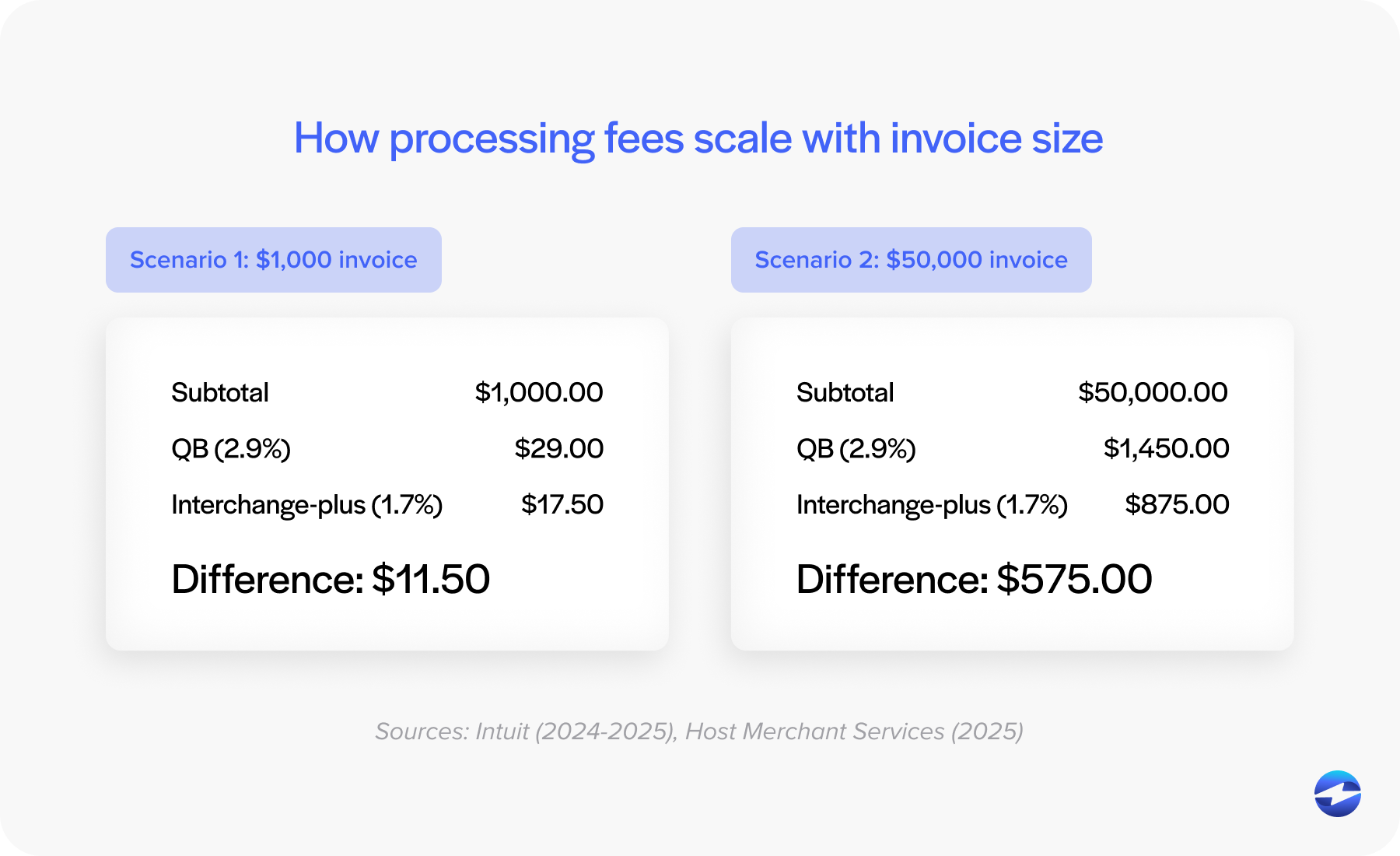
The bigger issue? Many businesses discover fees they didn’t account for in the beginning. Monthly minimums, chargeback fees, and various service charges can make your effective rate higher than the quoted rate. Sometimes the total cost of QuickBooks payment processing ends up being significantly higher than what you initially budgeted for.
Surcharging Limitations Become Costly
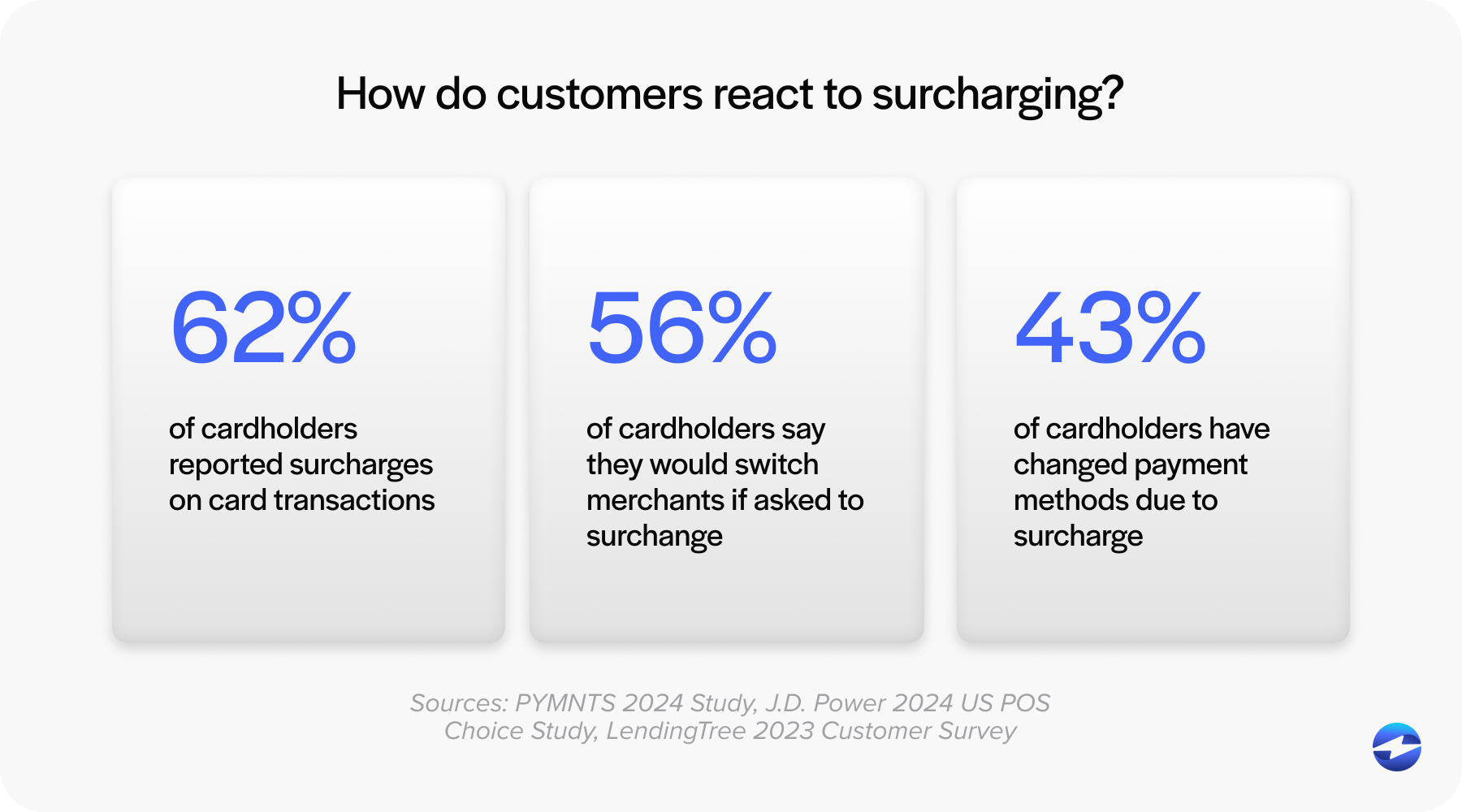
Here’s where things get interesting for businesses processing significant volumes. The ability to offset payment processing costs through surcharging or cash discount programs can save tens of thousands of dollars annually. But implementing these programs through the QuickBooks payment gateway isn’t straightforward, and in some cases, it’s not fully supported for all business types.
If you’re in a state where surcharging is legal and your customers are accustomed to it, not having flexible surcharge options means you’re leaving money on the table every single month. This alone drives many businesses to switch from QuickBooks Payments to a payment processing solution that offers more control over how processing costs are managed.
Integration Depth Matters More at Scale
QuickBooks integration sounds like a checkbox feature until you realize there are levels to it. Yes, QuickBooks Payments integrates with QuickBooks—but how deeply? Can it handle complex workflows with multiple entities, batch processing for hundreds of invoices, or automated reconciliation across different payment types?
This is especially true if you’re using QuickBooks ERP rather than the smaller versions. As your operations get more sophisticated, you need your payment processor to keep up. The standard QuickBooks integration might work fine for simpler setups, but enterprise-level operations need something more robust.
Your Options for QuickBooks Payments Processing
Before digging into specific alternatives, it’s worth understanding what you’re actually looking for in a payment processing solution.
For a QuickBooks integration, you’ll need to assess whether you want that integration from QuickBooks’ own payment gateway or from a third-party payment processor that specializes in native QuickBooks integration.
The QuickBooks payment gateway is built by Intuit specifically for their ecosystem. For businesses with straightforward needs—single entity, moderate volume, standard payment types—it’s a perfectly reasonable choice.
Third-party processors that offer native QuickBooks integration take a different approach. They can offer features and pricing structures that aren’t available through standard QuickBooks payment processing. This is where you find more advanced features like sophisticated surcharging, batch processing at scale, and more flexible pricing models.
QuickBooks Payments vs EBizCharge: A Practical Comparison
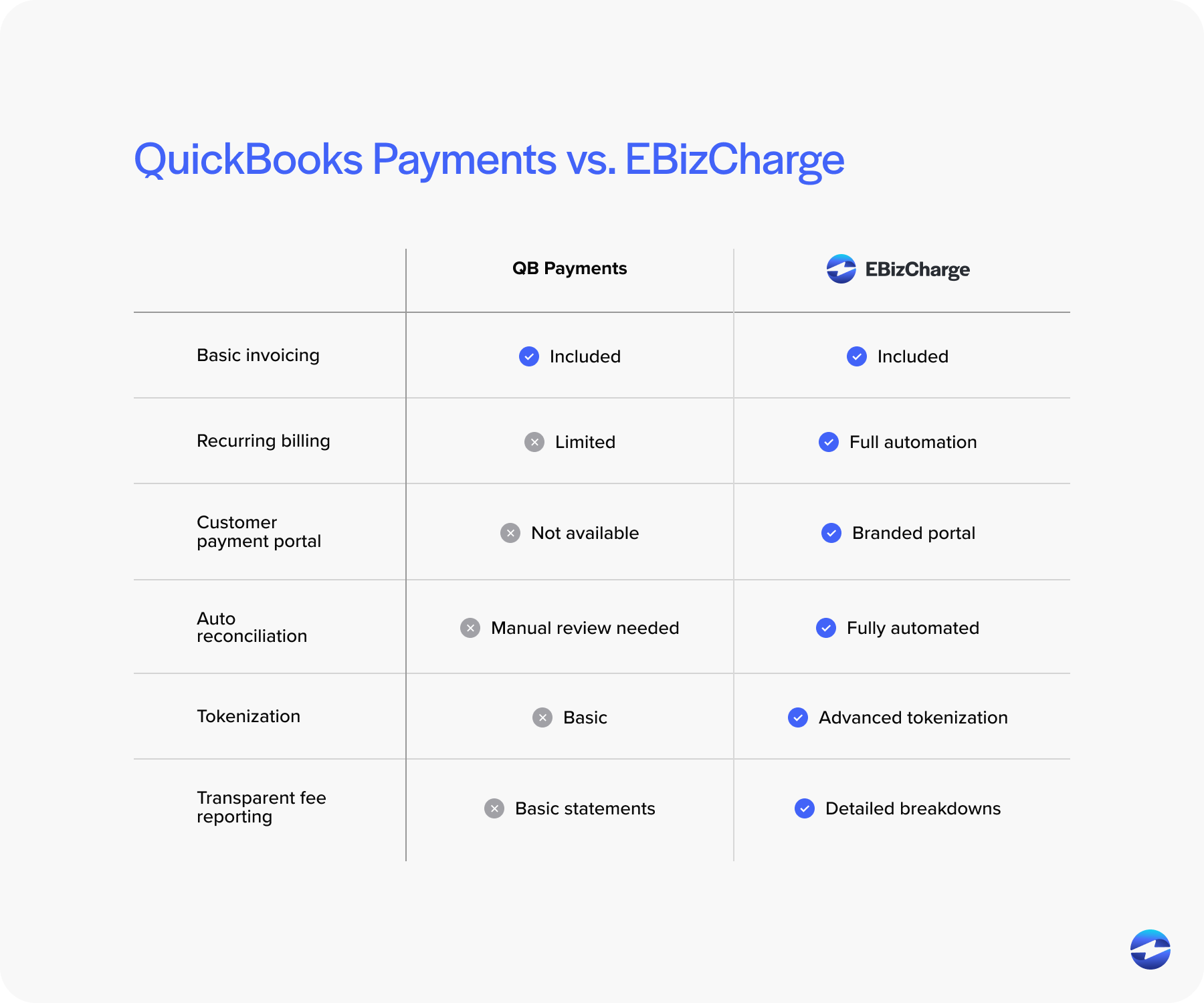
When you’re evaluating whether to switch from QuickBooks Payments, it helps to see a concrete comparison. Here’s a quick look at how EBizCharge stacks up as an alternative to QuickBooks Payments.
Where They’re Similar
Both solutions offer native QuickBooks integration, meaning they connect directly to your accounting system without requiring middleware or complicated workarounds. They both handle core payment acceptance—credit cards, ACH, and the standard payment types you’d expect from any modern payment processor.
The Key Differences
This is where things get interesting, and where you start to see why businesses make the switch.
Surcharging capabilities are a night and day difference. EBizCharge builds surcharging into its core functionality with automated compliance handling across different states. For businesses in competitive industries where margins matter, this difference alone can justify the switch.
Processing rates and fee structures vary significantly between the two. While QuickBooks Payments uses a fairly standard percentage model, EBizCharge offers more flexibility in how you’re charged, especially as your volume scales. The transparency in fee structure also tends to be better—fewer surprises when you get your statement.
Advanced automation features become crucial when you’re processing hundreds of transactions. EBizCharge handles batch processing more efficiently, supports multi-entity setups more effectiely, and can manage complex workflows that would require manual intervention with standard QuickBooks Payments. If you’re running QuickBooks ERP with multiple locations or subsidiaries, these automation capabilities make a tangible difference in how much manual work your team has to do.
Support structure is another major differentiator. EBizCharge provides US-based support with technical expertise specific to both payment processing and QuickBooks integration. When something breaks, you’re talking to someone who understands the technical details and can troubleshoot effectively.
Multi-entity and batch processing capabilities are particularly important for businesses using QuickBooks ERP. EBizCharge is built to handle multiple locations, complex entity structures, and high-volume processing scenarios that push the limits of standard QuickBooks merchant services.
Making the Switch: What You Should Know
Deciding to look for something better than QuickBooks Payments is one thing. Actually making the transition requires some planning.
The best time to switch is between billing cycles if possible. You want to avoid having payments in flight during the transition, which means coordinating with your AR team and communicating with customers who have autopay set up. Most transitions take one to two weeks from decision to fully operational, but the actual cutover typically happens in a single day.
Your payment history, customer payment methods, and recurring billing schedules need to transfer cleanly. A good payment processor handles this as part of onboarding, but you should verify what data transfers automatically and what requires manual setup. Customer credit card tokens need special attention for security and compliance reasons.
Even with similar interfaces, there’s a learning curve. Budget time for your AP/AR team to get comfortable with the new system. If you’re switching to another native QuickBooks integration, the learning curve is usually pretty gentle since the payment workflow stays similar.
The Real Question: What Do You Actually Need?
Here’s what it comes down to. QuickBooks Payments works great for many businesses. If your volume is moderate, your needs are straightforward, and you value convenience over customization, staying put makes perfect sense.
But if you’re processing serious volume, need advanced features like flexible surcharging, have a QuickBooks ERP setup that demands sophisticated payment routing, or need support that treats you like a priority customer—then it’s worth evaluating your options.
The businesses that switch usually aren’t unhappy with QuickBooks Payments exactly. They’ve just outgrown it. Their needs have become more complex, their volume has increased, and they need a payment processing solution built for their current scale, not their starting scale.
If you’re reading this and nodding along with the pain points covered here, that’s probably your answer. Run the numbers, honestly assess what you’re getting versus what you’re paying for, and map out your ideal payment processing setup. Sometimes that exercise confirms you’re in the right place. Other times, it reveals you’ve been working around limitations for too long.
The good news? Making a change isn’t as disruptive as it used to be. With proper planning and a payment processor that knows what they’re doing, you can transition smoothly and start seeing the benefits pretty quickly. Whether you decide to switch or stay, at least you’ll know you made an informed decision based on what your business actually needs.