Blog > Stripe Sage Intacct Integration: Limitations and Native Alternatives
Stripe Sage Intacct Integration: Limitations and Native Alternatives

If you’re running your business on Sage Intacct, you already know how important it is that everything inside your ERP talks to everything else. Your general ledger, accounts receivable, cash management, and reporting all depend on clean, connected data. So, when it comes time to add payment processing into the mix, it makes sense that a lot of teams start by looking at Stripe.
Stripe is one of the most well-known names in payment processing, and for good reason. It has a strong developer ecosystem, it works well for eCommerce and SaaS businesses, and it powers payments for companies of all sizes. But being a strong payment processor in general doesn’t automatically mean it’s the right fit for every Sage system, and when you dig into how the Sage Intacct Stripe integration actually works, a few important gaps start to show.
This article breaks down what you should know about connecting Stripe to Sage Intacct, where things tend to get complicated, and what a native Sage Intacct integration looks like when payment processing is built directly into your ERP workflow.
How Stripe Connects to Sage Intacct
The first thing to understand is that Stripe doesn’t offer a direct, native integration with Sage Intacct. There’s no built-in module you can just switch on inside your Sage software. Instead, most businesses that want to use Stripe with Intacct rely on one of a few workarounds.
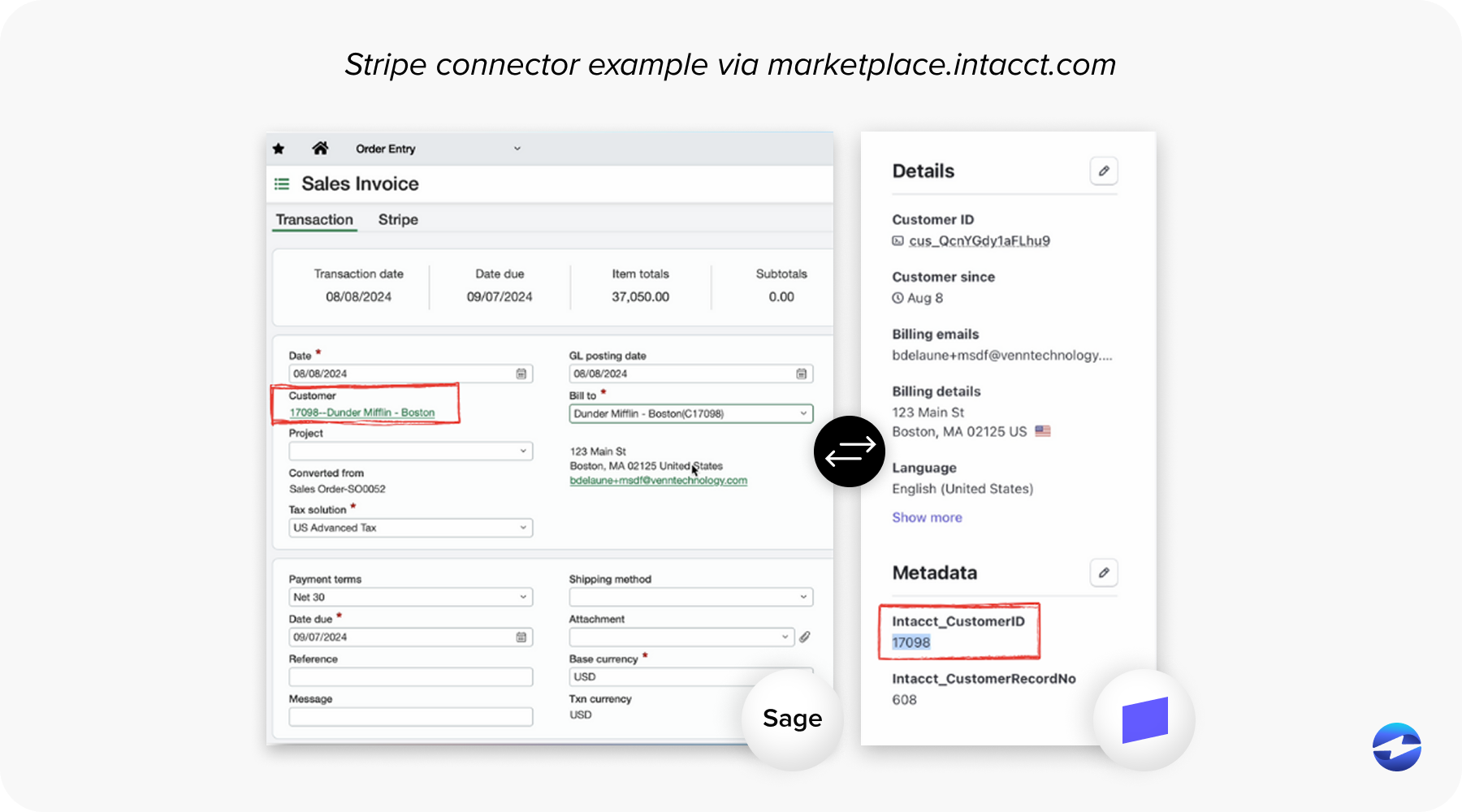
Some use middleware platforms to bridge the two systems, others use third-party connector apps. Some companies go the custom route, building their own application programming interface (API) connections between Stripe and Intacct with internal developer resources or outside consultants.
Any of these approaches can technically get payment data from Stripe into your Sage system. But “technically works” and “works well for your accounting team” are two very different things. Middleware adds layers of complexity. Custom integrations require ongoing developer maintenance. In both cases, your finance team ends up managing a connection that exists outside of their day-to-day ERP environment.
For CFOs, controllers, and billing managers who live inside Sage Intacct every day, this matters more than it might seem on paper.
Where the Sage Intacct Stripe Integration Falls Short
Let’s walk through some of the more common friction points that come up when businesses try to connect Stripe to their Sage Intacct ERP.
Reconciliation is rarely automatic. When payments are processed through Stripe, that data doesn’t just flow seamlessly back into Intacct. Depending on how the integration is configured, your team may still need to manually match payments to invoices, post cash receipts, or reconcile discrepancies between what Stripe recorded and what’s reflected in your ledger. For businesses processing hundreds or thousands of invoices a month, this adds up fast.
Accounts receivable automation is limited. Stripe is a payment gateway, so it’s built to accept and process payments. What it’s not built to do is manage the full accounts receivable lifecycle inside an ERP. Features like automated payment reminders, scheduled follow-ups on overdue invoices, customer self-service payment portals, and autopay enrollment typically aren’t part of the Stripe-to-Intacct equation. You’d need additional tools or manual processes to fill those gaps.
Middleware breaks and needs babysitting. If you’re using an iPaaS platform or a third-party connector to sync Stripe with Sage Intacct, you’re introducing a dependency that requires ongoing attention. APIs change. Sync jobs fail. Data mapping needs updating when either system pushes an update. Someone on your team, usually IT, has to monitor that connection and troubleshoot when things go sideways.
B2B payment optimization is an afterthought. Stripe’s pricing model is built around flat-rate simplicity, which works great for consumer-facing transactions. But B2B payments have different economics. If your business processes large invoice payments, you can often qualify for lower interchange rates by passing Level II and Level III transaction data. This is standard practice in Sage payment processing for B2B companies, but it’s not something Stripe is set up to handle natively within an Intacct workflow.
Surcharging is complicated. More and more B2B companies are offsetting credit card processing fees by adding a surcharge, which is legal in most states when done correctly. Setting up compliant surcharging through Stripe and ensuring it flows properly into your Sage Intacct ERP requires extra configuration and oversight that a purpose-built payment processing solution would handle out of the box.
Support is self-service. Stripe’s support model leans heavily on documentation, community forums, and chatbots. That’s fine if you have developers on staff who are comfortable troubleshooting API issues. It’s less helpful when your AP manager needs a quick answer about why a batch of payments didn’t post correctly inside Intacct.
What a Native Sage Integration Actually Looks Like
When we talk about a “native” Sage Intacct integration for payment processing, we mean a solution that’s built to work directly inside the ERP. No middleware. No connector apps. No custom API development. You open Sage Intacct, and your payment tools are right there.
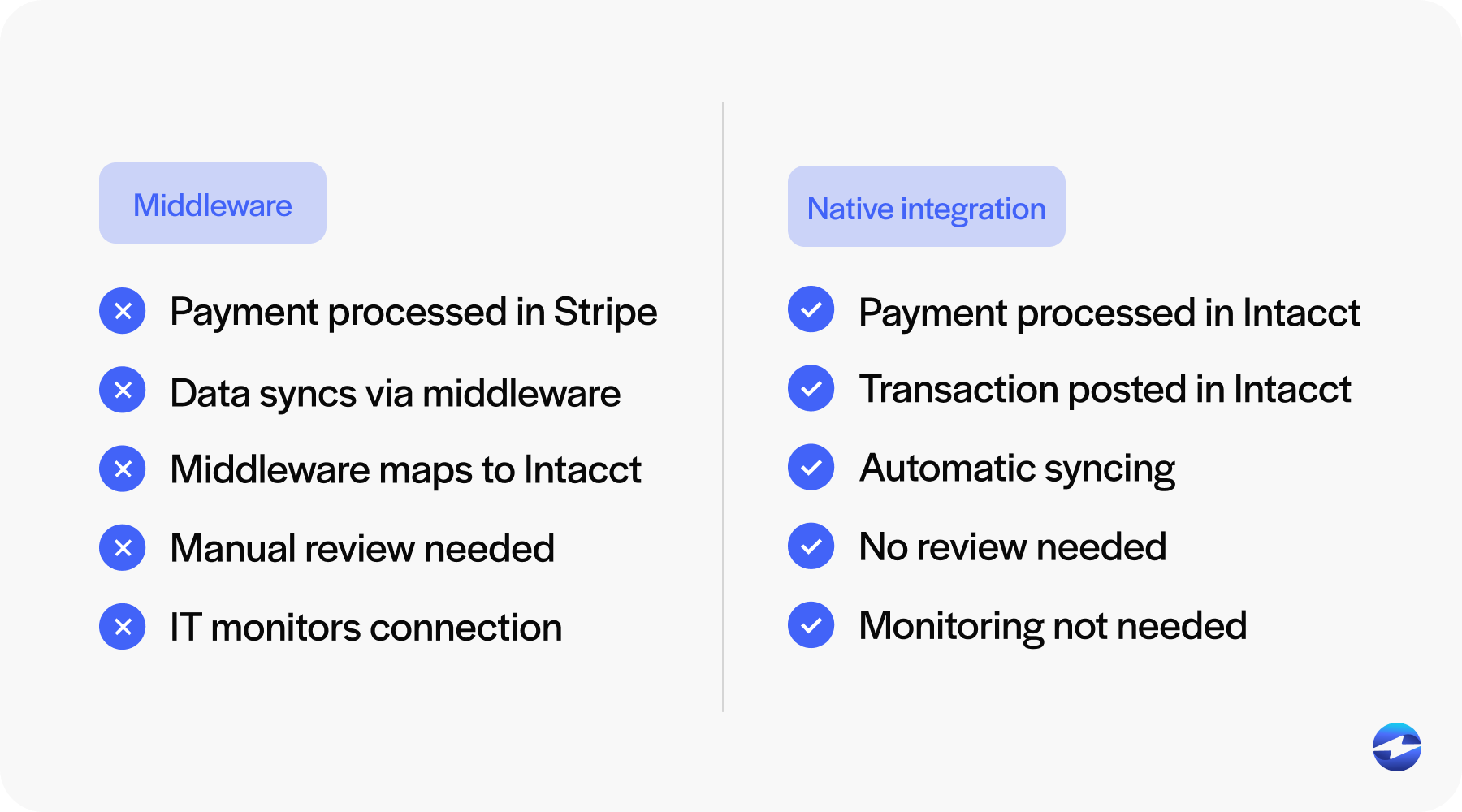
The difference in daily workflow is significant. With a native integration, payments are processed from within Intacct itself. When a customer pays an invoice, the cash receipt is posted automatically. Refunds and voids sync back in real time. Your AR aging reports stay accurate without anyone on the team having to manually update records or cross-reference a separate system.
This kind of integration also reduces the IT burden considerably. There’s no third-party sync job to monitor, no middleware to update, and no custom code to maintain. The payment processing solution lives inside your Sage software, so it stays in sync by design rather than by duct tape.
What to Look for in a Sage Intacct Payment Solution
If you’re evaluating alternatives to a Stripe-based setup, here are the things that tend to matter most for accounting and finance teams working in Sage Intacct.
Automatic two-way data sync is the foundation. Payments, refunds, credits, and voids should all be reflected in Intacct the moment they happen, without manual intervention. You also want real AR automation, meaning the ability to send payment reminders, set up autopay schedules, and give your customers a branded portal where they can view and pay outstanding invoices on their own.
PCI compliance should be handled within the integration, not bolted on separately. Level II and Level III data passing should be built in for B2B cost savings. Surcharging should be easy to configure and fully compliant, and when something goes wrong or your team has a question, you should be able to reach a real person who understands both the payment processor side and the accounting side.
How EBizCharge Works Inside Sage Intacct
The EBizCharge payment solution was built specifically for this kind of use case. It integrates natively with Sage Intacct, which means your team processes payments, manages receivables, and handles reconciliation without ever leaving the ERP.
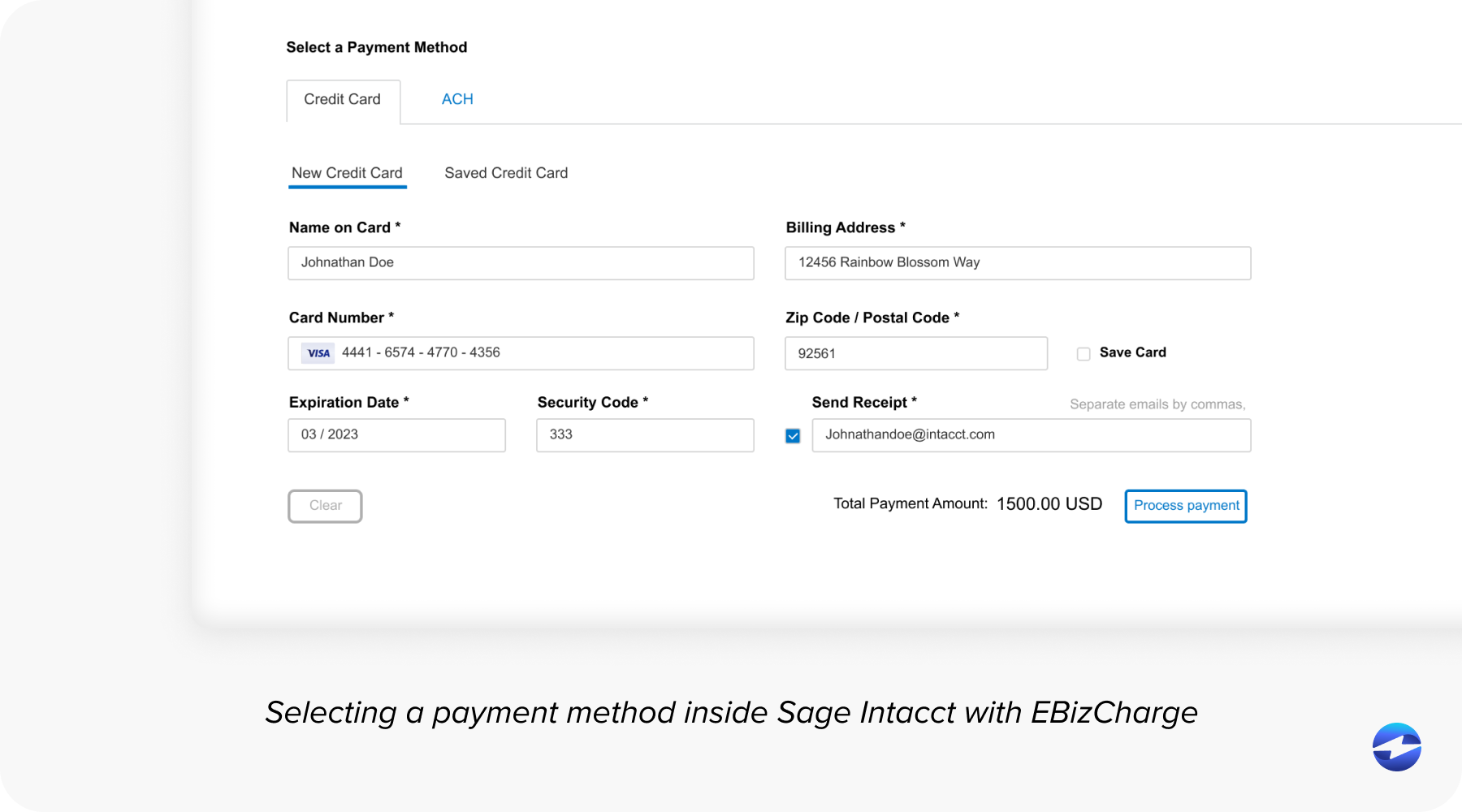
When a payment comes in, whether it’s through the customer payment portal, a scheduled autopay, or a payment processed manually by your team, the transaction data flows directly into Intacct. Cash receipts post automatically, payment status updates in real time, and because EBizCharge passes Level II and Level III data on qualifying B2B transactions, businesses that handle large invoice volumes often see meaningful savings on processing fees.
The platform also includes built-in surcharging that’s compliant and simple to manage, automated email reminders for overdue invoices, and a customer payment portal that reduces the number of calls and emails your AR team handles every week. Support is US-based and staffed by people who understand Sage payment processing workflows, not just generic payment questions.
Finding What Works for Your Business
Stripe is a capable payment processor with a strong reputation. But it wasn’t designed to live inside an ERP, and that gap becomes clear when you try to make it work with Sage Intacct at the level your accounting team actually needs.
If your business is running on the Sage Intacct ERP and you want payment processing that fits naturally into your existing workflow, a native Sage integration is going to save your team time, reduce errors, and eliminate the maintenance headaches that come with middleware-based workarounds. It’s worth taking the time to evaluate what’s out there and see the difference a purpose-built payment processing solution can make in practice.