Blog > CRM Invoice Management: Create and Collect in One System
CRM Invoice Management: Create and Collect in One System
Most businesses run their client relationships through one system and their invoicing through another. The CRM tracks the deal, the accounting software generates the invoice, a separate payment processor handles the transaction, and somewhere in between, someone is copying data from one place to the next and hoping nothing falls through the cracks.
It doesn’t have to work this way. CRM invoice management is the practice of handling invoice creation and payment collection within the same platform where you manage your client relationships. It sounds simple because it is. But the gap between how companies manage relationships and how they manage billing is still wider than it should be.
Why Invoicing Still Lives Outside the CRM
Customer relationship management software was originally built to help sales teams track leads, manage pipelines, and close deals. Billing was never part of the equation. That’s why most CRM platforms hand off to accounting tools the moment a deal is won.
Over time, that handoff became the accepted workflow. Sales closes the deal in the CRM, someone in finance logs into a separate tool to create the invoice, the client pays through another portal, and when it’s time to reconcile, the finance team pulls data from multiple systems to piece the picture together.
Most teams know this process is clunky, but they stick with it because it’s familiar. Switching feels complicated, and for a long time, there wasn’t a great alternative. The CRM system didn’t support invoicing, and the invoicing software didn’t understand client relationships. So, businesses just kept living in both worlds.
That’s changing now. The CRM software landscape has caught up, and if you’re a CFO, billing manager, or operations lead who’s been patching this workflow together with manual steps, the options available today are worth a serious look.
What It Costs to Keep Invoicing Separate
The problems with disconnected invoicing aren’t always obvious at first. They show up as small inefficiencies that slowly eat into your time and cash flow.
Double data entry is the most common issue. Every time someone rekeys client details or invoice amounts from one system to another, there’s a chance for error. Those errors might be small individually, but they stack up. They lead to incorrect invoices, delayed corrections, and uncomfortable conversations with clients.
Then there’s the delay factor. When creating an invoice requires switching to a different tool, it tends to get pushed back. Maybe it waits until the end of the week. Maybe it sits in someone’s task list for a few days. That lag between closing a deal and sending an invoice directly impacts how quickly you get paid. For companies managing dozens or hundreds of accounts, even a few days of delay per invoice adds up to real cash flow pressure.
Visibility is another problem. When invoicing lives outside the CRM, your sales and account management teams often have no idea whether a client’s payments are current. Neither side has the full picture because the data lives in two different places.
What CRM Invoice Management Looks Like in Practice
When invoicing and payment collection live inside your CRM, the workflow tightens up considerably.
Here’s what it looks like: a deal closes, and the CRM automatically generates an invoice based on the deal record. The client receives the invoice with a secure payment link. They pay online using their preferred method. The CRM updates the payment status in real time, and your finance team can see the whole transaction history without logging into a separate system.
No switching between tools. No copying data. No reconciliation surprises at month-end.
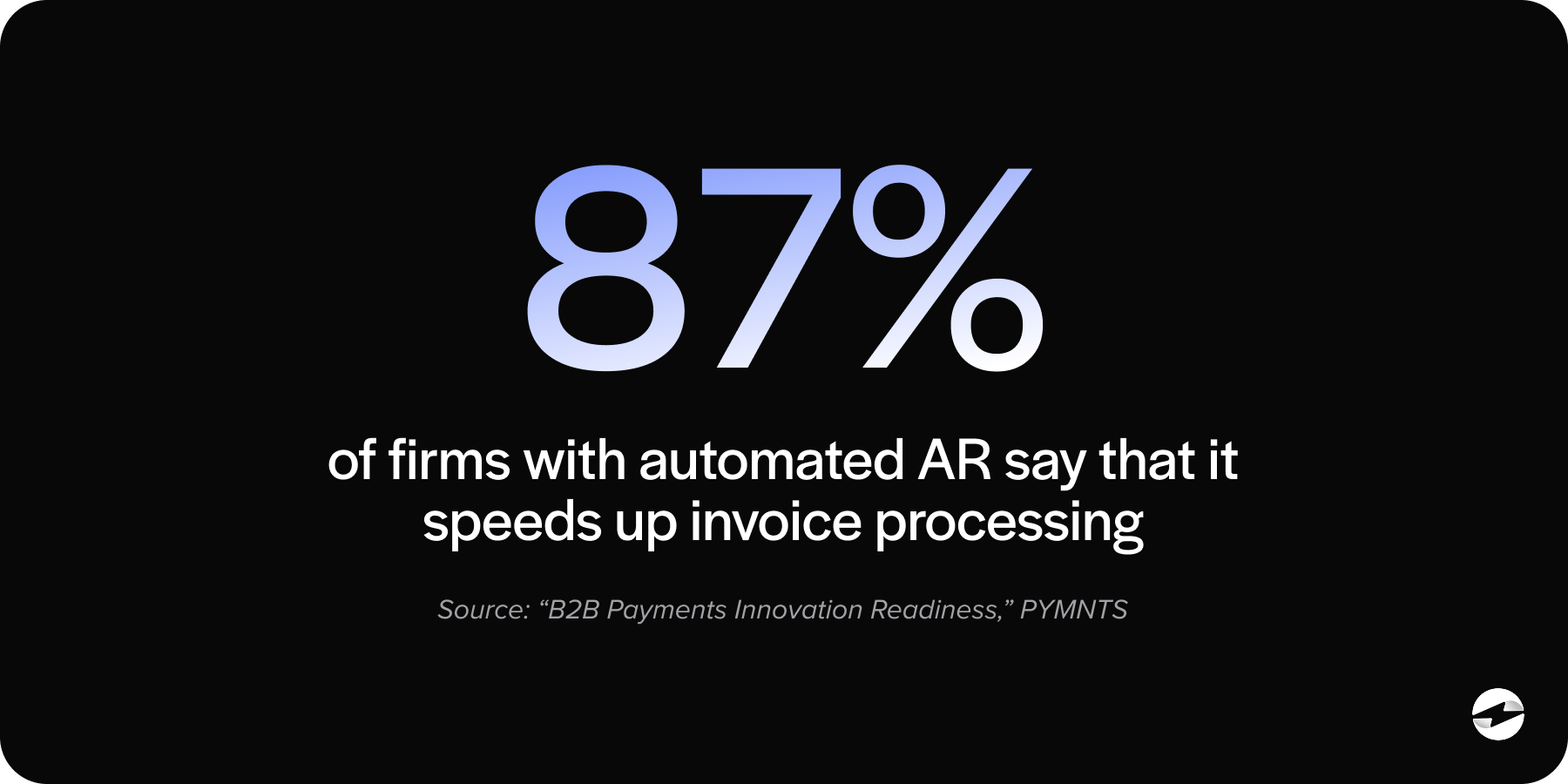
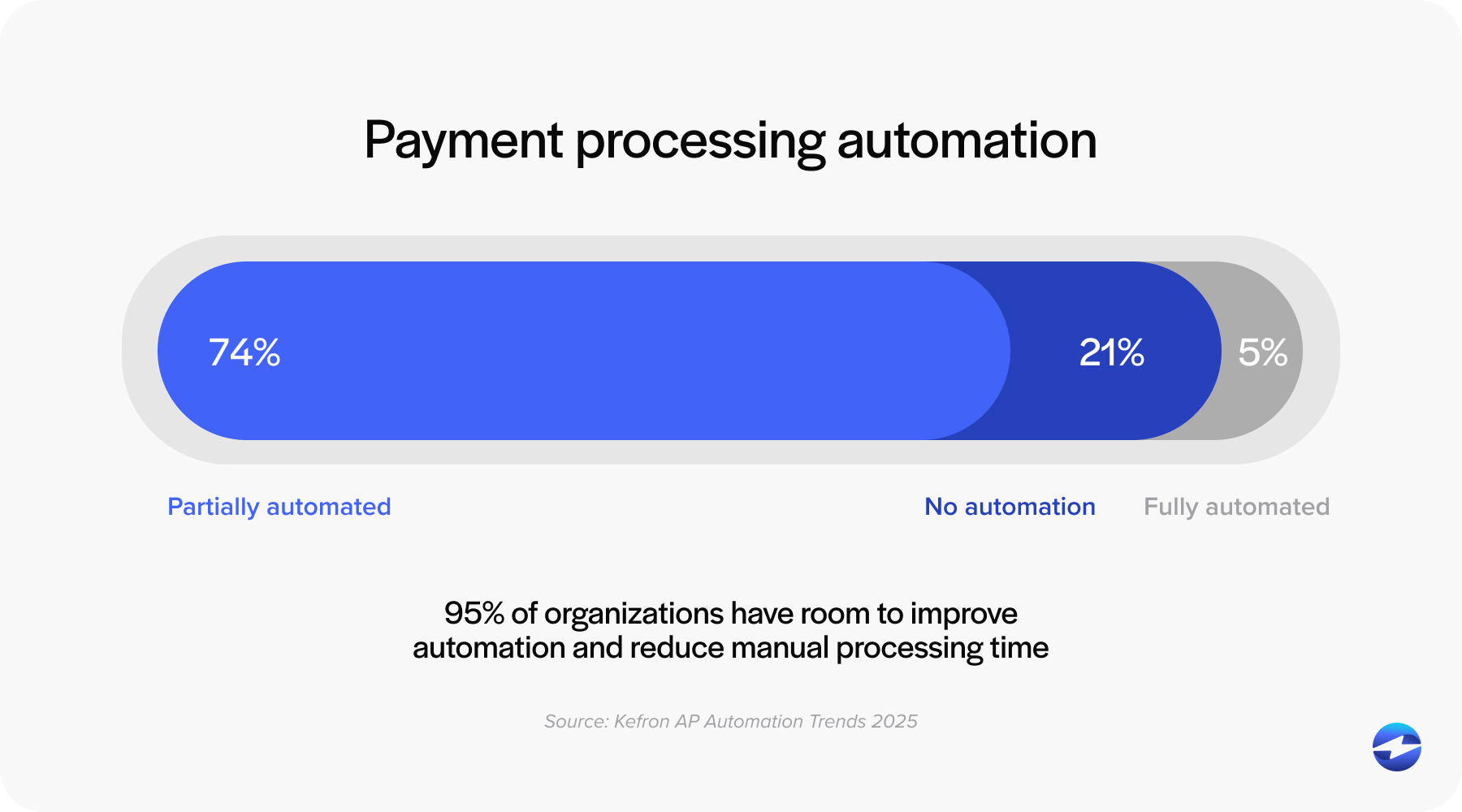
This kind of CRM integration also opens the door to automation that’s hard to pull off when your systems are disconnected. Recurring invoices can be generated on a set schedule. Payment reminders can be sent automatically at intervals you define. Payment terms can be applied consistently across client segments. All of it runs in the background while your team focuses on higher-value work.
The real benefit here goes beyond saving time. It’s about accuracy and consistency. When everything flows through one system, the data stays clean. Your sales team sees what finance sees. Your clients get a professional, consistent billing experience that matches the quality of your sales process.
Use Cases Across Industries
This isn’t a one-industry solution. Any business that invoices clients can benefit from managing that process inside their CRM.
B2B service companies often deal with retainer billing, milestone-based invoicing, or a combination of both. Having those invoices tied directly to client records means less administrative overhead and faster billing cycles.
Distribution and wholesale businesses handle high volumes of invoices tied to purchase orders. When those invoices are generated from the same system that tracks client activity, order accuracy improves, and disputes decrease.
SaaS and subscription companies need recurring billing that adjusts for usage or plan changes. A financial CRM setup that handles this natively removes the need for a separate subscription management tool.
Professional services firms bill based on project deliverables or hours worked. Linking invoices to the client engagement record inside the CRM keeps everything organized and auditable.
In each case, the advantage is the same. When invoice creation and payment collection happen where the client data already lives, the whole process gets simpler.
What to Look for When Evaluating Your Options
If you’re considering bringing invoicing into your CRM, a few things are worth paying close attention to.
Native integration matters more than most vendors will admit. For example, some payment processing solutions may offer a Salesforce integration, but not a native integration. Payment solutions like EBizCharge offer a native Salesforce integration that allows invoice processing to be facilitated within Salesforce’s software rather than requiring extra hands and more legwork. There’s a lot of customer relationship management software out there that offers plugins or third-party connectors that technically link to invoicing tools, but the experience is often shallow. Data syncs might be delayed. Workflows might require manual triggers. The interface might feel bolted on rather than built in.
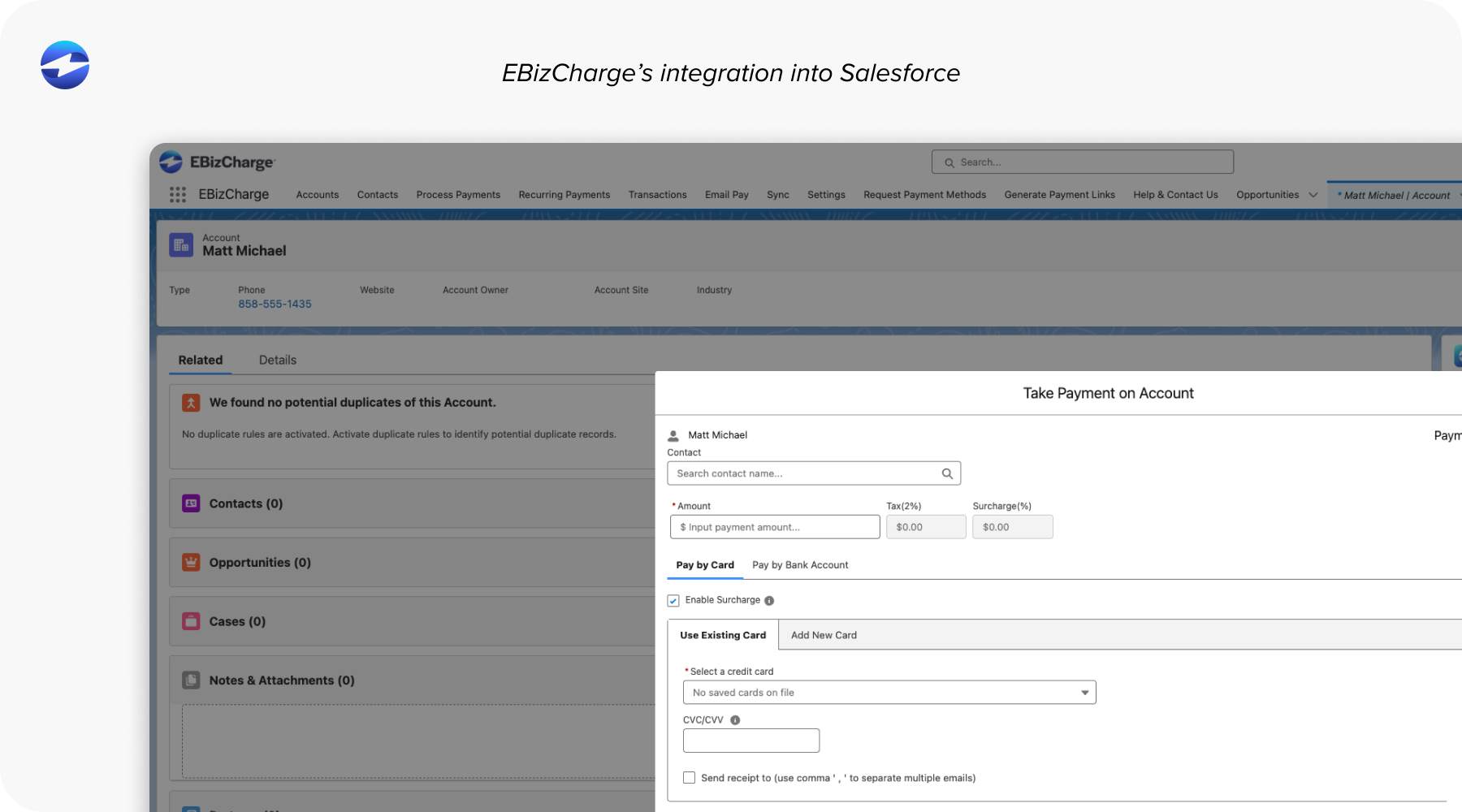
Look for solutions where invoicing and payment collection are deeply embedded in the CRM workflow, not just loosely connected.
A strong Salesforce CRM integration should let you generate invoices, send payment links, process transactions, and track payment status all within the Salesforce environment without jumping to external platforms.
Beyond the platform, look for support for multiple payment methods like ACH and credit cards, customer-facing payment portals, real-time syncing with your ERP or accounting software, and PCI-compliant security. A good payment processing solution should also offer customizable invoice templates so your billing reflects your brand, not a generic third-party layout.
How Embedded Payments Make This Possible
The reason CRM invoice management has become more practical in recent years comes down to embedded payments. This refers to payment processing built directly into the software your team already uses, rather than handled by a separate payment processor or gateway.
Embedded payments are what make it possible to create an invoice inside your CRM and collect payment without ever leaving the platform. Without this technology, CRM software could track invoices, but couldn’t actually process the transaction.
With embedded payments, the CRM system becomes the full billing platform. Invoice creation, delivery, payment collection, and reconciliation all happen in one place.
Practical Tips for Getting It Right
If you’re ready to bring invoicing and collections into your CRM, here are a few things that will set you up for success.
Automate invoice generation wherever you can. Whether it’s triggered by a deal closing or set on a recurring schedule, removing manual steps gets invoices out faster and reduces errors.
Set up payment reminders that escalate over time. A gentle nudge before the due date, a direct reminder the day after, and a firmer follow-up at 30 days overdue. This keeps collections moving without someone manually chasing every account.
Offer your clients a self-service payment portal. When clients can log in, view invoices, and pay on their own time, you remove friction and speed up the payment cycle.
Keep your CRM integration with accounting or ERP software running in real time. If invoice data doesn’t flow to your general ledger automatically, you’ll still end up with reconciliation headaches.
Bringing It Together
The businesses that create and collect in one system move faster, get paid sooner, and give their clients a cleaner experience. The gap between CRM and invoicing has been around for a long time, but the tools to close it are here now. Companies that take advantage of a financial CRM approach gain a real operational edge, not just in efficiency, but in the accuracy and professionalism of their entire billing process.
Your payment processing solution should work where your team works. Not in a separate tab, not in a different login, and not through a disconnected workflow. Just one system, doing what it should have done all along.