Blog > QuickBooks Payments vs Payment Gateway Alternatives
QuickBooks Payments vs Payment Gateway Alternatives
Choosing how to accept payments inside QuickBooks may seem like a small decision, but it becomes a much bigger one as your business grows. Many companies stick with QuickBooks Payments simply because it’s already there, easy to activate, and familiar. For early‑stage teams, that convenience is hard to beat. But as payment volume increases and workflows get more complex, the cracks begin to show. Fees rise, automation falls short, and daily tasks take longer than they should.
If you’ve reached the point where you’re comparing your current setup to an alternative to QuickBooks Payments, you’re not alone. Businesses across every industry eventually examine their options, looking for ways to reduce QuickBooks payment processing fees, improve accuracy, and streamline the accounting work that happens behind the scenes. This guide breaks down the differences between QuickBooks Payments and external gateways, explores why so many teams eventually switch, and offers practical insight into choosing the right payment processing solution for your long‑term needs.
How QuickBooks Payments Works Today
At its core, QuickBooks Payments is built for simplicity. You send an invoice, customers pay through a hosted link, and the payment appears in your books with minimal effort. When you’re processing a handful of transactions and don’t need complex reporting, this works just fine.
But QuickBooks Payments wasn’t designed to grow at the same pace as every business. As volume increases, the system’s limitations become more noticeable. Some payments don’t sync perfectly, refunds require manual adjustments, and businesses with multiple locations or entities find themselves spending more time fixing data than analyzing it.
These issues don’t make QuickBooks a bad accounting system. QuickBooks ERP still reliably supports millions of companies. But QuickBooks credit card processing through the built‑in tool may not be the best long‑term fit for organizations whose payment needs have grown more sophisticated.
Payment Processing Options for QuickBooks Users
When businesses begin exploring new ways to handle payments inside QuickBooks, the first step is usually understanding the landscape of what’s available. At a high level, most companies find themselves choosing between the built-in QuickBooks Payments tool, a standalone QuickBooks payment gateway, or a fully integrated third-party processor. Each path works, but they support business growth in very different ways.
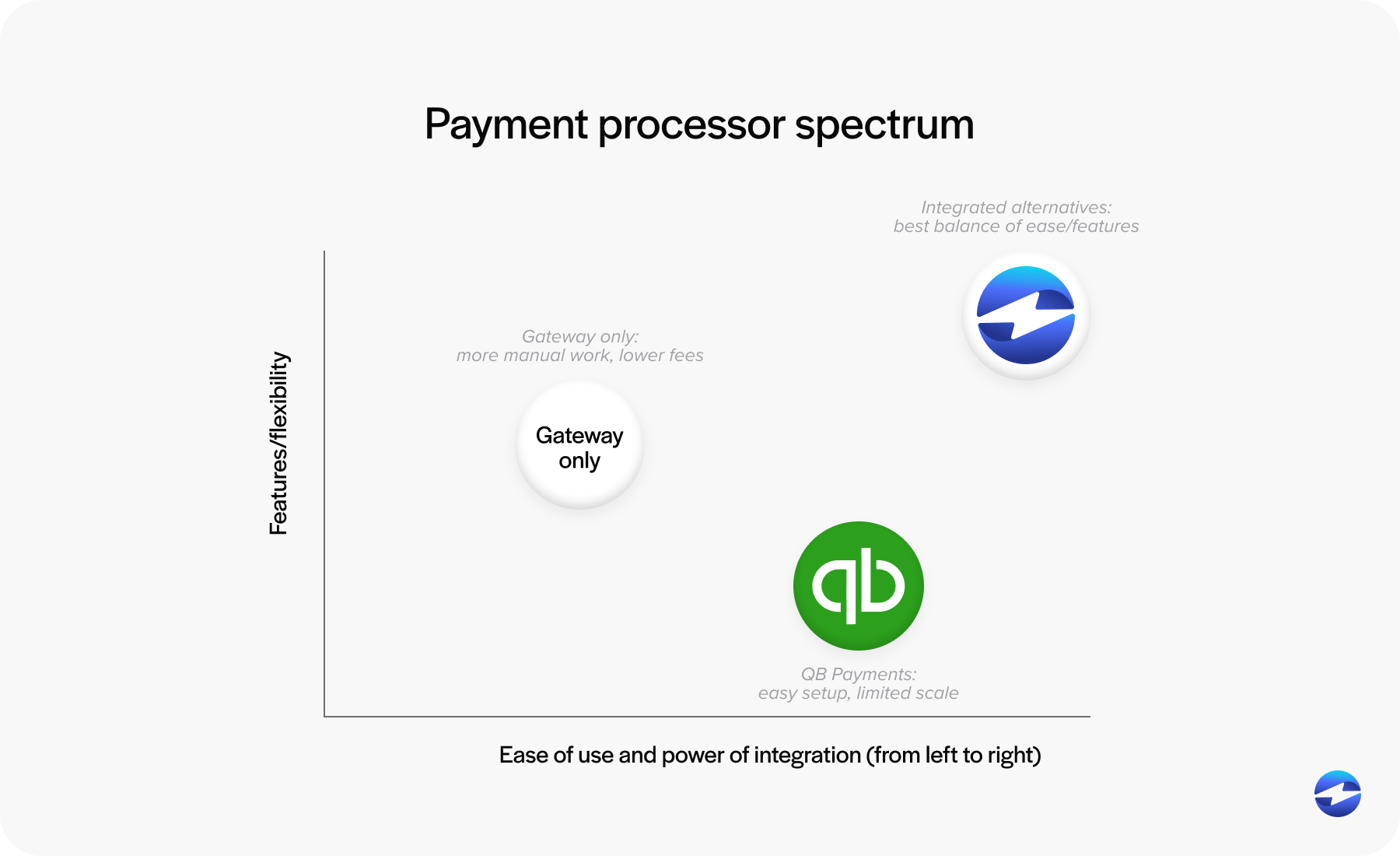
QuickBooks Payments offer immediate convenience. It’s embedded in the system, easy to activate, and ideal for straightforward invoicing workflows. But when payment volume increases or billing becomes more complex, the limitations of this simplicity become harder to ignore.
Standalone gateways offer more customization and sometimes better pricing, but the tradeoff is additional administrative work. Teams often spend time exporting batches, manually matching deposits, or resolving inconsistencies between gateway reports and QuickBooks.
Fully integrated processors often strike the best balance for growing businesses. They combine competitive pricing, automated syncing, and real-time posting – functioning less like an add-on and more like an extension of QuickBooks itself.
QuickBooks Payment Integration Options
Once you understand the types of payment tools available, the next layer is understanding how they actually connect to QuickBooks. Not all integrations are created equal, and the depth of the connection often determines how much manual cleanup a finance team ends up doing.
A native QuickBooks integration keeps everything aligned automatically. Payments, refunds, and adjustments are posted instantly. Customer records remain synced, and invoices update without intervention. This type of connection removes extra steps and keeps financial data consistent without additional oversight.
Gateway-based setups work differently. Instead of posting directly into QuickBooks in real time, they often rely on exported batch files or delayed synchronization. This can introduce administrative friction – extra reconciliation steps, mismatched deposits, or discrepancies that require manual fixes. While manageable at low volume, these issues compound quickly for teams handling high transaction counts.
For businesses processing dozens or hundreds of payments each day, the difference between native syncing and gateway-based posting can have a meaningful impact on accuracy, speed, and workload.
QuickBooks Payments vs Payment Gateway Alternatives
Comparing QuickBooks Payments to external gateways requires looking beyond features and focusing on how each system impacts your workflow.
QuickBooks Payments offers predictable workflows and built‑in convenience. But the simplicity comes with higher QuickBooks payment processing fees, limited automation, and less flexibility for businesses that need robust billing tools.
Payment gateways offer more flexibility and may offer lower pricing, but they introduce more manual work. Teams often spend time matching transactions, resolving mismatches, or tinkering with data imports. Over time, these added steps become hard to justify.
The most noticeable differences tend to fall into four categories:
- Cost: QuickBooks Payments uses flat‑rate pricing, which grows quickly as invoice sizes increase. Gateways may offer lower rates, but integrated processors typically offer the best balance of cost and automation.
- Automation: QuickBooks Payments handles basic syncing, but advanced automation – like recurring billing or Level 2/3 data – is limited.
- Accuracy: Gateways often require more manual adjustments, increasing the risk of posting errors.
- Scalability: As payment volume grows, so does the strain on systems not built for complex workflows.
Why Businesses Switch from QuickBooks Payments
Most teams don’t plan to switch processors; they grow into the need. It often starts with a few small annoyances: fees feel higher than expected, reconciliation takes longer, or a customer asks for a payment option that the current setup doesn’t support.
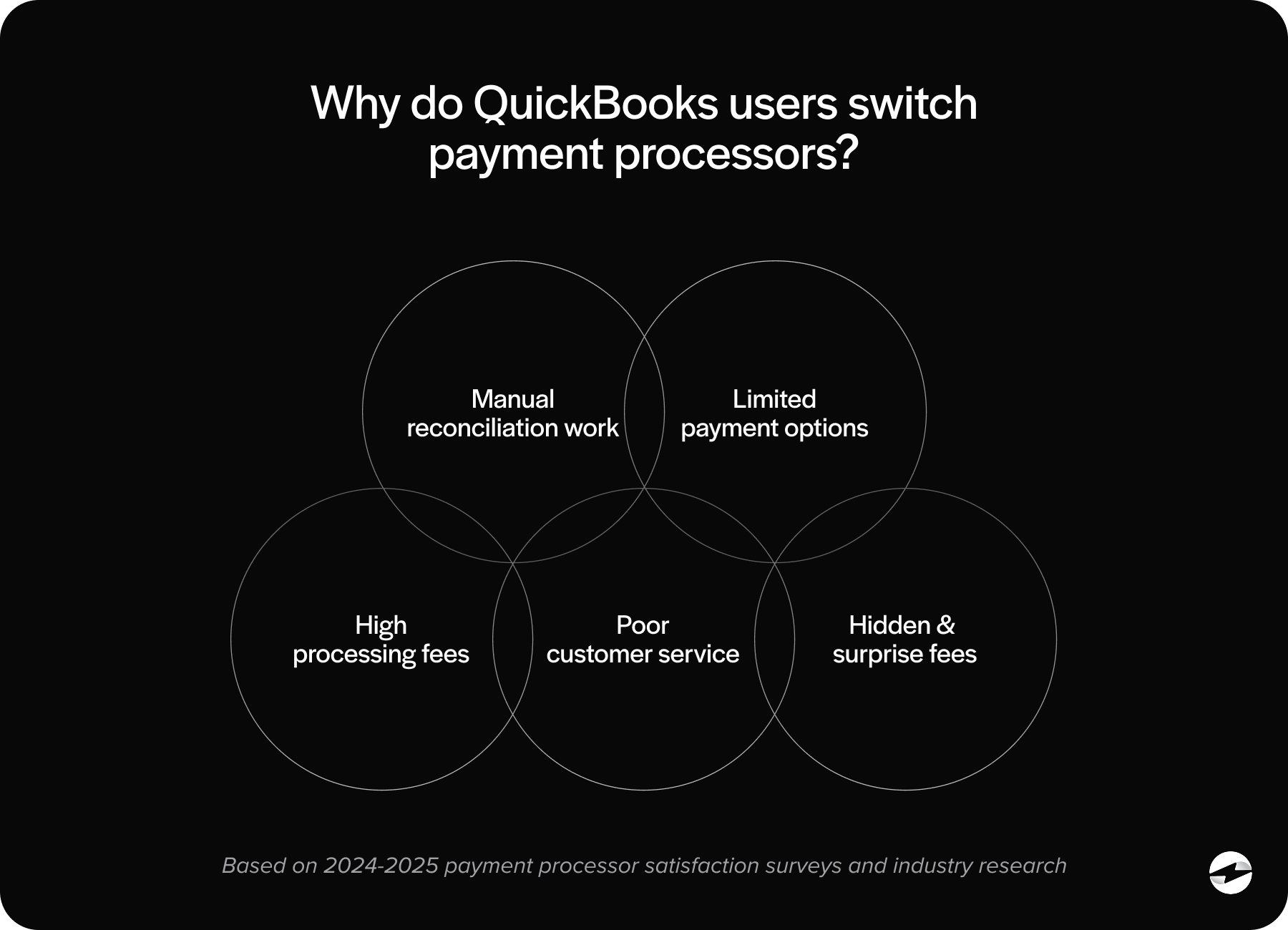
Over time, those small annoyances turn into operational slowdowns. Some companies find that card fees rise faster than revenue. Others notice that recurring billing or multi‑entity support is limited. Many start questioning their QuickBooks PCI compliance posture and look for tools with more advanced security like, tokenization, encryption, and real-time fraud controls.
Eventually, the tipping point arrives: the payment setup becomes a bottleneck. And when that happens, teams naturally look for an alternative to QuickBooks Payments that’s easier, faster, and more cost‑effective.
Why Many Businesses Choose EBizCharge as Their Alternative
Among the available alternatives, EBizCharge stands out because it doesn’t just replace the built‑in tools – it enhances the entire experience of managing payments inside QuickBooks. For teams that have struggled with syncing issues, high fees, or limited automation, this difference is immediately noticeable.
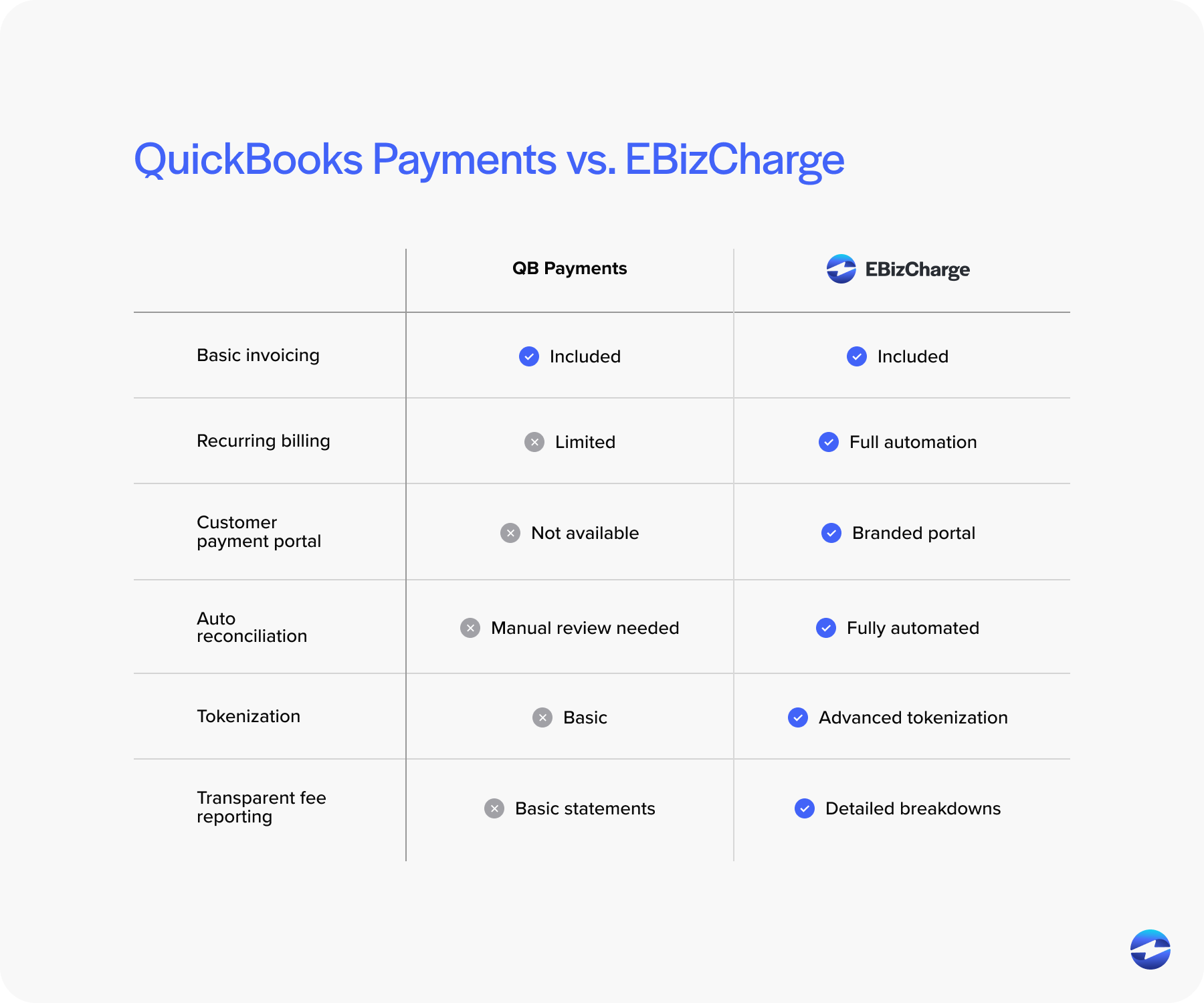
EBizCharge offers a fully native QuickBooks integration, which means payments, refunds, and adjustments post in real time without manual corrections. This alone can save hours each month and significantly reduce reconciliation fatigue. Its optimized pricing model also addresses one of the biggest pain points: rising QuickBooks credit card processing fees.
Beyond cost savings, EBizCharge includes tools like tokenized card storage, customer payment portals, recurring billing, Level 2/3 data support, and deeper security features than what QuickBooks Payments currently provides. All of these enhancements make it a powerful payment processor for teams needing more capability without changing accounting platforms.
For many businesses, switching to EBizCharge becomes the moment when QuickBooks finally works the way they always hoped it would – smooth, predictable, and scalable.
Choosing the Right Payment Setup for Your Business
Figuring out the right payment path means stepping back and honestly evaluating your current workflow. If fees seem unpredictable, if reconciliation drags, or if your team is constantly patching gaps with workarounds, those are signals that your payment setup isn’t supporting your growth.
The right payment processing solution should feel invisible. It should reduce manual work, align cleanly with your accounting process, and grow with your transaction volume. Whether that means staying with QuickBooks Payments, choosing a gateway, or adopting a fully integrated processor depends on your needs, your volume, and your long‑term goals.
- How QuickBooks Payments Works Today
- Payment Processing Options for QuickBooks Users
- QuickBooks Payment Integration Options
- QuickBooks Payments vs Payment Gateway Alternatives
- Why Businesses Switch from QuickBooks Payments
- Why Many Businesses Choose EBizCharge as Their Alternative
- Choosing the Right Payment Setup for Your Business