
Blog > Sage Intacct vs Sage 100 vs Sage 50: Which Is Right for Your Business?
Sage Intacct vs Sage 100 vs Sage 50: Which Is Right for Your Business?

Choosing business accounting software often feels harder than it should. If you’re comparing Sage Intacct vs Sage 100 or trying to decide whether Sage Intacct vs Sage 50 is a better long-term fit, you’re not alone. Many finance leaders reach a point where their current system hits a ceiling—too many manual processes, not enough automation, or reporting that takes hours instead of minutes.
Sage offers multiple financial platforms, each designed for different types of businesses. The challenge is figuring out which one matches your size, structure, and future growth. The goal of this guide is simple: to help you make a clear, grounded decision without jargon or sales fluff. It’ll explore how each system works, where they shine, and where they fall short. We’ll also touch on topics like Sage Intacct integration, migration paths, payment workflows, and even how these products stack up against QuickBooks.
Understanding the Three Platforms at a High Level
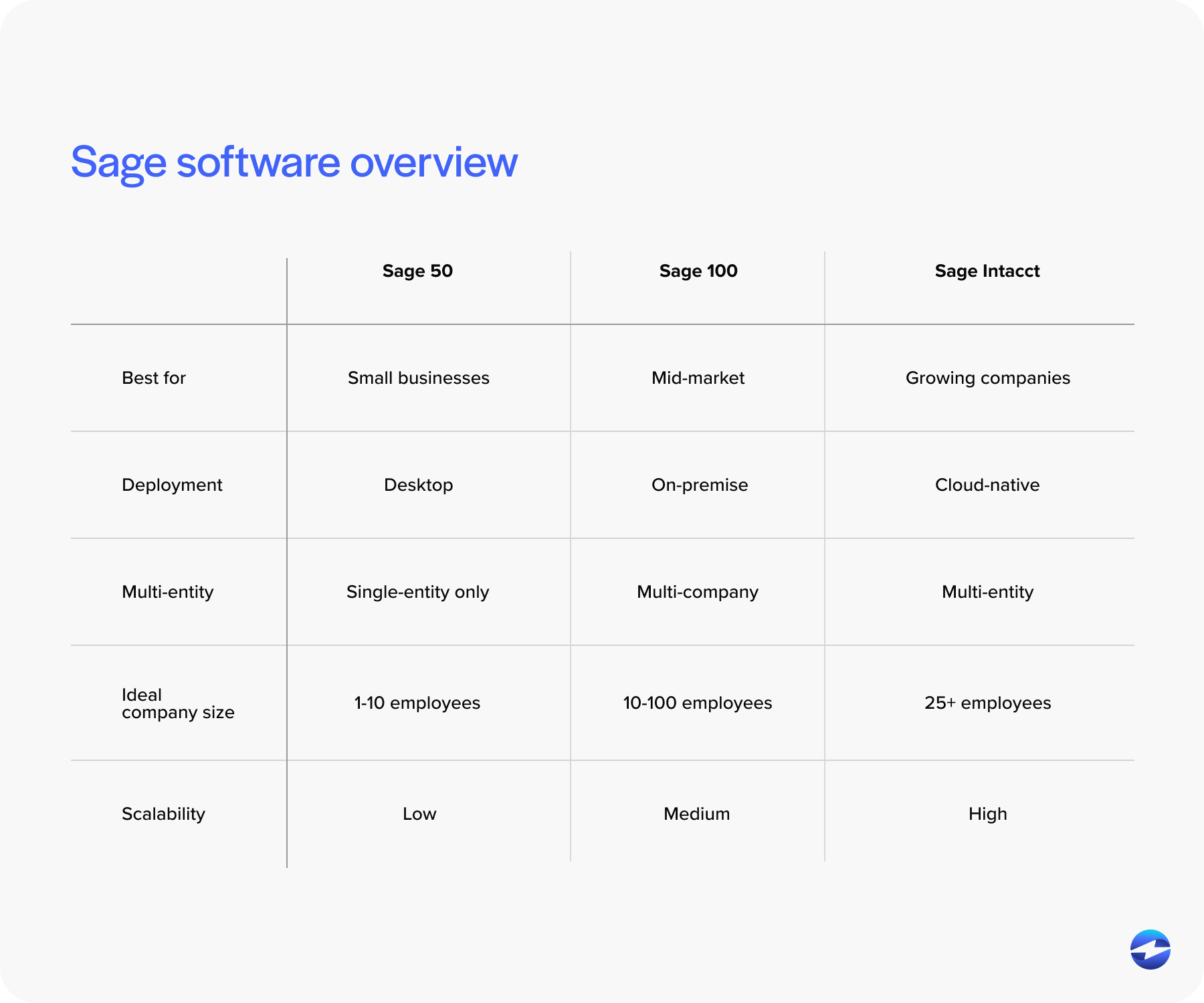
Before comparing features or pricing, it helps to take a step back and understand what each Sage product was originally built to do. Even though Sage Intacct, Sage 100, and Sage 50 share the same brand name, they were designed for very different stages of business growth. Knowing the “why” behind each platform makes it much easier to see which one fits your organization’s current needs – and which one positions you well for the future.
Sage Intacct
Sage Intacct is the cloud‑based option in the Sage family, built for companies that need automation, multi‑entity support, and strong real‑time reporting. Because it’s application programming interface (API) driven and seamlessly integrates with third‑party tools, it’s often the answer when a business needs data flowing cleanly between systems. This also impacts payments. A Sage Intacct payment integration works with modern payment tools, supports automated reconciliation, and gives teams more visibility.
Intacct’s main strength is its scalability. Whether you’re growing fast, opening new entities, or handling high transaction volume, Sage Intacct ERP can grow with you instead of working against you.
Sage 100
Sage 100 is a mid‑market ERP system originally designed as an on‑premise solution. While hosted versions exist, its architecture still feels more traditional than cloud‑native tools. Where it shines is in product‑based operations—manufacturing, inventory management, distribution, and job costing.
If your business ships products, tracks materials, or has complex supply chain needs, Sage 100 often lands in the “just right” category.
Sage 50
Sage 50 is the smallest of the three systems. Think of it as advanced bookkeeping software. It’s excellent for small businesses that need structure but don’t require full ERP capabilities. It offers basic reporting, invoicing, and bookkeeping without the heavier learning curve.
For many companies, Sage 50 is the first step before outgrowing the platform and evaluating Sage 100 vs Sage Intacct.
Feature-by-Feature Comparison
Choosing between Sage Intacct, Sage 100, and Sage 50 becomes much easier once you look at how each system handles the day-to-day work your finance team relies on.
Here is a quick breakdown of each platform’s features.
Financial Management & Reporting
If reporting flexibility matters to your finance team, this is where the differences show quickly.
- Sage Intacct uses dimensional reporting—meaning you can slice data by customer, project, location, entity, department, or anything else you define. Reports update in real time.
- Sage 100 has strong financial tools but relies on more structured, traditional accounting frameworks.
- Sage 50 provides basic financial reports but lacks advanced analytics.
If you’ve struggled with QuickBooks reporting limitations, you’ll see a major difference in Sage Intacct vs QuickBooks, particularly around automation and consolidation.
Multi‑Entity Accounting & Consolidations
Multi‑entity is where the “gaps” between systems become a bit more obvious.
- Sage Intacct handles multi‑entity out of the box—automated eliminations, shared charts of accounts, inter‑company transactions, and currency conversions.
- Sage 100 can support multi‑company setups, but it isn’t built for complex consolidation.
- Sage 50 is single‑entity only.
If you’re in a multi‑location or multi‑subsidiary environment, Sage 100 vs Sage Intacct usually ends with Intacct being the more practical answer.
Automation & Integrations
Automation is where Sage Intacct separates itself.
- Sage Intacct offers open API connections, dozens of pre‑built integrations, and streamlined automation for approvals, consolidations, and payment workflows.
- Sage 100 offers module‑based automation with fewer integration options.
- Sage 50 has limited automation and mostly entry‑level connectors.
This is also where Sage Intacct integration capabilities matter. If your team uses Salesforce, billing platforms, CRMs, or a third‑party payment processor, Intacct is much easier to connect.
Cloud vs. On‑Premise Flexibility
As businesses grow, add remote employees, or rely more on integrated tools, the ability to access data anywhere becomes a deciding factor. Understanding the technological foundation of each Sage product helps clarify why some platforms adapt more easily to modern workflows than others.
- Sage Intacct: Cloud‑native from day one.
- Sage 100: Primarily on‑premise, though hosted versions exist.
- Sage 50: Desktop‑first, very limited cloud functionality.
The more distributed or hybrid your workforce becomes, the more likely you’ll outgrow desktop systems.
Cost Differences & Total Cost of Ownership
Cost is often a major turning point, especially for teams trying to balance current needs with long-term scalability. It’s not just about comparing price tags – it’s about understanding what each system will cost you in time, maintenance, upgrades, and lost efficiency over the next several years. Many businesses realize that the biggest expense isn’t the software itself, but the hours spent working around limitations or patching together disconnected tools.
- Sage Intacct uses a subscription model based on modules and users.
- Sage 100 typically includes licensing, maintenance, and upgrade fees.
- Sage 500 has a low entry cost but limited ability to grow alongside a larger business.
When evaluating cost, consider the hours saved through automation. Many teams switching from Sage 100 or Sage 50 find that process automation – especially around billing and Sage Intacct payment processing – pays for itself by eliminating manual tasks and reducing reconciliation work.
Migration Considerations: When to Upgrade
Upgrading accounting systems isn’t something companies do on a whim. Most teams hold off as long as they can, squeezing every bit of life out of their existing platform before finally acknowledging that the system is slowing them down more than it’s helping. For many organizations, the tipping point is when manual work becomes the norm instead of the exception – when closing the books takes too long, integrations constantly break, or leadership needs better visibility than the software can realistically provide.
Most companies migrate when:
- Reporting becomes too manual.
- Multi-entity needs outgrow current tools.
- Integrations break or can’t scale.
- Workflows require automation instead of spreadsheets.
Many businesses outgrow Sage 50 first, then Sage 100, and eventually look toward cloud solutions. Along the way, comparisons like Sage Intacct vs Sage 50 or Sage 300 vs Sage Intacct help clarify the jump and highlight what modern systems can automate.
Helping You Decide: A Practical Framework
Choosing between Sage 50, Sage 100, and Sage Intacct can feel overwhelming, especially when your business is somewhere in the middle – not quite small enough for basic bookkeeping tools, but not so large that a full ERP seems like an obvious next step. Sometimes you simply need a grounded way to evaluate all three options without getting lost in feature lists or technical specs.
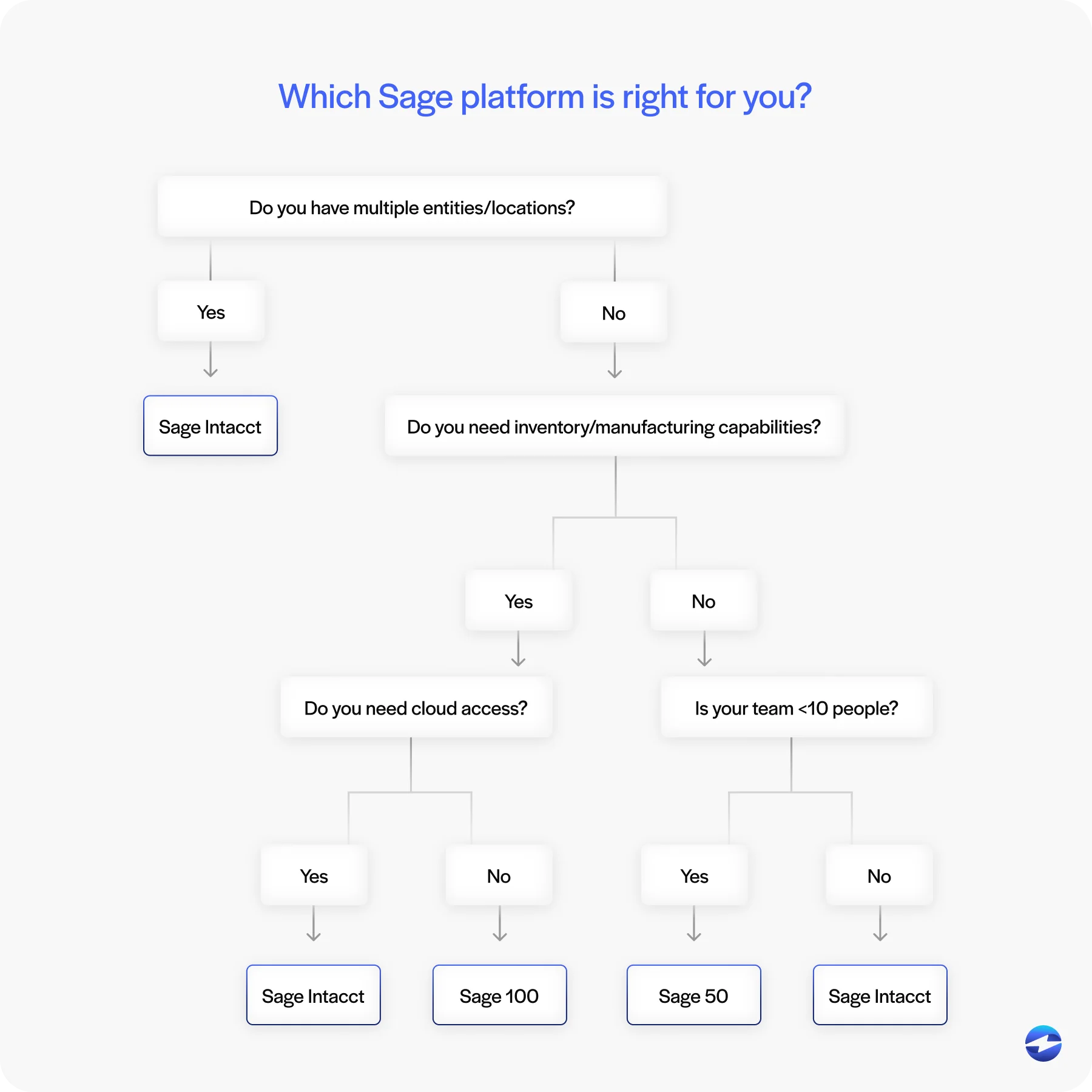
A simple way to make the decision:
- Choose Sage 50 if you’re a small business handling basic bookkeeping.
- Choose Sage 100 if you’re product-based with inventory needs.
- Choose Sage Intacct if you’re growing, multi-entity, or need automation.
At the end of the day, the right answer depends on how quickly your business is evolving and how much manual work your team is currently shouldering. Companies that expect steady growth, want cleaner integrations, or need better reporting often find that moving to Sage Intacct early prevents bigger headaches down the road.
Choosing the Right Sage Platform
Each Sage product has its place. The key is choosing the one that supports your workflows today without limiting your possibilities tomorrow.
For teams that need strong automation, deep integrations, and modern financial controls, Sage Intacct ERP is often the natural next step. And because Sage Intacct integrates cleanly with secure payment tools—especially when connected through a payment solution like EBizCharge—you gain the benefit of real‑time posting, lower manual work, and a payment processing solution that fits within the Sage ecosystem.
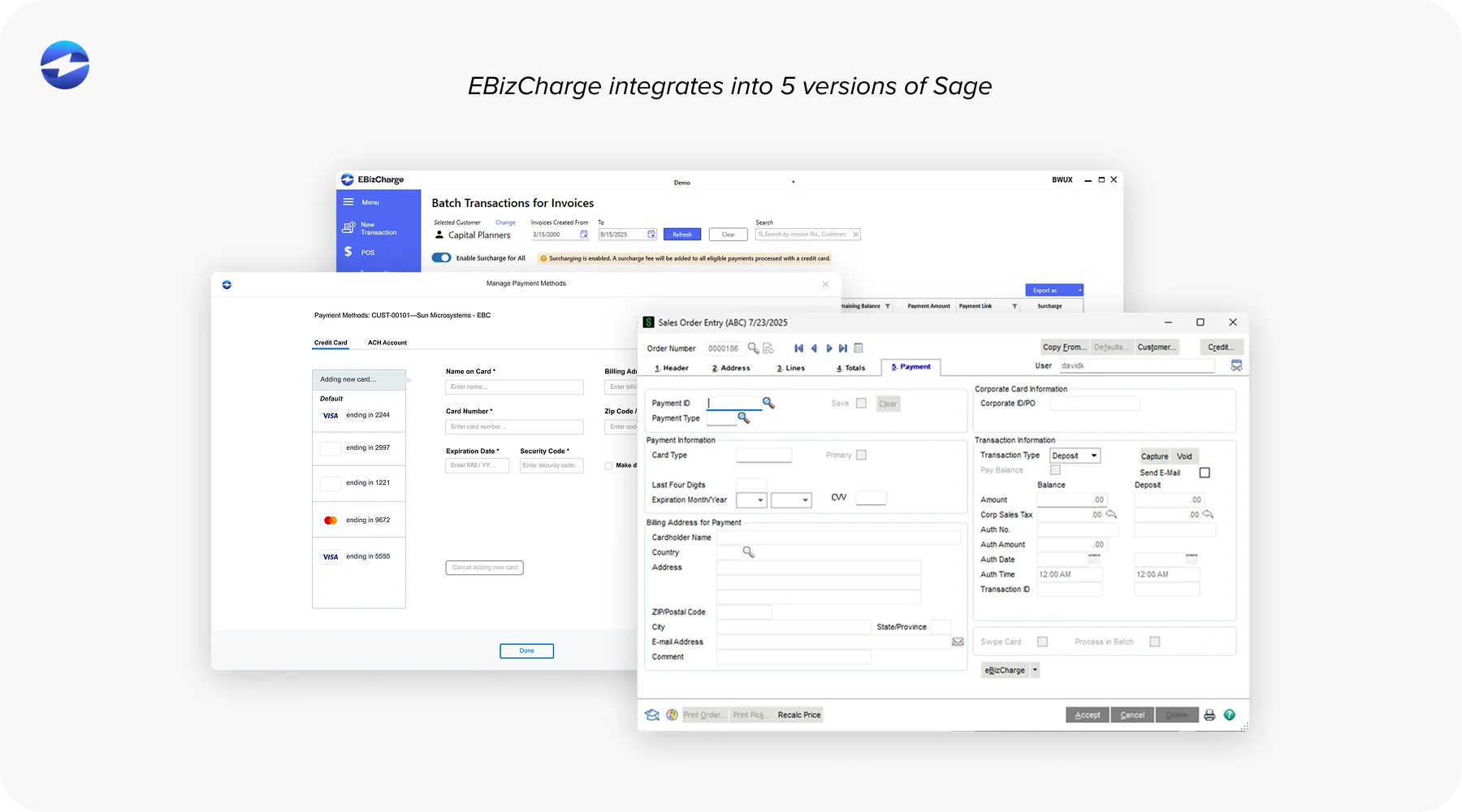
Whether you’re comparing Sage Intacct vs Sage 100, Sage 100 vs Sage Intacct, or looking at the long‑term gap between Sage Intacct vs Sage 50, the right choice comes down to where your business is headed—not just where it is today.