
Templates | Check Request Form
Check Request Form Template
Check Request Form Template
Looking for a free check request form pdf? Download our fillable template to standardize payment requests, track approvals, and keep your records organized.

Streamline your payments with our check request form. Ensure accuracy, approval, and proper record-keeping!
Download our check request form sample to easily request and track payments with proper approvals. Our fillable PDF, available as a blank simple check request form template or an online check request form, ensures accuracy and efficiency. Get your free copy now!
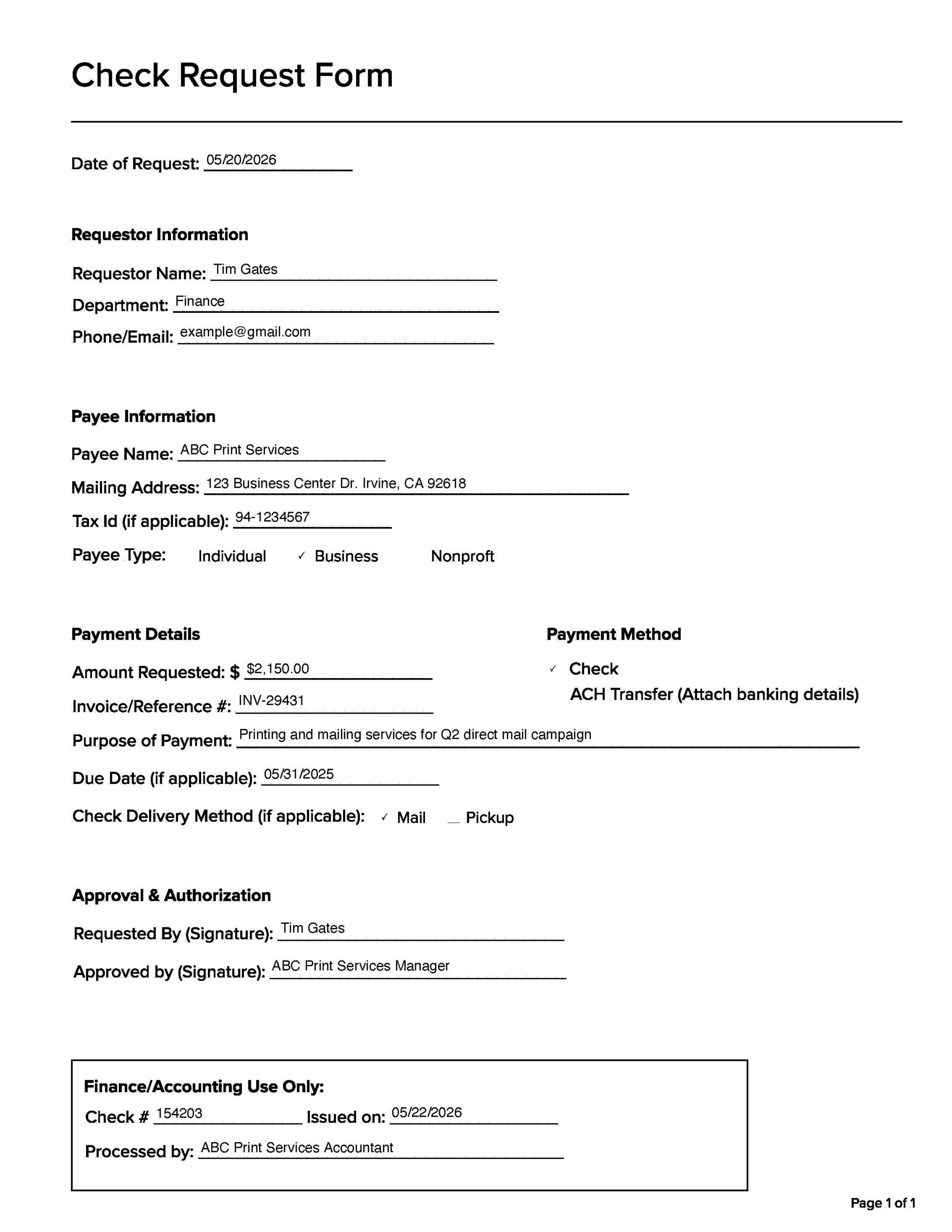
If you’ve ever needed to get a payment issued for a vendor, a speaker, a refund, or even just a reimbursement, then you might’ve come across something called a check request. At its core, it’s a simple document that helps your accounting or finance team know who needs to get paid, how much, and why. It’s not just paperwork for paperwork’s sake, it’s a way to keep payments organized and traceable, especially in environments where multiple people are requesting funds. Here is a sample check request form:
What is a check request?
A check request is a one-page document/form used to request a payment from your organization’s finance department. It provides the necessary details they need to cut a check or process a payment. It’s typically used outside the normal purchase order or invoicing system. Think of it as the go-to option when you can’t submit a formal invoice but still need to get someone paid.
When to use a check request form
Check request forms come in handy for a bunch of everyday scenarios. Maybe you hired a freelance designer who doesn’t issue formal invoices. Maybe a team member paid out of pocket for supplies and needs reimbursement. Or maybe a guest speaker is due an honorarium after an event.
Some other common examples include:
- Reimbursing employees for travel or meals
- Paying vendors or contractors who don’t submit invoices
- Sending donations or sponsorships
- Covering registration fees for events or training
- Processing one-off refunds to customers
- If it doesn’t go through your normal procurement process but still needs a formal paper trail, a check request form is often the right choice.
How to fill out a check request form
It’s pretty straightforward, but there are a few key details you’ll need to include.
- You’ll start by entering basic requestor info. Your name, department, and contact info so the finance team knows who to reach if something’s unclear.
- Next comes the payee information. That’s the person or business that should receive the payment. You’ll need their full name or company name, mailing address, and Tax ID if applicable (especially for businesses or independent contractors).
- From there, you’ll note the amount requested, the purpose of the payment, and any relevant invoice numbers or due dates. Try to be specific about what the payment is for, it helps speed up approvals and reduces back-and-forth later on.
- Finally, you’ll choose the payment method. Usually either a physical check or an ACH transfer (which is a direct deposit). Some forms let you specify whether the check should be mailed or picked up.
- Don’t forget the signatures at the bottom. One from you (the person making the request) and another from someone authorized to approve it—like your manager or department head. Finance usually won’t process the form without both.
Just to summarize, in order to fill out a check request form, you will need:
- Payee Information
- Payment Amount
- Reason for Request
- Supporting Documents / Relevant information
- Approval Signatures
Whether you’re new to this process or you’ve done it a few times before, don’t stress too much. The goal is to make things smooth for both you and the people issuing the payment. Keep things clear and complete to help your request move through without a hitch.
The Check Request Process: How It Works
Filling out the form is just one step. The full check request process usually follows a predictable path from submission to payment.
It starts when the requestor fills out the form and attaches any supporting documentation, like a receipt, contract, or event confirmation. The form then goes to a supervisor or department head for approval. Once approved, it moves to the accounts payable or finance team, who verify the details, confirm budget availability, and either cut a physical check or initiate an ACH payment. After the payment is issued, the form and supporting documents are filed for record-keeping and audit purposes.
The timeline varies by organization. Some companies turn check requests around in a few days, while others take a week or more depending on approval chains and payment schedules. If your requests tend to get stuck, it’s usually at the approval stage. Making sure all the required information is filled in upfront, with supporting docs attached, is the easiest way to keep things moving.
Check Request Forms by Industry
The basic check request form works across most organizations, but certain industries use them more frequently and sometimes with additional requirements.
- In construction, check requests are common for paying subcontractors, covering material costs, and processing lien releases. Construction firms often require additional fields for project numbers, job codes, and retention amounts.
- In higher education, check requests are used for everything from guest speaker honorariums to student organization reimbursements. Universities typically route these through departmental budget approvals before they reach accounts payable.
- Nonprofits rely on check requests for donations, sponsorships, and grant-related disbursements. These forms often require additional documentation for compliance and audit purposes.
The template on this page works as a starting point for any of these use cases. You can customize it by adding fields specific to your industry or organization’s internal requirements.
Is a check request and a check requisition the same?
While a check request and a check requisition are often used interchangeably, they’re not always exactly the same thing. The distinction mostly comes down to how formal the process is at your organization.
- A check requisition is usually part of an internal process. It’s a more structured document that authorizes someone to issue a check. A check requisition form often requires approval. Think of it as an official green light.
- A check request can be a bit more flexible. It may still require approvals, but it could also simply involve sending a form or email to your finance team, asking them to issue a check for a vendor, refund, or expense reimbursement.
Some companies treat the terms as synonyms; others draw a clear line between the two. So if you’re wondering which one to use, the best move is to check your organization’s policy or ask your finance department how they define each term. That little bit of clarity can save you a lot of time and rework.
Digital Alternatives to Paper Check Requests
Paper check request forms get the job done, but they can slow things down when approvals require physical signatures or when forms get lost between desks. That’s why a lot of organizations are shifting toward digital alternatives.
An online check request form lets requestors submit digitally, route approvals through email or workflow tools, and give finance teams a searchable record of every request. Some companies use simple fillable PDFs, while others build request workflows into their accounting or ERP system.
If your organization processes a high volume of check requests, it might also be worth looking at whether some of those payments could be handled electronically. ACH payments and online payment portals eliminate the time and cost of printing and mailing checks, and they give payees faster access to their funds. Tools like EBizCharge can automate payment processing and sync directly with your accounting system, which reduces the manual work that check requests create in the first place.
Frequently Asked Questions
What is a check request?
A check request is a document used to ask your organization’s finance or accounts payable department to issue a payment. It’s typically used when a payment falls outside the normal purchase order or invoicing process, such as reimbursements, vendor payments without formal invoices, or one-time disbursements.
What is a check request form?
A check request form is the actual document you fill out to submit the payment request. It includes fields for payee information, payment amount, purpose, supporting documentation, and approval signatures.
Is a check request the same as a check requisition?
They’re often used interchangeably, but some organizations draw a distinction. A check requisition is typically a more formal internal authorization document, while a check request can be a simpler, less structured submission. Check your organization’s policy to see which term applies.
How do I fill out a check request form?
Include the requestor’s name and department, the payee’s name and address, the payment amount, the reason for payment, any supporting documents, and approval signatures. Be specific about the purpose to speed up the approval process.
When should I use a check request form?
Use a check request when a payment doesn’t fit your normal procurement or invoicing process. Common scenarios include employee reimbursements, paying contractors who don’t issue invoices, event fees, donations, and one-time vendor payments.
Can I submit a check request form online?
Yes. Many organizations accept digital check request forms via fillable PDFs, email submissions, or workflow tools built into their accounting system. Online submission speeds up the approval process and creates a searchable record.
What is a check pick up form?
A check pick up form is a document used when someone needs to physically collect a check from the finance department rather than having it mailed. It typically requires identification and a signature to confirm receipt.

