Blog > Setting Up Payment Processing for QuickBooks: Your Options
Setting Up Payment Processing for QuickBooks: Your Options
Setting up payments inside QuickBooks often starts as a quick, practical decision rather than a long-term strategy. Many teams take advantage of QuickBooks Payments simply because it’s built in and gets the job done with minimal effort. In the early stages, when the main goal is sending invoices and getting paid without friction, that convenience feels like enough.
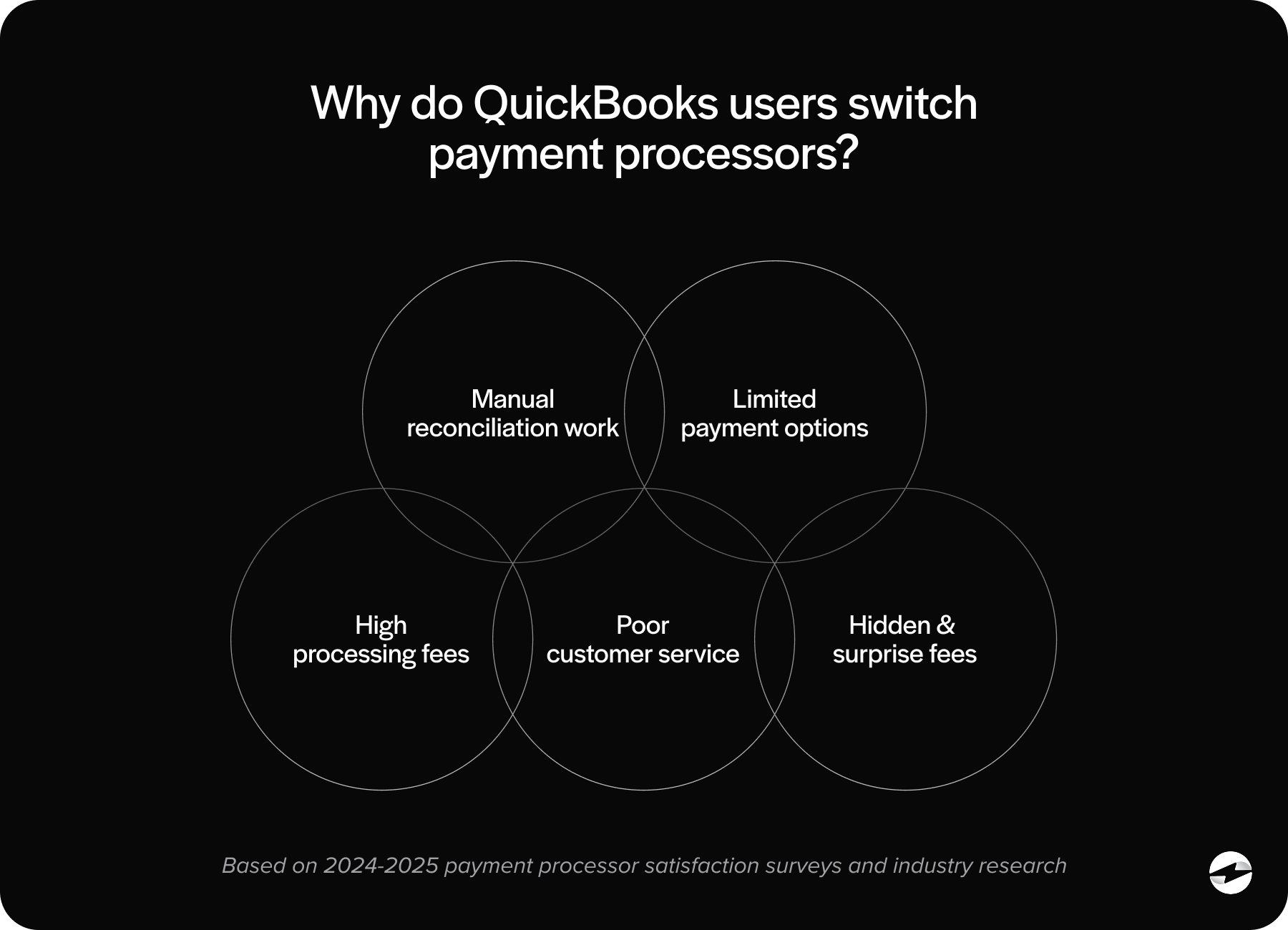
But as the workload grows, the simplicity that once felt helpful can turn into operational strain. Fees that seemed manageable at first begin to take a bigger bit out of margins, reconciliation becomes more hands-on than expected, and automation doesn’t always align with the real demands of a busier finance operation. What once felt efficient can start to feel limiting.
If you’ve reached a point where you’re questioning whether your current setup still fits – or whether other QuickBooks payment options might better support your growth – you’re not alone. QuickBooks offers a wide range of integration paths, and understanding them can help you choose a system that strengthens your workflow instead of complicating it.
How Payment Processing Works in QuickBooks
To understand your options, it helps to start with how QuickBooks Payments works today. Intuit’s built‑in tool handles the basics of QuickBooks payment processing: sending invoices, accepting customer payments through hosted links, and posting those payments back into your books.
When everything goes smoothly, the workflow is straightforward. A customer receives an invoice, pays using a QuickBooks payment link, and the transaction appears in QuickBooks without requiring additional steps. For many small businesses, this is enough.
But as operations scale, limitations surface. Some payments don’t sync perfectly. Refunds can require manual adjustments. And while the out‑of‑the‑box automation is helpful, it doesn’t always handle more advanced workflows—like multi‑entity routing, recurring billing, or detailed fee reporting. These gaps often prompt businesses to explore a deeper QuickBooks integration or a stronger external payment processing solution.
Payment Processing Options for QuickBooks Users
QuickBooks users have three primary paths to consider:
- QuickBooks Payments (The Built‑In Option): This is the easiest to activate. It’s embedded directly into the platform and offers a clean user experience. But ease of use doesn’t always equal long‑term fit, especially for companies with higher payment volume.
- Payment Gateway Alternatives: A standalone payment gateway connects your customer-facing payment experience to your merchant account. These tools can offer lower fees or more flexibility, but the tradeoff is often additional steps in reconciliation or posting.
- Fully Integrated Third‑Party Processors: These options blend the best of both worlds: lower fees, better automation, and real‑time syncing inside QuickBooks ERP. For growing teams, this is where the most meaningful improvements often occur.
Every business’s needs are different. Some prioritize cost, others prioritize automation, and others need the cleanest possible integration into QuickBooks ERP. Understanding these categories helps clarify which direction makes the most sense.
QuickBooks Payment Integration vs Payment Gateway Alternatives
A payment gateway is essentially a bridge—the tool that moves transaction data from the customer to the processor. When used with QuickBooks, gateways may require manual batching, exporting files, or adjusting transaction data after settlement.
A native QuickBooks integration, on the other hand, keeps everything inside the system. Payments post automatically, invoices update instantly, and reconciliation requires far fewer steps.
This difference becomes more meaningful as payment volume grows. Companies quickly realize how much time they spend correcting misaligned transactions or adjusting deposits when the connection isn’t strong. A tight integration reduces errors, speeds up month‑end, and provides a clearer real‑time financial picture.
For many organizations, this alone is reason enough to evaluate alternatives to the built‑in QuickBooks Payments tool.
Evaluating Cost, Automation, and Scalability
There’s no one-size-fits-all system, so evaluating your options through the lens of fees, workflows, and growth potential is essential.
Cost Considerations
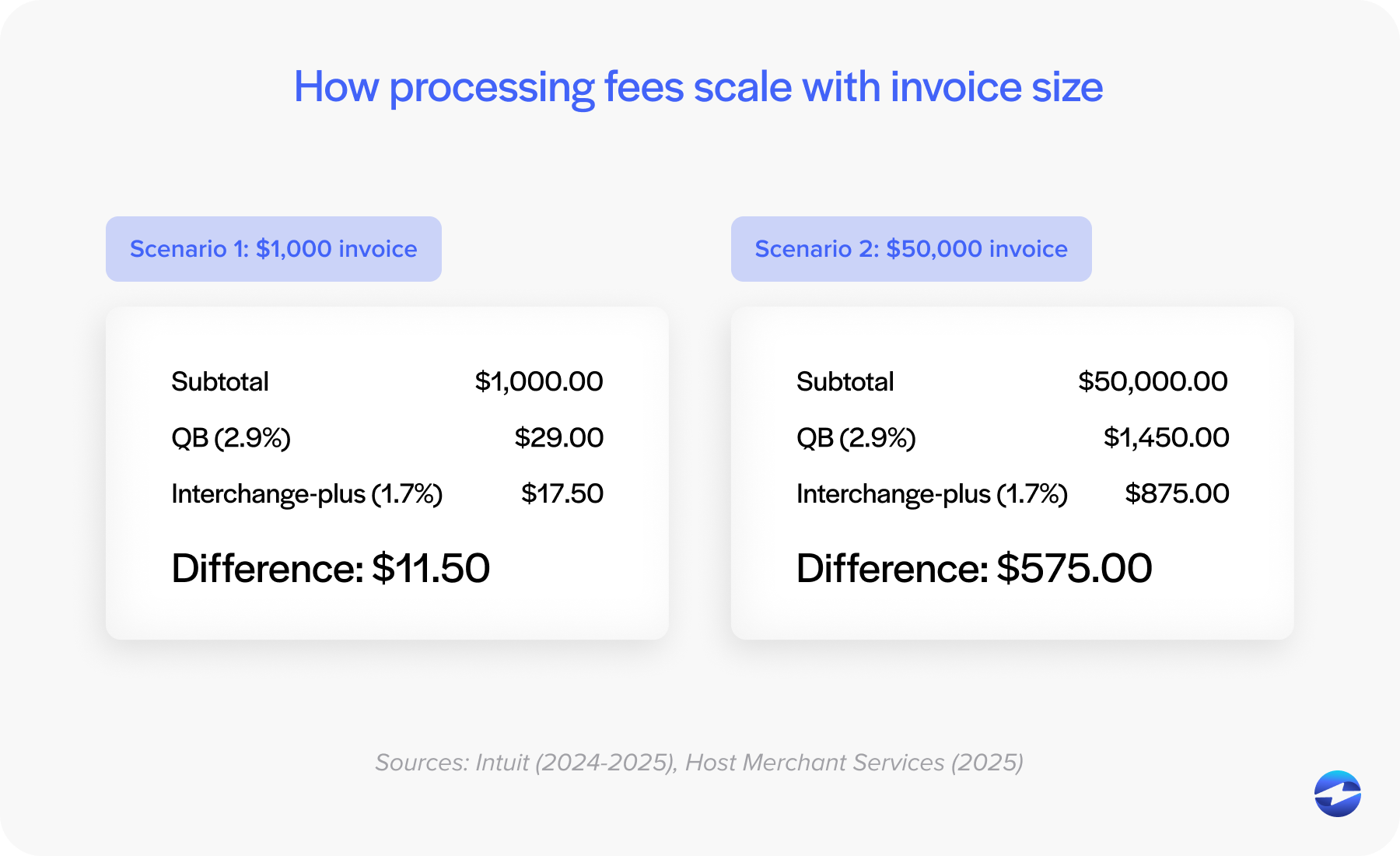
Businesses often start comparing solutions once they take a closer look at how fees behave in real-world use. Credit card rates, ACH charges, and even lesser-known costs tied to specific card types can add up quickly. As invoice sizes grow, so do the expenses, and many teams discover that transaction fees increase at a pace that becomes difficult to justify. This is often the point where companies begin exploring whether another option might offer more predictable and cost-effective pricing.
Automation Level
Automation is where payment processing solutions really separate themselves. QuickBooks Payments handles basic syncing well but can fall short with recurring billing, extensive ACH use, or complex posting rules.
Scalability
As your organization grows, so does your need for accurate, repeatable processes. A solution that works for 50 transactions a month may not work for 500 or 5,000. Looking ahead is part of ensuring your QuickBooks Payment setup doesn’t become a bottleneck.
QuickBooks Payments vs EBizCharge
When exploring alternatives, many businesses compare Intuit QuickBooks Payments to a dedicated processor like EBizCharge. The difference becomes clear once teams consider price, automation, and integration depth.
With QuickBooks Payments, pricing is fixed. It’s simple, but not always cost‑effective, especially for businesses processing larger invoices or high monthly volume.
EBizCharge, in contrast, uses optimized pricing models that lower credit card and ACH fees. Because it’s a native QuickBooks integration, payments post in real time, refunds sync accurately, and reconciliation is significantly faster.
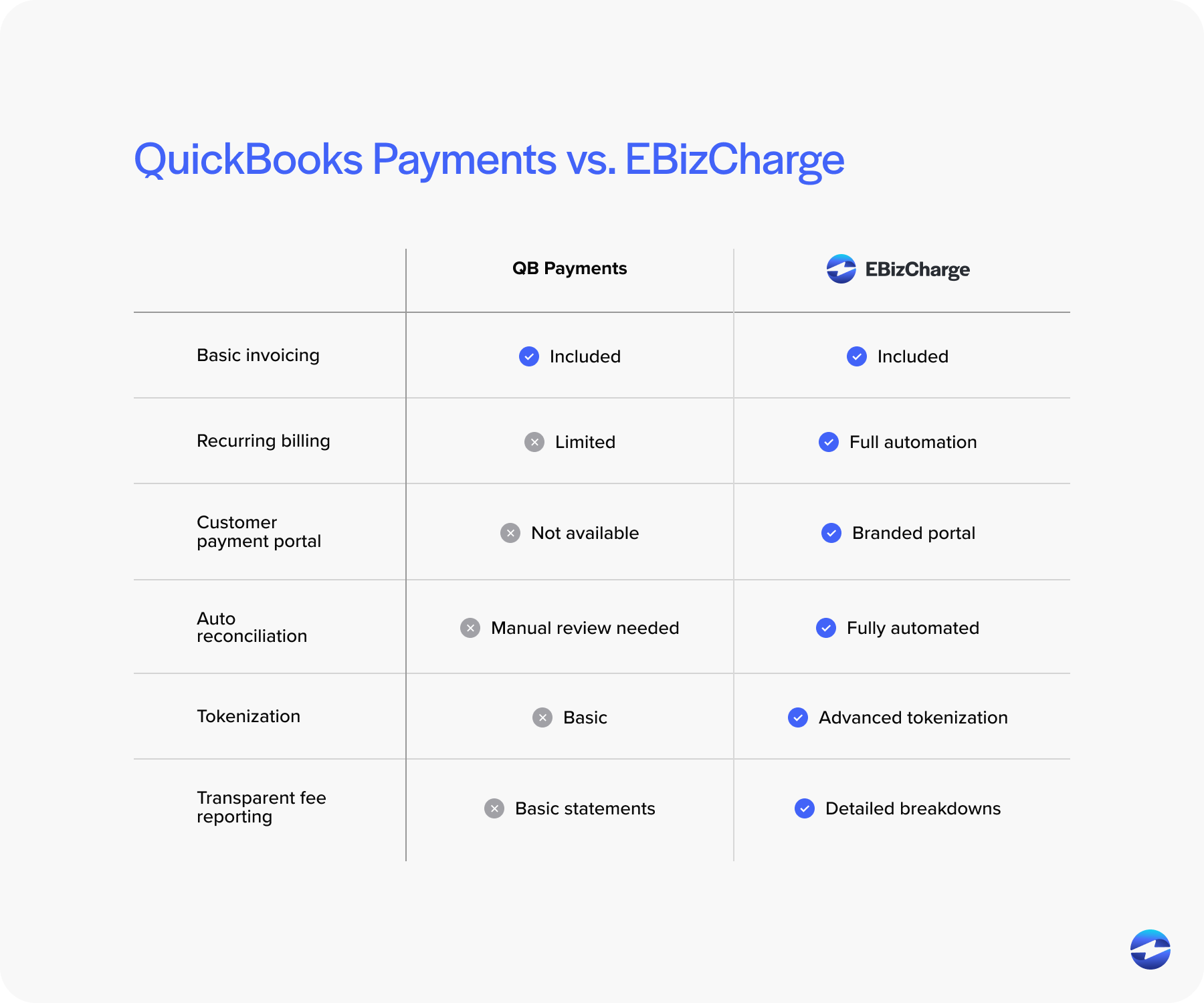
Beyond pricing, EBizCharge includes tools built for modern workflows: tokenized card storage, recurring billing, customizable customer payment portals, and multi‑entity support. All of these enhancements reduce manual work and improve cash‑flow visibility without forcing teams to adopt a new accounting system.
This combination of lower costs and stronger automation is why many businesses move away from QuickBooks Payments toward a more efficient payment processing solution.
How to Choose the Right Setup for Your Business
There’s no perfect formula, but most businesses benefit from stepping back and evaluating a few key indicators:
- Are payment fees rising faster than revenue?
- Is reconciliation taking too much time each month?
- Are customers asking for more flexible payment methods?
- Does your team need stronger automation or more control over posting rules?
If you answered yes to any of these, your processor—not QuickBooks—may be slowing you down. The right payment processor will feel like an extension of your accounting workflow, not an obstacle you need to work around.
Implementation Tips for QuickBooks Payment Processing
Setting up or switching your QuickBooks Payment setup doesn’t have to be stressful. A smooth rollout usually includes:
- Verifying integration settings and user permissions
- Testing credit card and ACH transactions in a controlled environment
- Reviewing posting rules for accuracy
- Communicating changes to customers, especially if introducing a new payment portal
If migrating from QuickBooks Payments to a third‑party option, it’s smart to run both systems in parallel briefly. This ensures that the new payment gateway or processor syncs correctly before you make a full transition.
A thoughtful setup makes a meaningful difference in how effective your QuickBooks payment processing becomes.
Moving Forward with Confidence
QuickBooks gives businesses a strong accounting foundation, but the payment system you layer on top of it determines how efficiently you get paid, how predictable your fees are, and how much manual work your team takes on. You’re not limited to the default tools.
Whether you’re exploring QuickBooks payment options for the first time or rethinking your existing workflow, remember that the best system is the one that supports your growth, reduces friction, and keeps your books clean.
Take the time to evaluate your current setup, compare alternatives like EBizCharge, and choose a payment path that helps QuickBooks work the way you always hoped it would.