Blog > Better Alternatives to QuickBooks Merchant Services
Better Alternatives to QuickBooks Merchant Services
Choosing a payment processor inside QuickBooks should feel straightforward, but for many businesses, it becomes one of those areas that gets more complicated the longer you use the system. Maybe you start with QuickBooks Merchant Services because it was already there, already familiar, and didn’t require much setup. It lets you accept payments quickly, connect your accounts, and move on with your day.
But as your organization grows, you begin noticing the cracks. Fees climb as volume increases. Reconciliation takes more time. ACH tools don’t feel as cost-friendly as you expected. Refunds don’t always sync as cleanly as they should. Before long, many teams start asking the same question: is there a better alternative to QuickBooks for payment processing—one that still works seamlessly inside the system but solves the pain points QuickBooks can’t?
If you’re reading this, you’ve likely reached that point. And you’re not alone.
This guide explores why so many companies move away from QuickBooks Payments and what they choose instead. It’ll break down the real costs, the workflow challenges, the gaps in automation, and how third-party tools—especially native QuickBooks integrations—can turn a clunky payment setup into something significantly smoother.
Why QuickBooks Users Eventually Look for Alternatives
Most teams don’t start out searching for a new payment processor. They just want QuickBooks to work the way it’s advertised: simple, automated, and cost-effective. And in the early days, it often is. For new or small businesses, the built-in tools feel intuitive. You send an invoice, a customer pays, and QuickBooks payment processing logs it into the ledger.
But the more your payment volume grows, the harder it becomes to overlook the gaps. Maybe your monthly statements suddenly feel unpredictable because your invoice sizes have increased. Maybe your finance team spends more time cleaning up posting errors. Or maybe you simply outgrow what QuickBooks merchant services can automate.
These pain points tend to appear gradually, but once they do, they don’t go away. Businesses often notice:
- Percentage-based fees that cut deeper into margins as invoice sizes climb.
- Extra charges for ACH, certain card types, or card-not-present transactions.
- Slower or inconsistent syncing between payments and invoices.
- Manual steps required for refunds, partial payments, or multi-entity workflows.
None of this means QuickBooks is a weak accounting system. In fact, QuickBooks ERP environments still support millions of companies reliably. The challenge is that the built-in processor simply isn’t designed for growing organizations that need stronger automation and more predictable pricing.
The Limitations of QuickBooks Merchant Services
Let’s break down where the limitations tend to appear most clearly.
1. Cost Structure
The flat-rate pricing model seems straightforward at first, but it becomes expensive for companies processing larger invoices or heavy monthly volume. Even QuickBooks Online Payments via ACH—which should be the cheapest payment method—comes with fees that dilute savings.
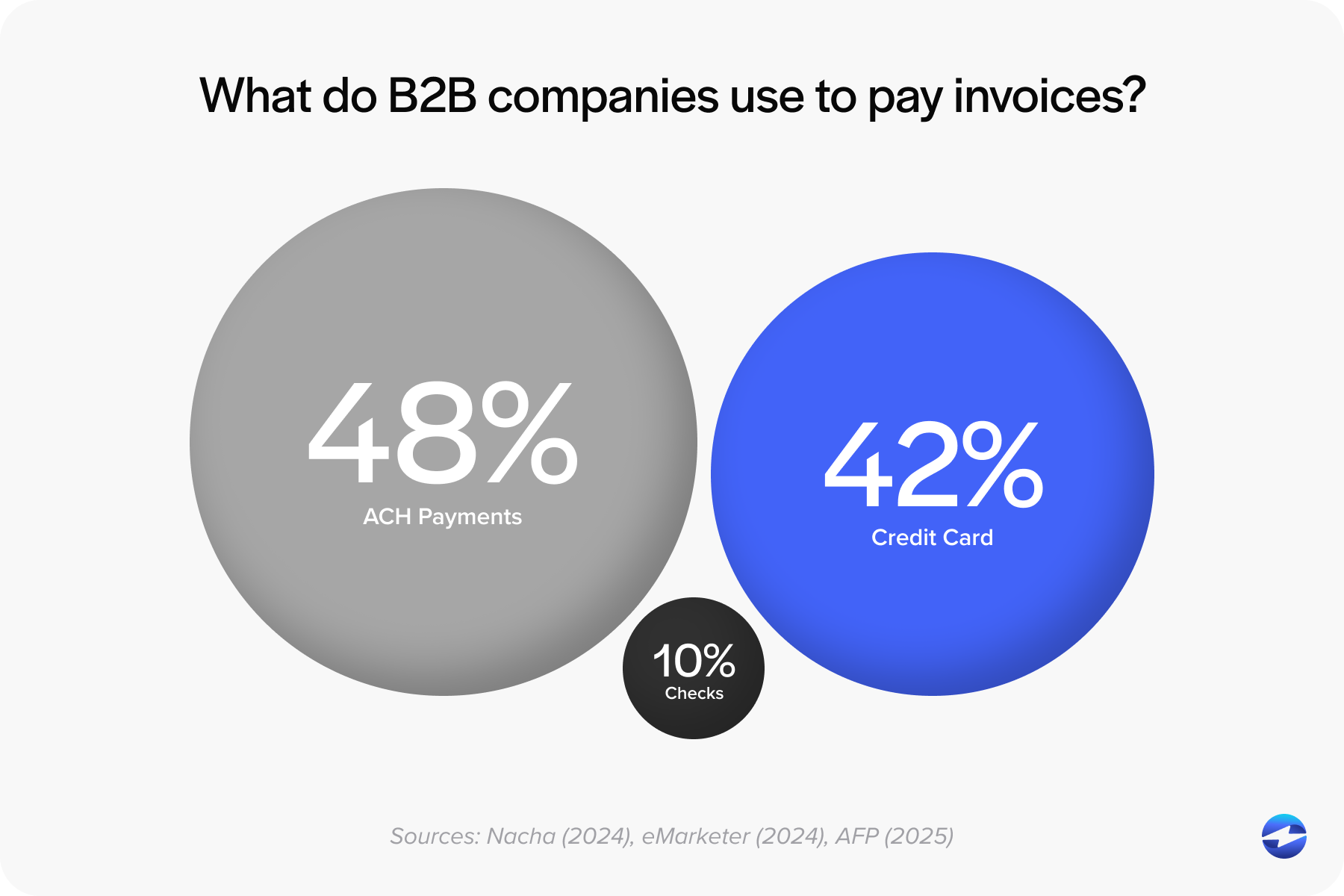
As organizations grow, this often becomes the top reason they start exploring lower-cost options.
2. Workflow Bottlenecks
QuickBooks’ built-in tools work smoothly for basic invoicing, but they don’t scale well for:
- Recurring billing
- Multi-entity accounting
- B2B transactions requiring Level 2/3 data
- Stored payment profiles and subscription-based payments
This leaves accounting teams with more manual clean-up work than expected.
3. Limited Automation
QuickBooks can only automate what the processor behind it can handle. When the processor lacks deep posting controls, refund mapping, or robust reconciliation, the accounting team takes on the extra work.
4. Slower Support for Complex Use Cases
As soon as payments need to support more complicated workflows—such as deposits across different departments, franchise structures, or multi-location operations—the limitations of QuickBooks merchant account tools become apparent.
What Businesses Actually Need from a Payment Processor
By the time companies start exploring new options, their needs are usually pretty clear. They’re not just searching for lower fees—they’re looking for a payment processing solution that matches how modern businesses operate inside QuickBooks.
Most teams want:
- More predictable pricing that scales with their business.
- Stronger support for recurring payments and ACH billing.
- Real-time syncing and fewer manual adjustments.
- Customer portals that feel professional and easy to use.
- Robust security that includes tokenization and encryption.
- A QuickBooks integration that stays stable and accurate over time.
In short, businesses want a processor that improves QuickBooks—not one they constantly have to work around.
How to Evaluate Better Alternatives to QuickBooks Merchant Services
When businesses begin searching for new options, they usually compare three types of payment setups: merchant accounts, gateway-plus-merchant combinations, and fully integrated QuickBooks processors.
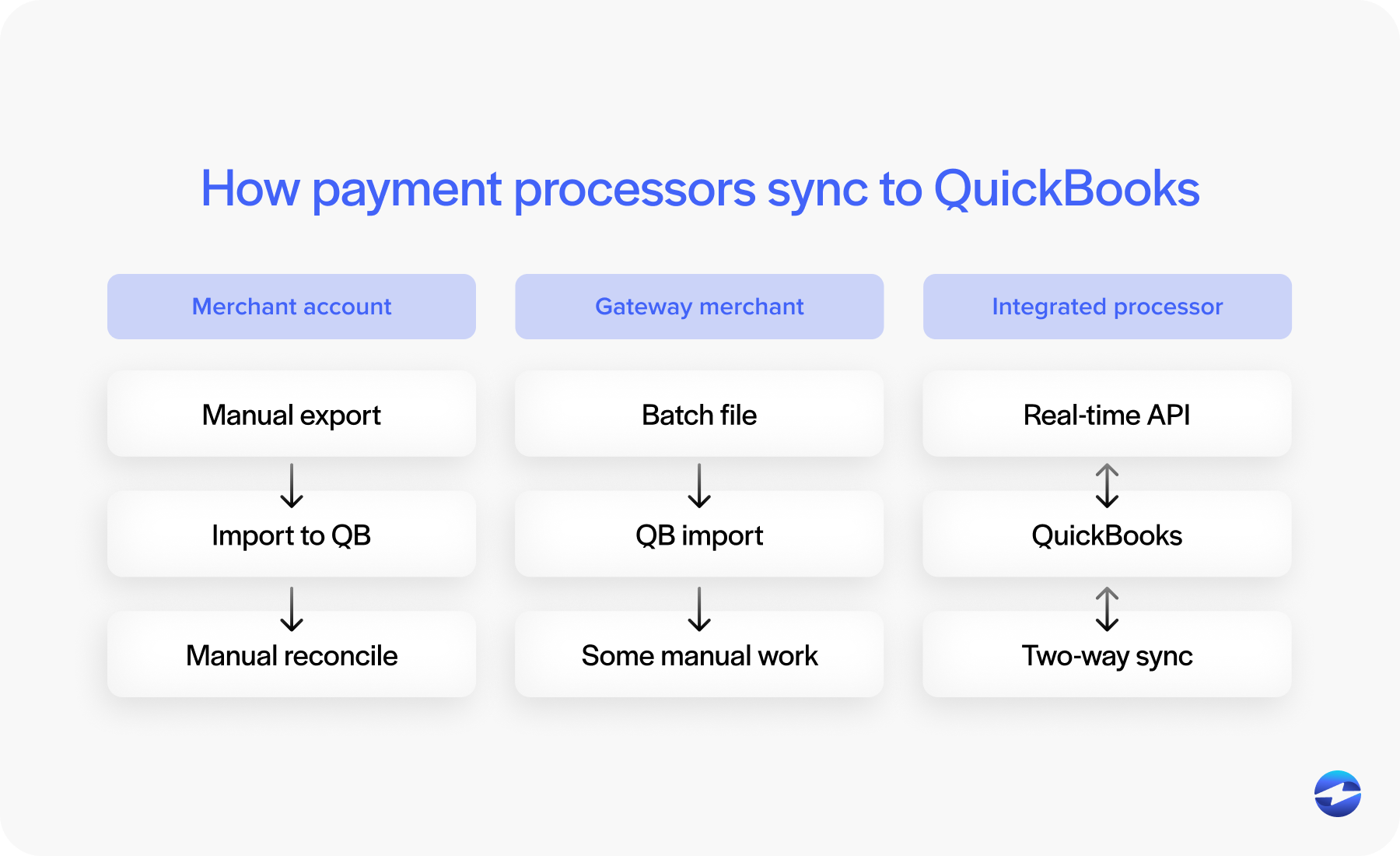
Merchant accounts can offer great rates, but often require more manual accounting work unless paired with a strong integration. Gateway setups offer flexibility but may introduce extra steps like batching or exporting payment files.
Fully integrated processors, however, tend to provide the best balance. They combine competitive pricing with powerful automation and clean syncing directly into QuickBooks. For most businesses, this combination ends up delivering the best long-term value.
QuickBooks Payments vs. EBizCharge: A Practical Comparison
Among the stronger alternatives, EBizCharge consistently comes up because it does something many processors don’t: it behaves like it was built for QuickBooks, not just loosely connected to it. It fits seamlessly into the accounting flow, updating records in real time and reducing the friction that teams often experience with loosely integrated tools.
Another notable feature is EBizCharge’s pricing model. While QuickBooks Payments keeps pricing flat and simple, EBizCharge uses interchange-optimized pricing—meaning transactions automatically route through the lowest-cost categories. For most companies, this immediately reduces total processing expenses.
EBizCharge also offers:
- Real-time payment posting
- Level 2/3 data for B2B cost reductions
- Lower-cost ACH processing
- Tokenized card storage
- Recurring billing tools
- A customizable QuickBooks payment link and branded payment portal
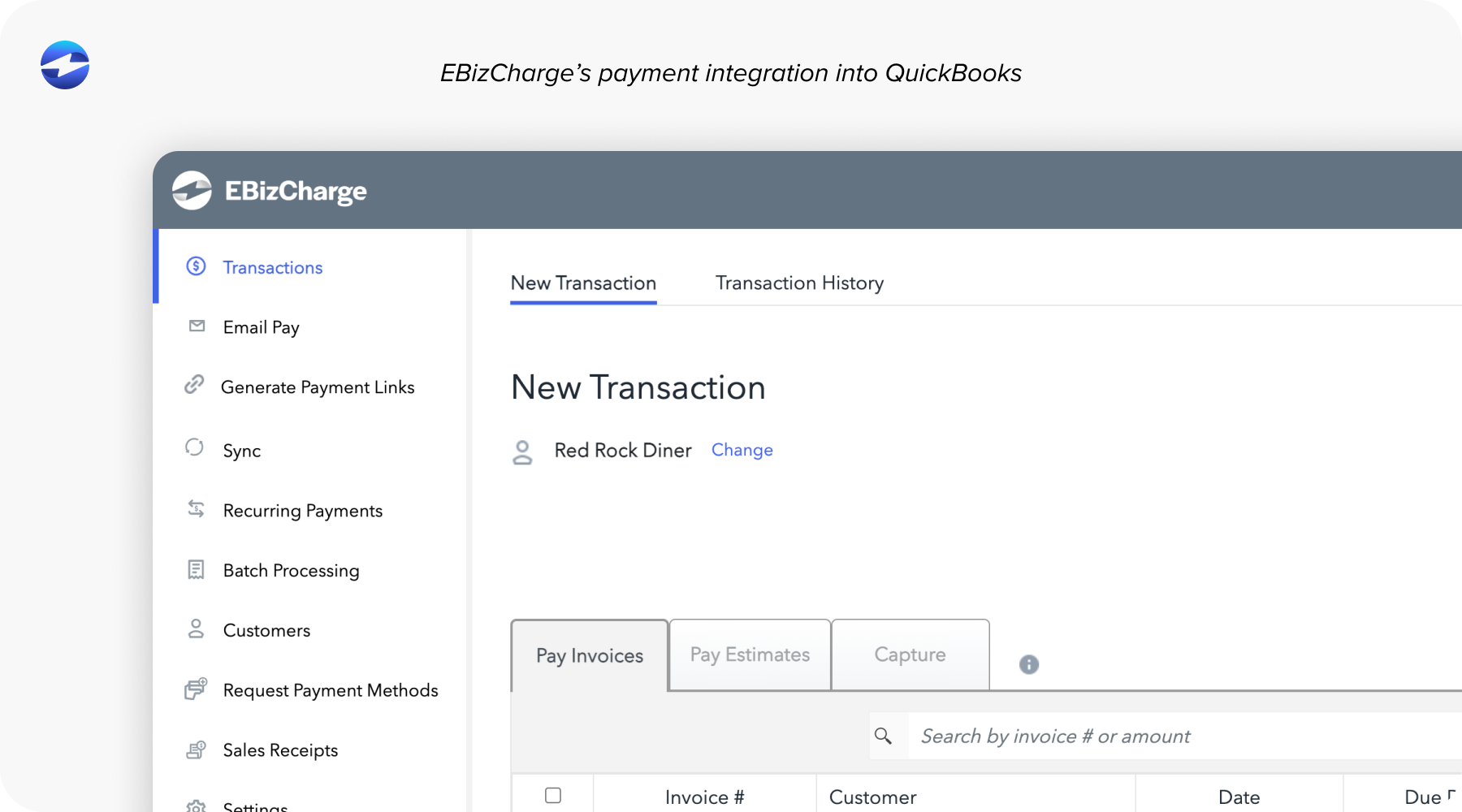
The difference shows up quickly in everyday workflows. Invoices update instantly, refunds sync cleanly, payment data is more accurate, and reconciliation becomes something the system handles for you, not something your accounting team spends hours fixing.
Choosing the Right Solution for Your QuickBooks Workflow
Picking the right processor comes down to more than pricing. It’s about finding a tool that supports your processes instead of forcing you into rigid workflows.
Businesses often ask themselves questions like:
- Are our payment fees rising faster than our revenue?
- Are we spending too much time reconciling payments?
- Do we need stronger ACH capabilities?
- Is our processor limiting our ability to automate billing?
- Are we confident in our PCI compliance setup?
If any of these sound familiar, it’s a strong sign you’ve outgrown QuickBooks Payments Online and need a processor that can support your next stage of growth.
A good payment processor should feel almost invisible. It should handle fee optimizations, compliance requirements, posting rules, and automation while your team focuses on financial strategy.
Finding The Best Payment System for Your Business
QuickBooks remains one of the most trusted accounting platforms for small and mid-size businesses. But its built-in processor isn’t always the most economical or efficient choice for long-term growth. Once businesses grow beyond simple invoicing, they often need deeper automation, lower ACH rates, more secure card storage, and predictable monthly statements.
That’s where exploring a strong alternative to QuickBooks—especially one with robust automation, real-time syncing, and secure QuickBooks integration—becomes imperative. With the right system in place, QuickBooks becomes more powerful, not more complicated. These days, upgrading your payment workflow isn’t about abandoning QuickBooks. It’s about choosing a processor that finally brings out the best in it.