
Templates | Bank Reconciliation
Bank Reconciliation Template
Bank Reconciliation Template
Looking for a free bank reconciliation template? Download our free Excel spreadsheet to compare your book balance to your bank statement, track outstanding checks and deposits in transit, and reconcile your accounts in minutes. Works for monthly or weekly reconciliation.

Download our bank reconciliation template to streamline your accounting!
Download now to keep your finances in check, catch errors early, and avoid costly mistakes! Our Simple Excel bank reconciliation template ensures your financial records match your bank’s, helping you stay on top of cash flow and spot any discrepancies quickly.
Bank reconciliation might sound like a formal accounting chore, and unfortunately, it sort of is. At the end of the day, it’s just about making sure your records match what the bank says happened. Whether you’re running a business or managing your organization’s finances, reconciling your accounts regularly helps you catch errors, spot fraud, and keep your books accurate.
If you’ve ever looked at your bank statement and thought, “Wait, that’s not what I have in my spreadsheet,” then you already get why this matters.
What is a bank reconciliation?
Bank reconciliation is the process of comparing a company’s internal financial records with those of its bank account to ensure they match. This helps identify discrepancies such as missing payments, errors in the bank’s records, or mistakes in the company’s accounting. Essentially, it’s a way to confirm that the balance on your company’s books is in harmony with what the bank says you have.
Imagine this: You’re about to write a check for a new project, but when you look at your account balance, it seems off. You know you’ve had several expenses recently, but some payments haven’t appeared in your records yet. By reconciling your bank account, you can figure out exactly where those differences come from, ensuring that your balance is accurate before making any decisions.
Why is this important? Accurate bank reconciliation helps prevent fraud, spot errors, and avoid any surprises in your finances. It gives business owners a clearer picture of their financial health, which is crucial for making informed decisions.
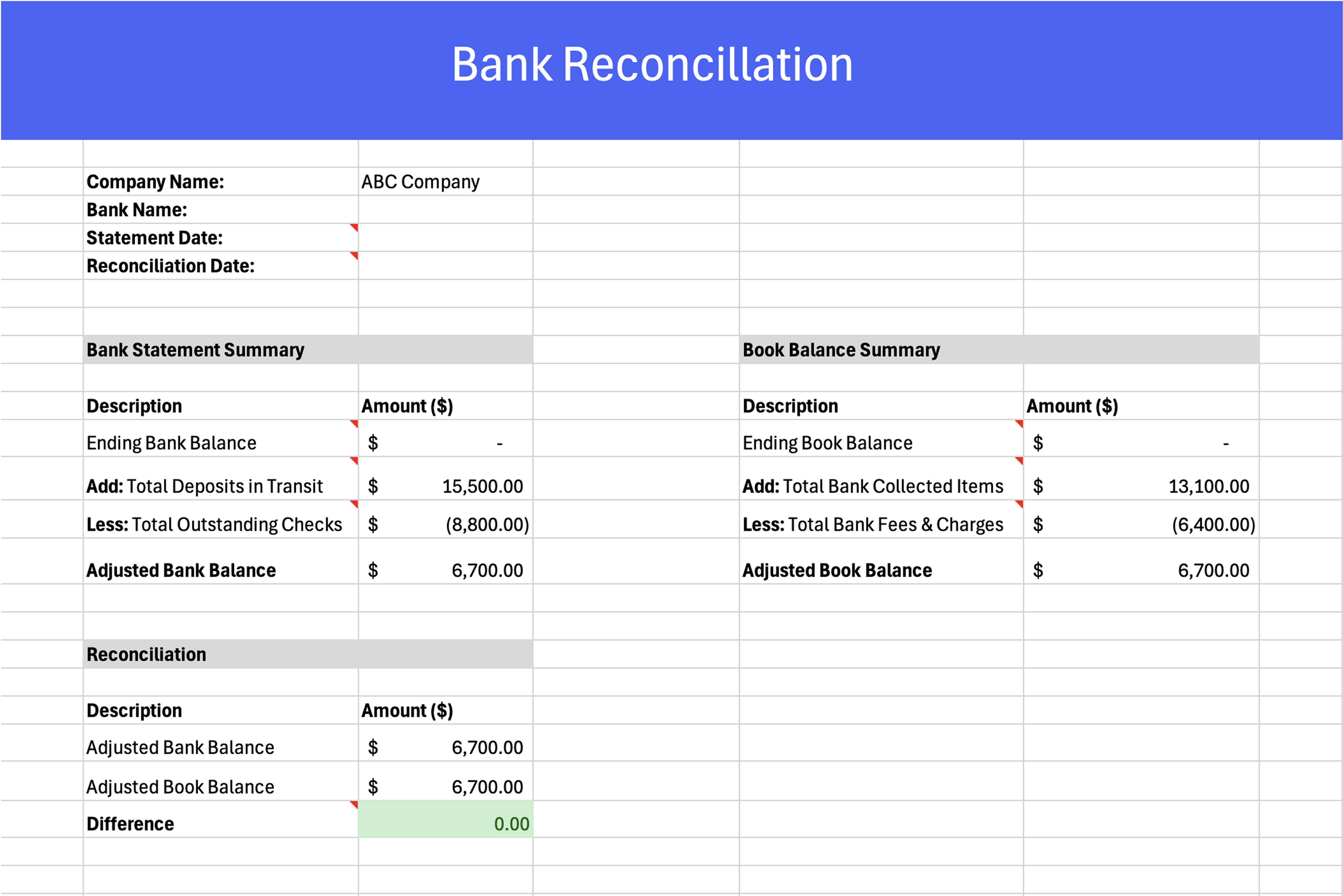
What is a bank reconciliation statement (BRS)?
You’ll sometimes hear the term “BRS” thrown around in accounting circles, especially in international contexts. BRS stands for bank reconciliation statement, and it’s really just a more formal way of referring to the document you produce at the end of the reconciliation process. The BRS lays out the adjusted balances from both your internal books and the bank’s records side by side, with a clear list of every item that caused a difference between the two.
Think of it as the finished product. The reconciliation itself is the process of comparing everything. The BRS is the document that captures what you found and how the numbers were resolved. Most companies that go through a regular reconciliation process end up with some version of a BRS, whether they call it that or not.
If you’re using a template to do your reconciliation in Excel, the completed spreadsheet effectively becomes your BRS. Some businesses keep these on file for auditing purposes, and it’s a good habit to save a copy each period regardless of whether you’re required to.
How to do a bank reconciliation?
It’s not as complicated as people think. It’s mostly a matter of comparing two sources of truth: your internal records (like your accounting software or check register) and the bank statement for the same time period. Here’s a step-by-step walkthrough:
Step 1: Gather your documents
You’ll need:
- Your internal records (this could be from QuickBooks, Excel, or wherever you track transactions)
- The bank statement for the period you’re reconciling (monthly is most common)
It helps if you’ve already entered all transactions up to the statement’s end date. If not, go ahead and do that first.
Step 2: Check off matching transactions
Start by going down the bank statement and checking each transaction against your records. For every deposit or withdrawal, look for a match in your books. If it’s there and the amount is correct, check it off.
This step is where the detailed transaction list becomes really important. Your bank statement will usually show a breakdown of every payment, deposit, and fee that cleared during the period. On your side, your accounting records should reflect the same activity. Reconciling these line by line helps you catch timing issues or missed entries early on.
Here’s an example of what those detailed transactions typically look like in a bank reconciliation
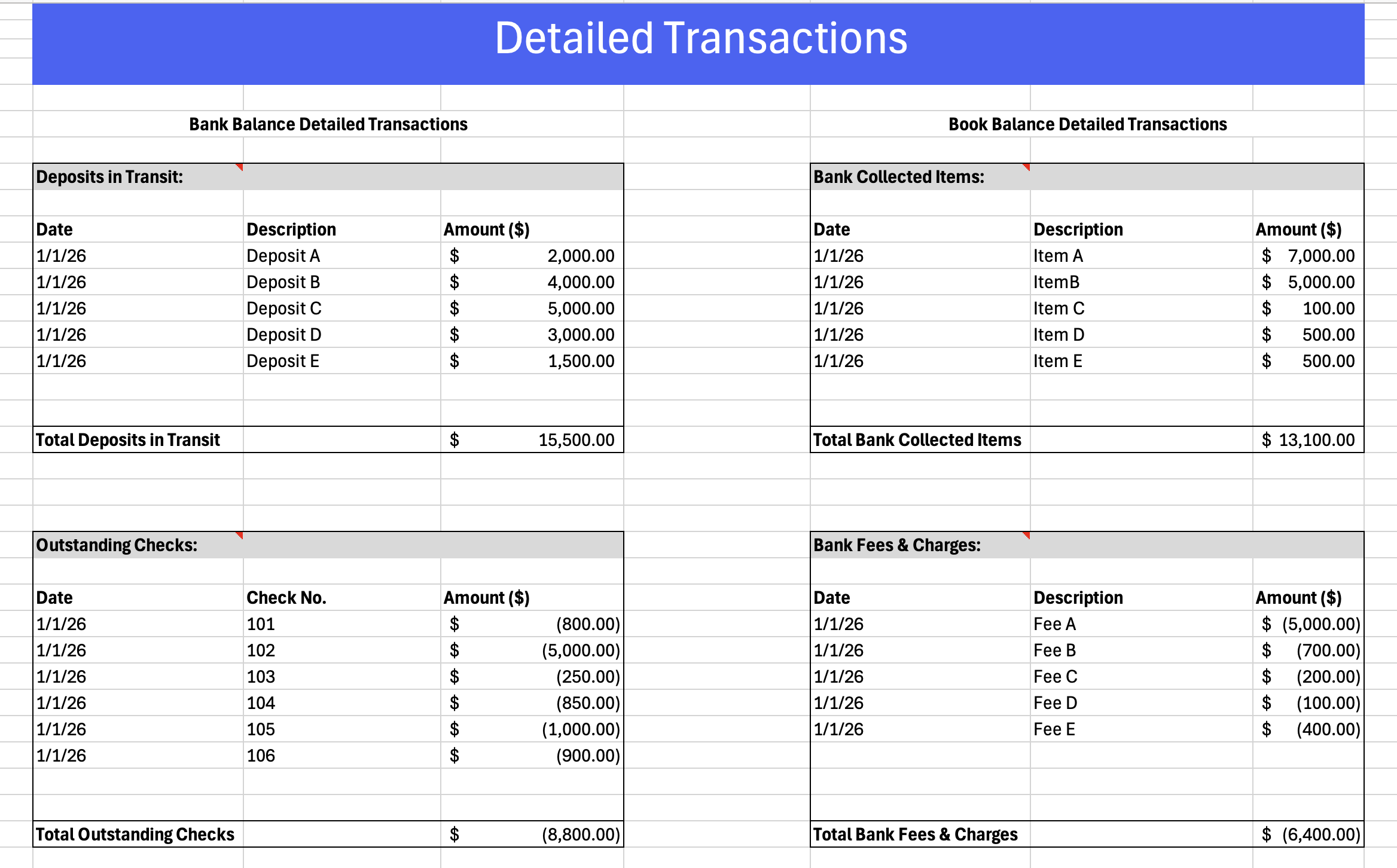
Some people like to do this manually with a printed copy and a highlighter. Others do it right inside accounting software, which often has built-in reconciliation tools.
Step 3: Note any discrepancies
There will probably be a few. Common ones include:
- Checks you wrote that haven’t cleared yet
- Deposits in transit (you recorded it, but the bank hasn’t yet)
- Bank fees, interest, or automatic charges you didn’t enter
Make a list of anything that doesn’t match. Sometimes it’s just a timing issue. Other times, it’s something you missed—or a bank error that needs following up.
Step 4: Adjust your records
Once you’ve spotted the differences, go ahead and make any needed corrections in your books:
- Add missing transactions (like a bank fee you forgot to log)
- Fix data entry mistakes (maybe you flipped two numbers in a deposit)
- Flag anything suspicious or unexpected for review
You don’t want to force the numbers to match—you want to understand why they don’t and fix the underlying issue.
Step 5: Compare ending balances
Now look at your adjusted book balance and compare it to the bank’s ending balance. After accounting for outstanding checks or deposits in transit, the numbers should match.
If they don’t, double-check your math and walk through the reconciliation again. Even a small typo can throw it off.
How often should you reconcile? Weekly vs. monthly
Most businesses reconcile their bank accounts once a month, usually after the bank statement closes. For a lot of small to mid-size companies, monthly is plenty. It gives you enough time to gather all the transactions without letting things pile up so long that errors become hard to trace.
But monthly reconciliation isn’t always frequent enough. If your business processes a high volume of transactions, or if cash flow is tight enough that you need to know your exact position throughout the month, weekly reconciliation can be worth the effort. With weekly reconciliation, you’re essentially doing the same process on a shorter cycle. You pull the transactions for that week, compare them against your records, and note anything that doesn’t match.
The trade-off is time. Weekly reconciliation catches problems faster, which means fewer surprises at the end of the month. But it also means someone on your team is spending more time on it. For businesses with a small accounting team, that’s a real consideration.
Here’s a general way to think about it:
| Factor | Monthly works fine | Consider weekly |
|---|---|---|
| Transaction volume | Under ~200 per month | Several hundred or more |
| Cash flow sensitivity | Comfortable buffer | Tight margins or variable revenue |
| Payment types | Mostly checks and ACH | Mix of cards, ACH, checks, and wire transfers |
| Error frequency | Rare discrepancies | Regular issues with missing or duplicate entries |
| Team size | Dedicated bookkeeper or accountant | Shared responsibility or lean staff |
There’s no single right answer. Some businesses reconcile daily during busy periods and monthly during slower ones. The point is that you’re doing it consistently, whatever the cadence. Letting reconciliation slide for two or three months is where real problems start to build up.
Bank reconciliation example
Bank reconciliation example
Let’s walk through a more detailed example so you can see how the pieces come together. Say your company’s internal records show an ending cash balance of $12,400 for the month of March. Your bank statement, however, shows $13,150.
That $750 gap needs to be explained. Here’s what you find when you start digging:
On the bank’s side:
There are two outstanding checks that you wrote but the bank hasn’t processed yet. Check #4052 for $900 to a vendor, and check #4058 for $350 to a contractor. Together, that’s $1,250 in checks the bank doesn’t yet reflect.
There’s also a deposit you made on March 30 for $2,000 that won’t show up on the bank statement until April 1. That’s a deposit in transit.
On your side:
The bank charged a $25 monthly service fee and a $15 wire transfer fee that you didn’t record in your books. There’s also $60 in interest income that the bank credited to your account, which you haven’t logged yet.
Here’s how the reconciliation looks when you lay it all out:
| Item | Amount |
|---|---|
| Bank statement balance | $13,150 |
| Less: Outstanding check #4052 | -$900 |
| Less: Outstanding check #4058 | -$350 |
| Add: Deposit in transit (March 30) | +$2,000 |
| Adjusted bank balance | $13,900 |
| Item | Amount |
|---|---|
| Book balance (your records) | $12,400 |
| Less: Bank service fee | -$25 |
| Less: Wire transfer fee | -$15 |
| Add: Interest income | +$60 |
| Adjusted book balance | $12,420 |
Wait. $13,900 doesn’t match $12,420. That means there’s still a $1,480 difference to track down.
You go back through the transactions and find that a customer payment of $1,480 was deposited into the bank account on March 22, but nobody recorded it in the accounting system. Once you add that to your books, the adjusted book balance becomes $13,900, and now both sides match.
A closer look at outstanding checks
Outstanding checks tend to be the most common reconciling item. They’re checks you’ve written and mailed (or handed out), but the recipient hasn’t deposited them yet, or the bank is still processing them.
This creates a gap because your records show the money as spent the moment you wrote the check, but the bank still shows those funds as available. A few outstanding checks at the end of each period is normal. But if you have checks that have been outstanding for 60, 90, or even 120 days, that’s worth investigating. The recipient may have lost the check, or it may have been sent to the wrong address. Some businesses set a policy to void and reissue checks that haven’t cleared after 90 days.
Keeping a running list of outstanding checks in your reconciliation template makes it easier to carry them forward from month to month and spot anything that’s been hanging around too long.
Bank reconciliation format
If you’re new to this or just want to make sure you’re following a clear structure, here’s a simple bank reconciliation format you can use. Most formats include:
- Date of reconciliation
- Opening balance (according to your records)
- Additions (e.g., deposits in transit)
- Subtractions (e.g., outstanding checks, bank fees)
- Adjusted book balance
- Bank statement ending balance
- A place to list and explain any discrepancies
You can recreate this in a spreadsheet, or download a bank reconciliation template to get started. The format doesn’t have to be complicated—it just needs to help you clearly compare and match your internal records with the bank’s records.
What to look for in a bank reconciliation template for Excel
There’s no shortage of bank reconciliation templates floating around online, and most of them will get the job done at a basic level. But if you’re going to rely on one regularly, it’s worth knowing what separates a useful template from one that creates more work than it saves.
A solid Excel bank reconciliation template should have a few things built in.
- First, you want a clear area at the top for entering the statement period, the account name, and the opening balances for both the bank and your books. This is where you set the foundation for the rest of the reconciliation.
- Below that, there should be a detailed transaction section with columns for the date, description, check or reference number, debits, credits, and a status column to mark whether each item has been matched. This part of the template is where you’ll spend most of your time, so it needs to be easy to scan. If you’re dealing with hundreds of transactions per month, readability matters a lot more than fancy formatting.
- You also want a built-in section that calculates your adjusted balances automatically. The whole point of using a template instead of doing this on paper is letting the spreadsheet handle the math. If you’re manually adding things up at the bottom, you might as well not use a template at all.
- Finally, look for a spot to note outstanding items. Things like checks that haven’t cleared, deposits in transit, or bank fees you haven’t recorded yet. Having these broken out in their own section makes it much easier to see why your two balances don’t match, and to verify that the differences are expected.
Here’s a quick reference for the fields your Excel template should include:
| Field | What it’s for |
|---|---|
| Statement Period | The date range being reconciled |
| Account name/number | Which account this applies to |
| Bank statement ending balance | The closing balance from the bank |
| Book balance (per your records) | Your internal ending balance |
| Transaction date | When each transaction occurred |
| Description | Payee name, memo, or purpose |
| Check/reference number | For tracking specific payments |
| Debit amount | Withdrawals, payments, and fees |
| Credit amount | Deposits and incoming payments |
| Cleared status | Whether the bank has processed the item |
| Outstanding checks | Checks you wrote that haven’t cleared |
| Deposits in transit | Deposits you recorded, but the bank hasn’t |
| Adjusted book balance | Your balance after corrections |
| Adjusted bank balance | Bank balance after accounting for outstanding items |
| Notes/discrepancies | Explanation of differences found |
If you’re working in Excel, you can also add conditional formatting to flag items that haven’t been cleared or to highlight discrepancies above a certain dollar amount. Small touches like that save time when you’re reconciling accounts with a lot of activity.
Other types of reconciliation templates
Bank reconciliation is the most common type, but it’s far from the only one. If you manage finances for a business, you’ve probably run into situations where you need to reconcile other kinds of records too. The good news is that the general concept is the same: you’re comparing two sources of information and making sure they agree. The details just change depending on what you’re reconciling.
Here’s a quick breakdown of the most common ones:
Account reconciliation
This is the broad category that bank reconciliation falls under. Account reconciliation applies to any general ledger account, not just your bank account. You might reconcile your accounts receivable, accounts payable, or even intercompany accounts. The goal is always the same: make sure the balance in your books matches whatever supporting documentation exists for that account. If you’re an accountant managing a full chart of accounts, you’re probably doing some form of account reconciliation on a monthly basis for several line items beyond just the bank.
Balance sheet reconciliation
A balance sheet reconciliation takes the process a step further by working through every account on your balance sheet, not just the bank. That includes things like prepaid expenses, fixed assets, accrued liabilities, and equity accounts. Most mid-size and larger companies do this monthly or quarterly as part of their close process. It’s more involved than a standard bank reconciliation, but the logic is the same. You’re verifying that the balance on the books is supported by real documentation.
Payment reconciliation
If your business accepts payments from customers, payment reconciliation is how you confirm that the amounts deposited into your account match what you actually charged. This comes up a lot with credit card processing. Your processor might batch settlements together or hold funds for a day or two, and the amounts that land in your bank account don’t always line up neatly with individual transactions. Payment reconciliation helps you sort through that and make sure nothing is missing or duplicated. For businesses processing a high volume of transactions, this one tends to be the most time-consuming if you’re doing it manually.
Invoice reconciliation
Invoice reconciliation is about matching your invoices to the payments you’ve received (or the bills you’ve paid, if you’re looking at the AP side). You’re checking that every invoice has a corresponding payment and that the amounts match. This is especially common in B2B environments where payment terms mean there’s a gap between when an invoice is issued and when it gets paid. If you’ve ever had a customer short-pay an invoice or pay two invoices with a single check, you know how messy this can get without a clear process.
Clearing account reconciliation
Clearing accounts are temporary holding accounts used to move money between two places. Payroll clearing accounts are a common example. You transfer funds into the clearing account, payroll runs, and then the account should zero out. Reconciling a clearing account means verifying that it does, in fact, end up at zero (or very close to it). If there’s a remaining balance, something didn’t process correctly and needs to be tracked down.
Billing reconciliation
Billing reconciliation is the process of comparing what you billed your customers against what you actually delivered or what they were supposed to be charged. It catches overbilling, underbilling, and billing errors before they turn into disputes. Businesses with recurring billing, subscriptions, or usage-based pricing tend to run into this one frequently.
Each of these follows the same core pattern as a bank reconciliation. You’re comparing records, identifying differences, and resolving them. If you’re building out your reconciliation processes, starting with a solid bank reconciliation template and adapting it for other account types is a reasonable approach.
Reconcile monthly, take your time, and don’t rush the process. The more you do it, the more it becomes second nature. If something doesn’t add up, don’t just ignore it. You’ll learn a lot about your own financial system along the way.
Frequently Asked Questions
What is a bank reconciliation template?
A bank reconciliation template is a pre-built spreadsheet that gives you a structured layout for comparing your financial records to your bank statement. It includes fields for balances, transactions, cleared items, and adjustments so you’re not building the format from scratch every month.
How do I do a bank reconciliation in Excel?
Enter your bank statement’s ending balance and your book balance into the template. Check off each transaction that appears in both places. Note anything that shows up in one but not the other, like outstanding checks or bank fees. Adjust both balances for those items, and if the numbers match, you’re done.
What is the difference between a bank reconciliation and a balance sheet reconciliation?
A bank reconciliation only covers your bank account. A balance sheet reconciliation covers every account on your balance sheet, including accounts receivable, prepaid expenses, and accrued liabilities. Bank reconciliation is one piece of that larger process.
How often should a business reconcile its bank account?
Monthly is the standard, timed to when the bank statement closes. Companies with high transaction volumes or tight cash flow may benefit from weekly reconciliation. The key is doing it consistently.
What are outstanding checks in a bank reconciliation?
Outstanding checks are checks you’ve written and recorded in your books, but the bank hasn’t processed yet. They’re one of the most common reconciling items. A few each month is normal, but checks outstanding for 90+ days may need to be investigated.
Can I use a bank reconciliation template for multiple accounts?
Yes, but reconcile each account separately. Make a copy of the template for each bank account rather than combining them into one sheet.
What is a BRS format?
BRS stands for bank reconciliation statement. It’s the finished document that shows the bank balance and book balance side by side with all adjustments. If you’re using an Excel template, your completed spreadsheet is essentially your BRS.
Why doesn’t my bank reconciliation balance?
The most common causes are data entry errors, unrecorded transactions (bank fees, automatic payments), timing differences (deposits in transit, outstanding checks), and duplicate entries. Start by checking the largest dollar amounts first.
Manual bank reconciliation vs. automated reconciliation: which is better?
Manual reconciliation works well for lower transaction volumes. Automated reconciliation through accounting or payment software is better when you’re processing hundreds or thousands of transactions per month. Most businesses start manual and move toward automation as volume grows.

