

Blog > How to Set Up a Surcharge Program: A Step-by-Step Guide for Merchants
How to Set Up a Surcharge Program: A Step-by-Step Guide for Merchants

Surcharging is one of those things that sounds straightforward until you actually try to implement it. You decide you want to recover processing costs, you look into it, and suddenly you’re reading about network registration deadlines, state-by-state restrictions, disclosure language requirements, and card type detection logic. It’s a lot more structured than most merchants expect.
Merchants who launch a surcharge program without working through the setup properly tend to discover their gaps through customer disputes or compliance notices, which is a harder way to learn. This guide walks through every step, from the initial program decision to go-live testing, so you can implement credit card surcharging correctly the first time.
Step One: Choose Between a Surcharge Program and a Cash Discount Program
These two approaches are often lumped together, but they work differently and carry different compliance profiles.
A surcharge program adds a fee on top of your posted price when a customer pays by credit card. Your base price stays the same. Card users pay more. A cash discount program works the other way: your posted price already includes the cost of card acceptance, and customers who pay by cash, check, or ACH receive a discount off that price.
The distinction matters for a few reasons. Some states prohibit surcharging but permit cash discount programs, so your location may make the decision for you. Cash discount program setup also requires repricing your products or services to build the card cost into the base, which is a bigger operational change. Surcharging doesn’t require repricing, but it does require card network registration and stricter disclosure requirements.
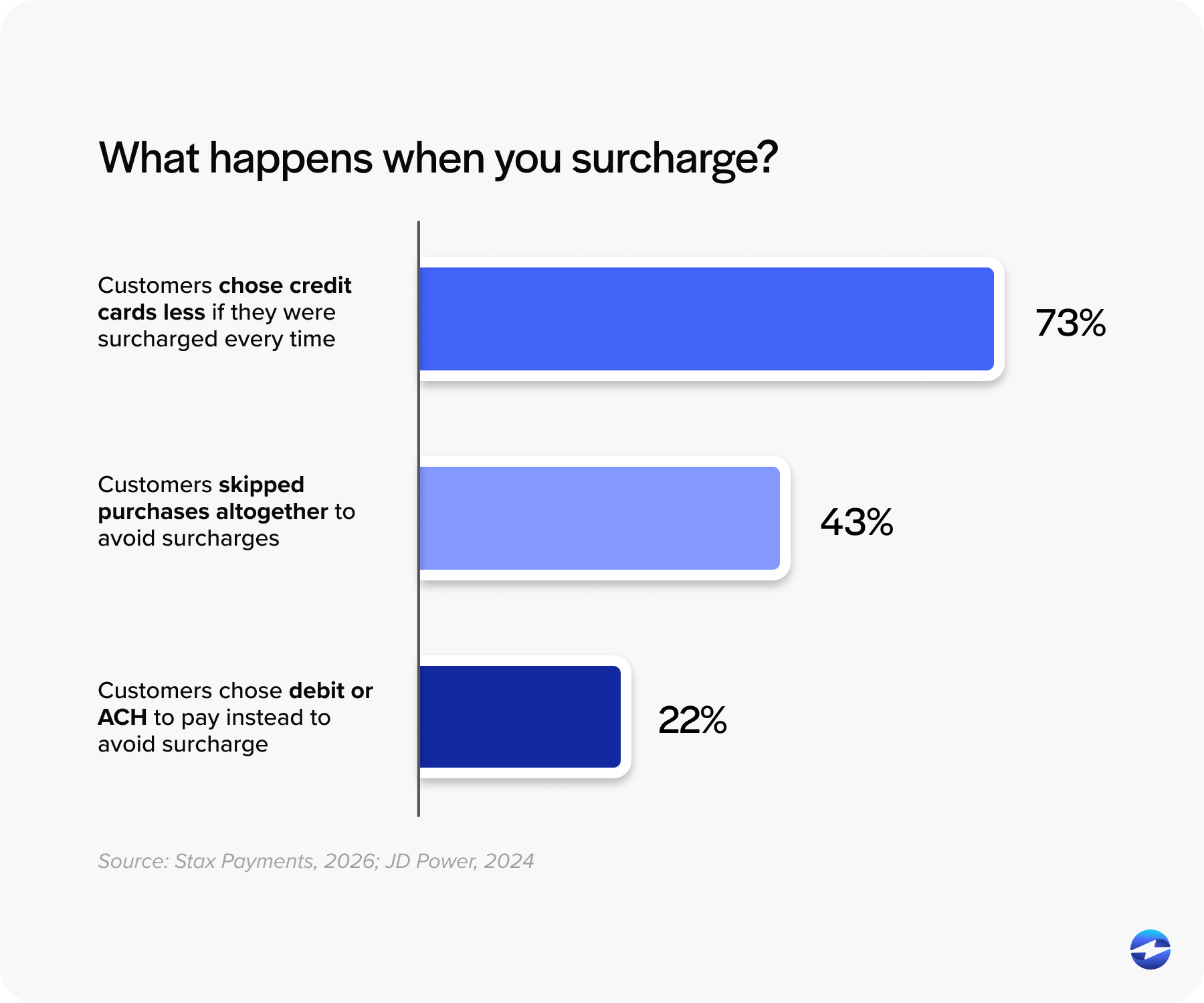
For B2B merchants with established customer relationships, surcharging credit cards tends to work well because buyers are accustomed to cost-driven fees and can plan around them. For consumer-facing businesses in competitive markets, the cash discount framing often lands better with customers. Neither is universally correct. Make the decision based on your customer base, your state, and your existing pricing structure, and document it before moving forward.
Step Two: Verify Surcharging Is Legal in Your State
This step has to happen before anything else. Several states prohibit credit card surcharging entirely or impose requirements that go beyond card network rules. State law is not overridden by Visa or Mastercard policy. If surcharging is prohibited where you operate, no network registration makes it legal.
For e-commerce merchants, this gets more complicated. The relevant state is where your customer is located, not necessarily where your business is headquartered. If you sell to customers across the country, you need a payment processing solution that can handle state-level restrictions automatically based on billing address data.
If surcharging is prohibited in your state, a cash discount program may still be an option. Consult your payment processor or legal counsel if you’re unsure about your specific situation.
Step Three: Register With the Card Networks
This is the step that catches most merchants off guard. Surcharging credit cards without registering first is a network rule violation, and it happens more often than it should simply because merchants don’t know the registration requirement exists.
Visa and Mastercard both require at least 30 days advance notice before your first surcharged transaction. Registration doesn’t go directly to the networks. It flows through your acquiring bank or payment processor, who submits it on your behalf. American Express follows the same general process. You’ll need your merchant ID, your intended surcharge percentage, and your planned start date.
The 30-day waiting period is not flexible. Use that time to complete the remaining setup steps in this guide.
Step Four: Set Your Surcharge Rate
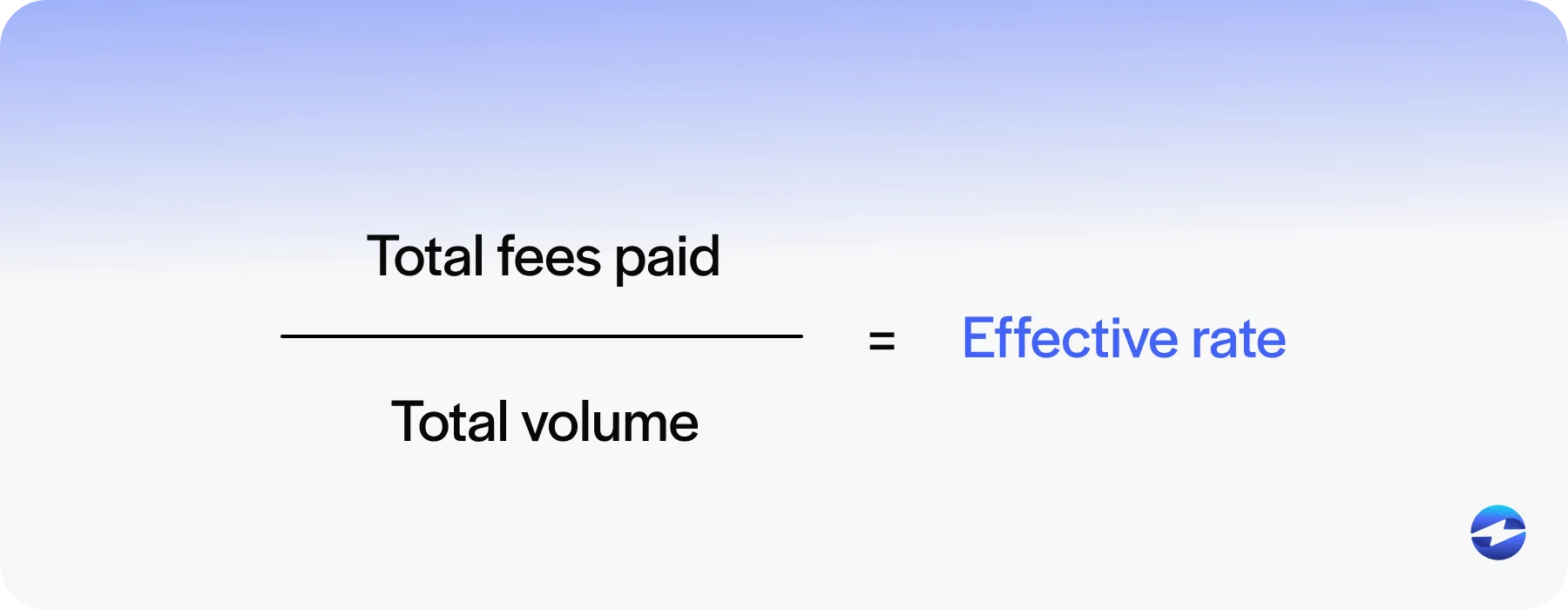
The surcharge cannot exceed your actual cost of card acceptance or the current network cap, whichever is lower. Visa and Mastercard currently cap surcharges at 3%. Your actual cost of acceptance is your total processing fees divided by your total card volume, typically averaged over the past 12 months.
Setting the rate at a round number without checking your actual cost is a common mistake. If your effective rate is 2.4% and you set your surcharge at 3%, you’re overcharging, which is a violation even if the amount seems small.
The same rate must also apply across all card brands. You can’t charge Visa customers 2.5% and Amex customers 3%. Consistency is required.
Review your surcharge rate at least once a year and whenever your processing agreement changes.
Step Five: Prepare Your Disclosures and Signage
Pre-transaction disclosure is a hard requirement, not a best practice. Customers must know about the surcharge payment before the transaction happens, not after.
For physical locations, signage goes at the store entrance and at the point-of-sale (POS) terminal. For e-commerce, the disclosure needs to appear on the checkout page before the customer submits payment. For B2B merchants using ERP-generated invoices or customer payment portals, the disclosure should appear on the invoice itself and on the payment screen before card entry.
Every receipt also needs to show the surcharge as its own labeled line item. Rolling it into the total without identifying it separately is a violation.
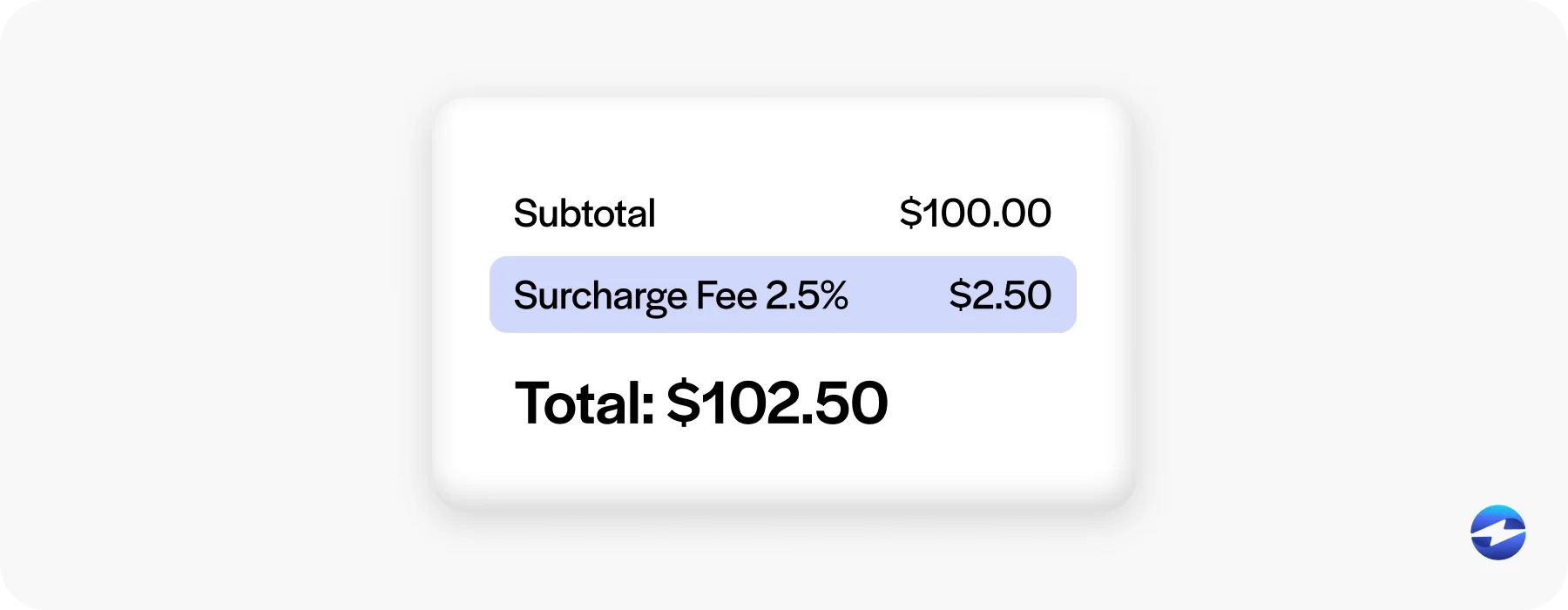
Verbal notice doesn’t count. Fine print buried in your terms and conditions doesn’t count. A notification that appears only on the receipt after the transaction is done doesn’t count. If you’re unsure whether your disclosure approach meets the standard, ask your payment processor to review it before launch.
Step Six: Configure Your Payment Software
For business owners, finance managers, AR teams, and controllers working through this setup, this is where the most operational work happens, and it’s also where the most things can go wrong if you’re using the wrong tool.
Surcharge credit card processing requires software that handles several things automatically. Card type detection has to run on every transaction, so debit and prepaid cards are never incorrectly surcharged. The surcharge rate needs to be locked in the system to prevent accidental overcharges. State-level restrictions need to suppress surcharging automatically for customers in prohibited states. The surcharge has to appear on receipts as its own line item. And in ERP environments, it needs to post to the general ledger without requiring manual entry from your AR team.
If your payment processing solution can’t clearly confirm all of those things, the configuration isn’t complete. A bolted-on or third-party surcharge tool often can’t, because it sits outside the system where your transaction data lives, pushing compliance decisions back onto your team.
Go through each item on that list with your payment processor before you flip the switch. If any answer is unclear, treat it as a no.
Step Seven: Train Your Team
Your front-line staff and AR team need to understand the surcharge program before it goes live, not after a customer complains.
Front-line staff should know what the surcharge is, which card types it applies to, and how to explain it calmly to a customer. They should also know what to do if a customer pushes back. Having a clear internal policy on whether surcharges can be waived prevents staff from improvising in the moment.
AR and billing teams need to understand how surcharges will appear on invoices, how they post to the GL, and what reconciliation looks like going forward. If surcharging is new to your operation, the first few weeks of transactions will involve questions. Answering them before they come up makes the transition smoother.
Step Eight: Test Before You Go Live
A surcharge applied incorrectly on the first real transaction is much harder to recover from than catching the problem in testing.
- Run a credit card test transaction and confirm the surcharge appears correctly on the receipt.
- Run a debit card transaction and confirm no surcharge is applied.
- Check that the surcharge posts as a separate line item in the GL.
- Walk through your checkout or payment portal flow and confirm the disclosure appears before payment submission.
- If you operate in multiple states, test a customer address in a prohibited state and confirm the surcharge is suppressed.
- Document the results before you launch. If a dispute or audit ever comes up, that documentation shows the configuration was verified before the program went live.
Step Nine: Keep It Current After Launch
How to add a credit card surcharge to your operation is only part of the answer. Keeping the program compliant over time is the other part.
Card network policies around surcharging update periodically. Your effective processing rate will drift over time, and your surcharge rate should reflect it. If you expand into new states or add new payment channels, your disclosure and restriction logic needs to cover those additions.
Working with a payment processor that monitors network rule changes and reflects them in the platform automatically takes most of this burden off your team.
Let EBizCharge Handle the Setup for You
Setting up a surcharge program correctly is manageable, so long as the steps are properly followed, and the quality of execution depends heavily on the payment processing solution and processor you’re working with.
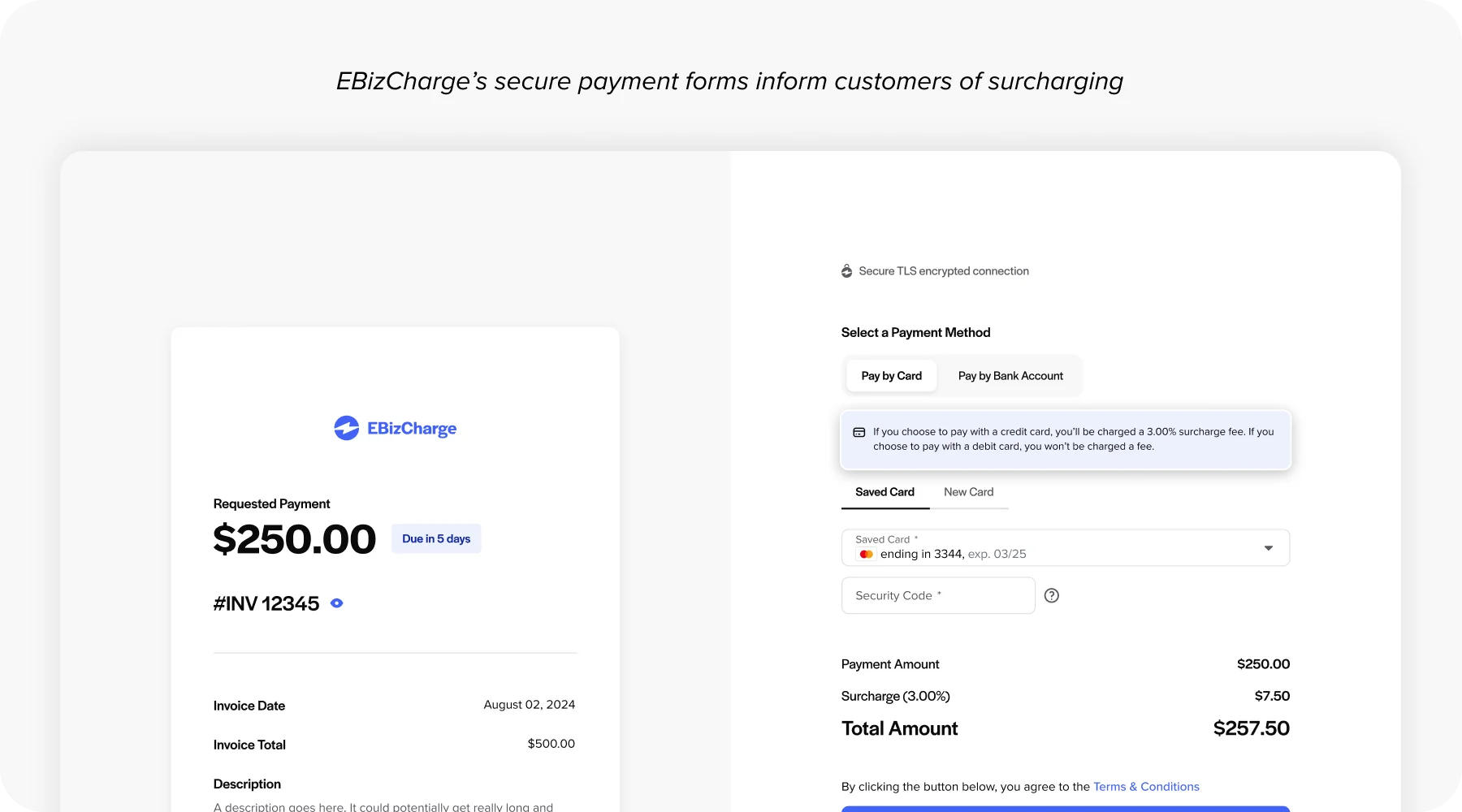
EBizCharge credit card processing feature handles card type detection, state-level restriction logic, surcharge rate enforcement, GL posting, and disclosure automation natively inside your ERP. Merchants who want to launch credit card surcharging without building a compliance framework from scratch have most of that work done for them.
If you’re ready to see how the setup works inside your specific ERP environment, request a demo. The process is more straightforward than it looks when the right tools are already in place.
- Step One: Choose Between a Surcharge Program and a Cash Discount Program
- Step Two: Verify Surcharging Is Legal in Your State
- Step Three: Register With the Card Networks
- Step Four: Set Your Surcharge Rate
- Step Five: Prepare Your Disclosures and Signage
- Step Six: Configure Your Payment Software
- Step Seven: Train Your Team
- Step Eight: Test Before You Go Live
- Step Nine: Keep It Current After Launch
- Let EBizCharge Handle the Setup for You