
Blog > Salesforce Accounts Receivable: AR Automation Guide
Salesforce Accounts Receivable: AR Automation Guide

Most companies use Salesforce to manage the entire sales cycle. Leads come in, opportunities move through the pipeline, deals close, and everything gets tracked on the account record. It’s a well-oiled machine right up until someone needs to send an invoice and collect a payment.
That’s usually where the process falls apart. The deal closes in Salesforce, and then the billing team switches to a completely different system to generate the invoice. Payment status lives in accounting software that sales never sees. Follow-up on past-due balances happens through spreadsheets and email threads that no one else can access. The result is a gap between closing the deal and actually getting paid, and that gap costs real money.
The good news is that Salesforce accounts receivable management doesn’t have to work this way. With the right setup and the right integrations, you can automate the AR process directly inside Salesforce and give your team a single platform for tracking invoices, collecting payments, and following up on outstanding balances.
Why AR Still Lives Outside Salesforce at Most Companies
Salesforce was originally built as a CRM, not an accounting tool. So, it makes sense that most teams never think of it as a place to manage accounts receivable. Invoicing, payment collection, and aging reports have traditionally lived in standalone platforms like QuickBooks, Sage, or NetSuite.
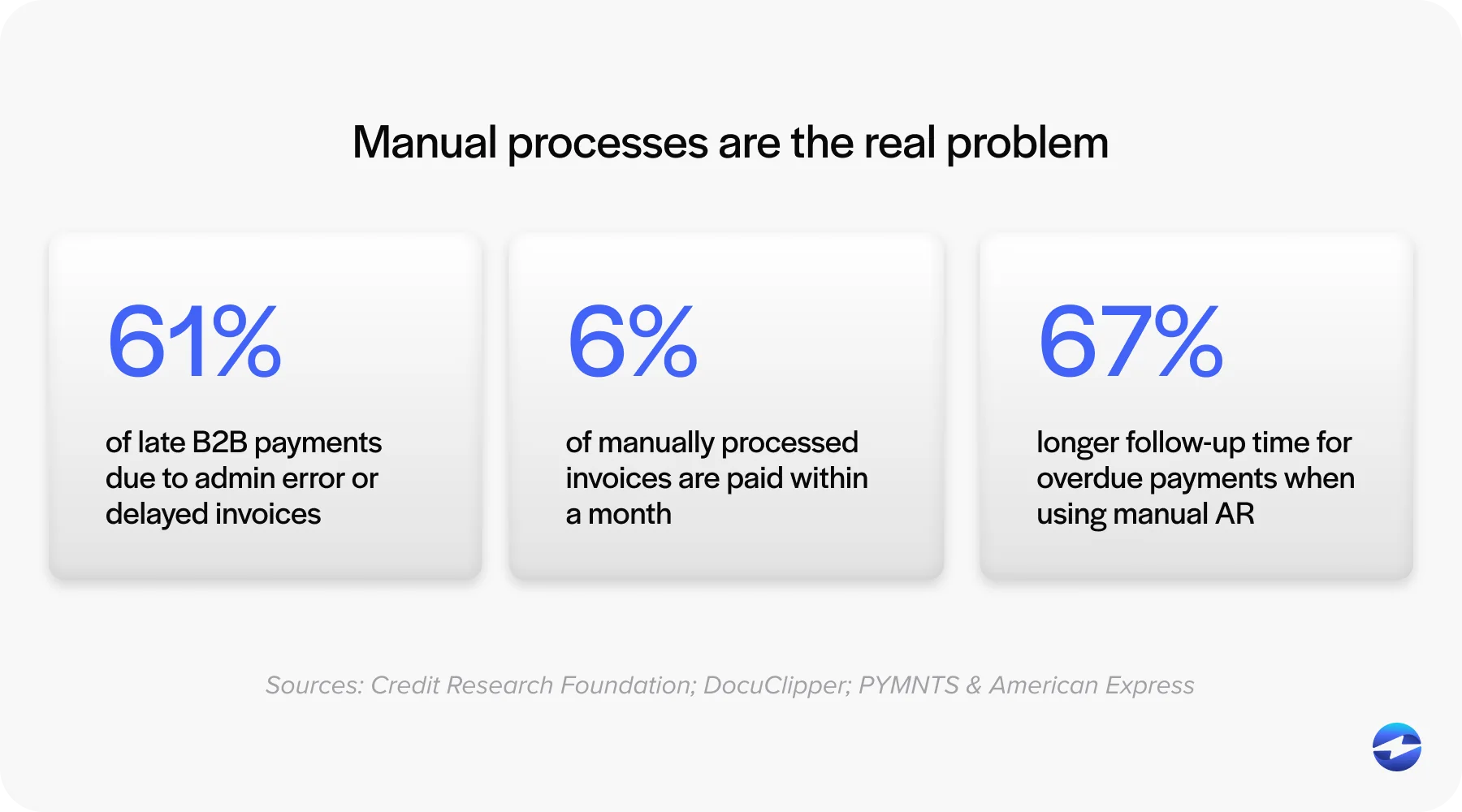
The problem isn’t that those tools are bad at what they do. The problem is the disconnect. Finance doesn’t have visibility into Salesforce, and sales doesn’t have visibility into payment status. When a rep wants to know if a client has paid, they have to email the billing team. When the AR team needs context on a past-due account, they have to dig through Salesforce records they may not even have access to.
If you’re a CFO, controller, or AR manager running your sales process through Salesforce, you’ve probably felt this friction firsthand. The customer data is in one place, the billing data is in another, and nobody has the full picture without manually stitching it all together.
What Salesforce AR Management Actually Looks Like
Managing accounts receivable Salesforce-side doesn’t mean ditching your accounting software. It means extending Salesforce so your AR team has what they need inside the platform where the customer record already lives.
In practice, this means invoices are generated or synced to the Salesforce record when a deal closes. Payment status that updates automatically on the account or opportunity. Follow-up workflows that trigger reminders when invoices go past due. And embedded payment options that let customers pay directly through a link sent from Salesforce.
None of this is native Salesforce functionality out of the box. You need a Salesforce integration with a payment processing solution to make it work. But once that integration is in place, the entire AR workflow lives in one system, and the manual handoffs that slow everything down go away.
The Case for AR Automation Salesforce Teams Should Know
Automating accounts receivable inside Salesforce is not about adding complexity. It’s about removing the manual steps that are already slowing your team down.
Start with invoicing. When an invoice can be triggered automatically the moment an opportunity moves to closed-won, you eliminate the delay between deal close and billing. That alone can shave days off your collections timeline. In B2B environments where deals are large and net terms are standard, even a few days of improvement has a meaningful impact on cash flow.
Then there’s payment visibility. When payment status lives on the Salesforce record, everyone works from the same data. Sales knows whether a client has paid before reaching out about a renewal. Customer success can see if there’s an outstanding balance before scheduling a QBR. Finance doesn’t have to field “did they pay yet?” questions because the answer is right there on the account. This kind of accounts receivable automation saves time across every team that touches the customer.
Automated follow-up is where things really start to compound. Instead of someone manually tracking which invoices are overdue and sending individual reminder emails, you build Salesforce flows that handle it automatically. A friendly nudge at 7 days past due. A firmer reminder at 30. An escalation to a manager or senior contact at 60. These sequences run in the background, which means your AR team spends less time chasing and more time on accounts that actually need human attention.
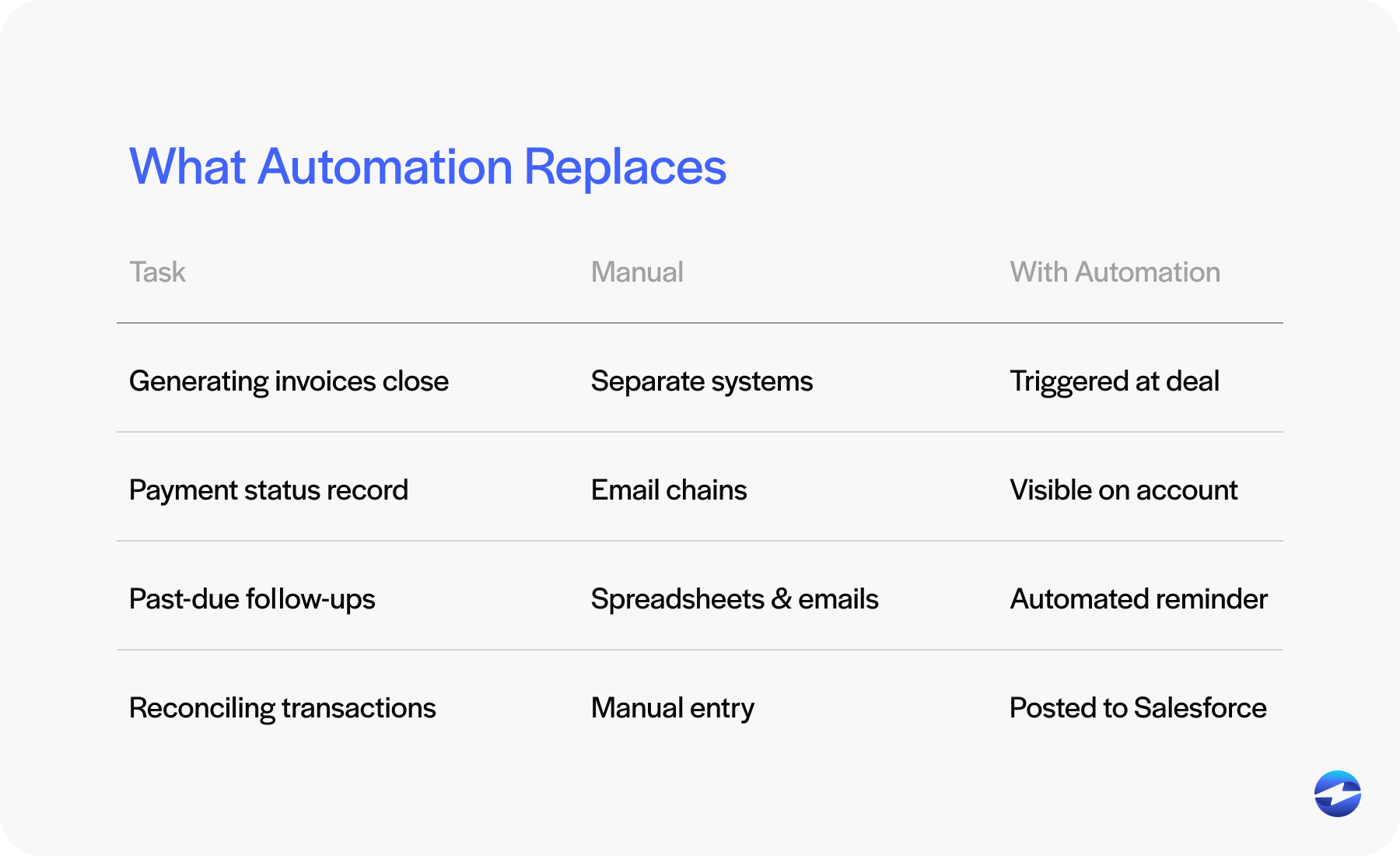
All of this reduces errors. When invoice and payment data syncs directly to the customer record, there’s no re-keying, no spreadsheet formulas breaking, and no version control headaches. The data is accurate because it was never manually entered in the first place.
Collecting Payments Directly in Salesforce
One of the biggest benefits of any Salesforce AR workflow is giving customers an easy way to pay. You can automate every reminder and build every dashboard, but if the customer still has to call someone, mail a check, or hunt down a payment portal they’ve never used before, you’re leaving money on the table.
This is where a payment processor integration makes all the difference. With the right accounts receivable software connected to Salesforce, your team can send payment links directly from the account record. Those links can go out via email or text message, and they let the customer pay by credit card or ACH in a few clicks.
When the customer pays, the transaction is automatically posted back to Salesforce. The payment status updates on the record. Aging reports adjust in real time. And any automated follow-up sequences stop because the system knows the balance has been settled. It’s a closed loop that runs without anyone on your team touching it.
For B2B companies, this kind of friction reduction is significant. A lot of past-due invoices aren’t actually disputes. They’re just inconvenient to pay. Remove the inconvenience, and you’ll be surprised how quickly balances clear.
Building AR Workflows That Actually Run
If you want to automate accounts receivable inside Salesforce, the building blocks are straightforward.
Start with invoice triggers. Set up your Salesforce software to generate or sync invoices when deals close or when project milestones are reached. The less time between delivery and billing, the faster you get paid.
Next, build aging alerts. Configure notifications that fire when invoices hit key milestones, whether that’s 15, 30, 60, or 90 days past due. These should create tasks, send internal alerts, or trigger outreach workflows depending on the severity.
From there, layer in reminder sequences. Pre-build email and text templates for each stage of the aging cycle and let Salesforce send them automatically. The tone should escalate with time. Early reminders assume good intent. Later messages are more direct about consequences.
Assign ownership clearly. Use your Salesforce software to route follow-up tasks to specific people based on account ownership, invoice amount, or territory. When everyone knows which accounts they’re responsible for, nothing slips through the cracks.
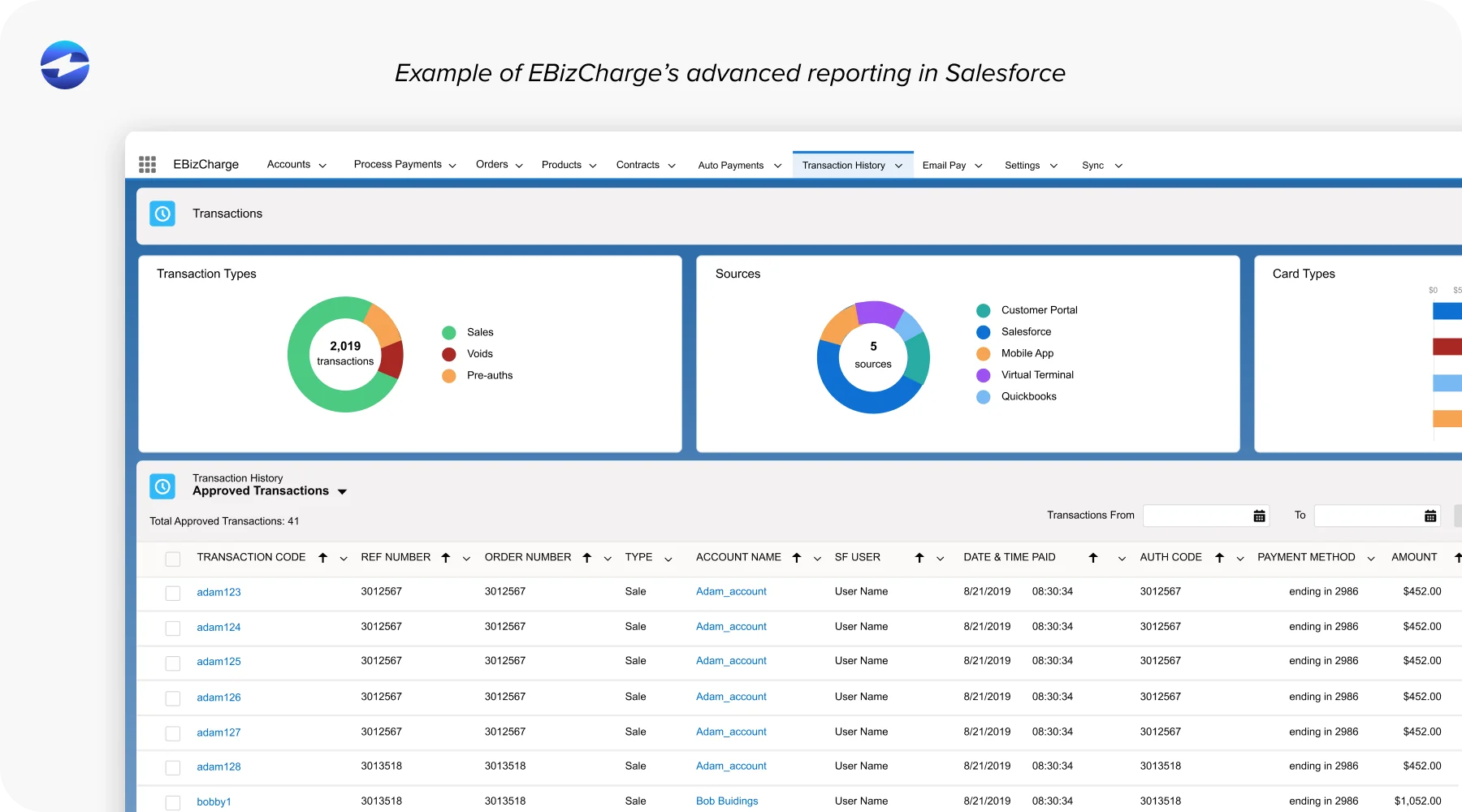
And finally, build dashboards. Track total outstanding AR, aging breakdown by bucket, average days to collect, recovery rates, and team activity. This is accounts receivable software functionality that most standalone tools struggle to customize, but Salesforce reporting handles it well.
Avoiding Common Mistakes
A few things to watch out for. Don’t try to build a custom AR solution from scratch inside Salesforce when proven integrations already exist. It takes longer, costs more, and usually doesn’t work as well.
Don’t automate follow-up without including a way to pay in every message. A reminder without a payment link is just noise.
And don’t treat AR automation Salesforce workflows as a set-it-and-forget-it project. Review your templates, sequences, and results quarterly. What works at 50 invoices a month may not work at 500.
Why EBizCharge Is Built for This
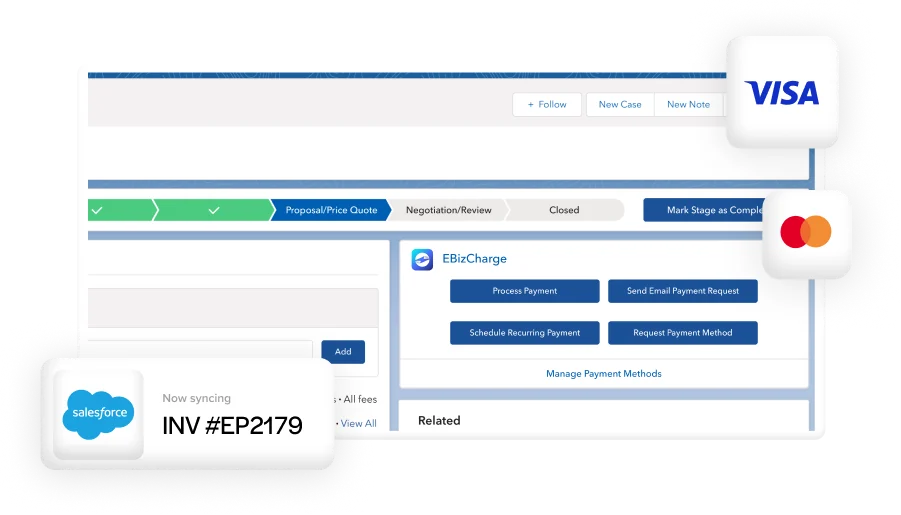
For Salesforce users looking to put all of this into practice, EBizCharge is a strong fit. It integrates natively with Salesforce, meaning it installs directly into the platform and works within the UI your team already knows. There’s no middleware and no separate portal to manage.
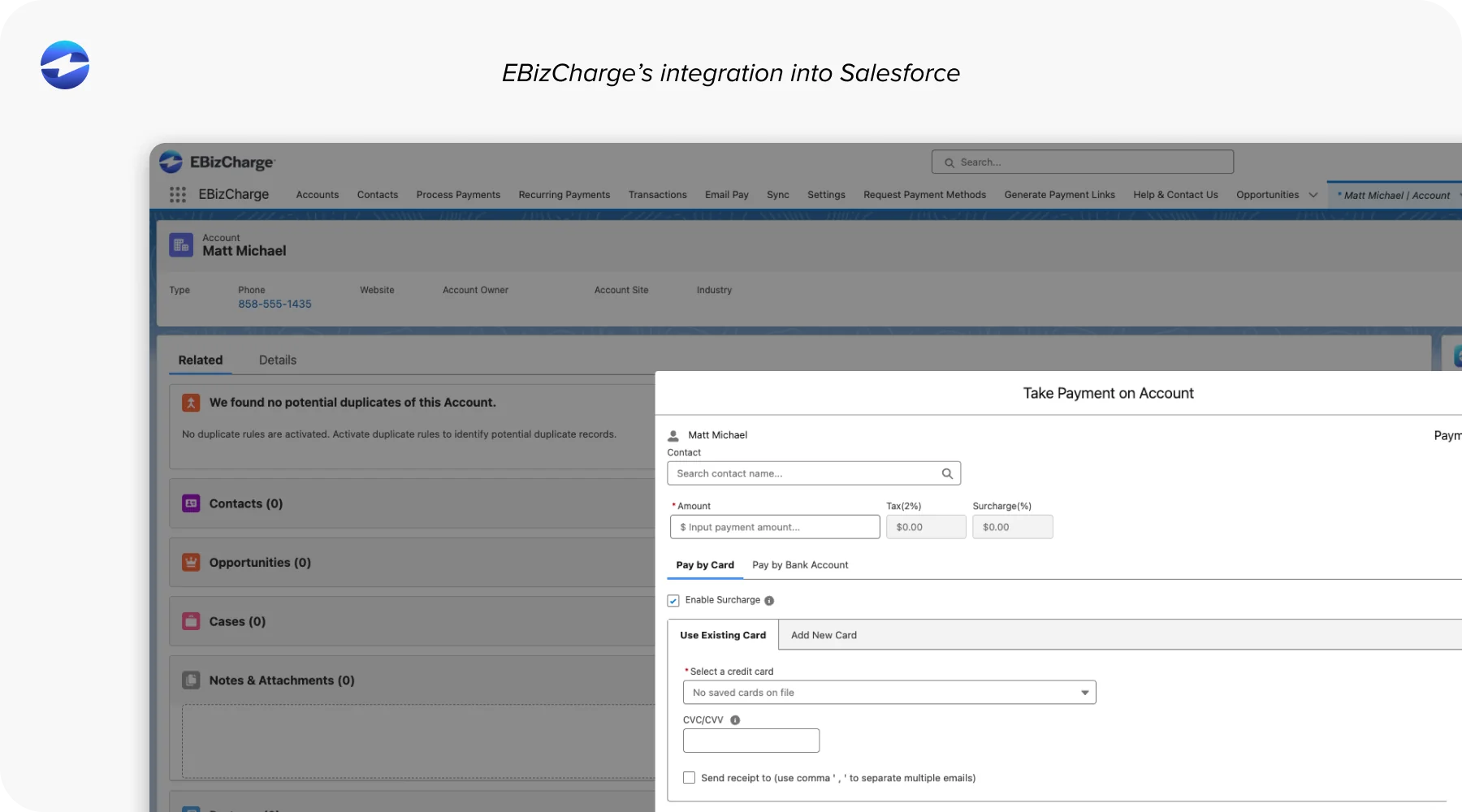
Your team can accept credit card and ACH payments right from the Salesforce record. Email-to-pay and text-to-pay links go out with a few clicks, and transactions post back automatically. A branded customer payment portal gives clients self-service access to view and pay outstanding invoices on their own schedule. PCI compliance and tokenization are handled entirely on the EBizCharge side, so your team never touches sensitive data.
Instead of stitching together multiple tools, EBizCharge gives AR teams one Salesforce integration that handles payment collection, automation, and reconciliation in one place. As a payment processing solution and payment processor built specifically for B2B workflows, it’s designed for exactly the kind of AR challenges outlined in this article.